
Best Vector Databases for RAG in 2026: Complete Comparison Guide
A vector database is one of the most important infrastructure choices in a Retrieval-Augmented Generation system. The right vector database can improve retrieval speed, semantic relevance, metadata filtering, scalability, and grounding quality. The wrong choice can create slow queries, noisy retrieval, higher infrastructure costs, and weaker RAG answers.
In Simple Terms
A vector database stores embeddings, which are numerical representations of text, documents, images, code, or other data. In a RAG system, your documents are split into chunks, converted into embeddings, stored in a vector database, and retrieved when a user asks a question.
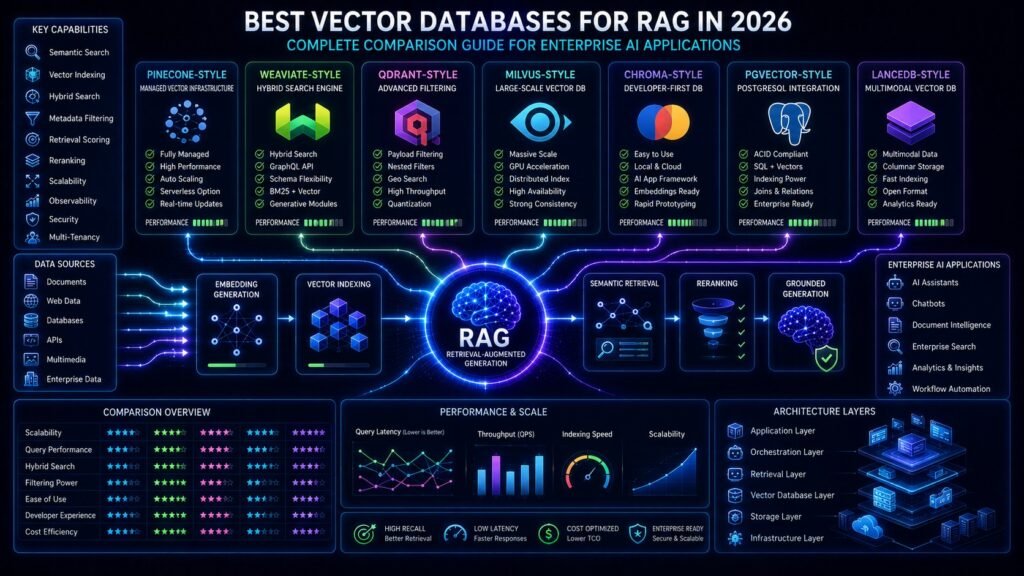
The best vector database for RAG is not always the most popular one. It depends on your workload. Pinecone is strong for managed production scaling, Weaviate is strong for hybrid search, Qdrant is strong for filtering and performance-oriented deployments, Milvus is strong for large-scale open-source infrastructure, Chroma is useful for fast prototypes, pgvector is practical when your team already uses PostgreSQL, and LanceDB is useful for multimodal or lakehouse-style retrieval workflows. Pinecone positions itself as a fully managed vector database for production AI, Weaviate documents semantic and hybrid search support for RAG, and Qdrant emphasizes high-performance vector similarity search with payload-based filtering.
Why Vector Databases Matter in RAG
RAG depends on retrieval quality. If the retriever finds the wrong chunks, the language model receives weak context and may generate incomplete or hallucinated answers. A vector database affects how quickly and accurately your system can find relevant chunks from thousands, millions, or billions of embeddings.
A strong vector database should support fast similarity search, metadata filtering, index management, scaling, access controls, and reliable production operations. For enterprise RAG, the database should also work well with hybrid search, reranking, observability, multi-tenancy, and permission-aware retrieval. This is why vector database choice should be treated as an architecture decision, not just a library preference.
Quick Comparison Table
| Vector Database | Best For | Main Strength | Main Trade-Off |
| Pinecone | Managed production RAG | Low-ops scaling | Vendor dependency |
| Weaviate | Hybrid search RAG | Vector + keyword retrieval | Requires tuning at scale |
| Qdrant | Filter-heavy RAG | Payload filtering and speed | Smaller ecosystem than older tools |
| Milvus | Massive-scale RAG | Distributed open-source scale | Higher operational complexity |
| Chroma | Prototypes and small apps | Developer simplicity | Less ideal for complex enterprise scale |
| pgvector | Postgres-native RAG | SQL + vectors together | Not always ideal for huge vector workloads |
| LanceDB | Multimodal and lakehouse RAG | Data, metadata, vectors together | Newer ecosystem |
1. Pinecone
Pinecone is one of the strongest choices for teams that want a managed vector database for production RAG systems. It is built for semantic search and AI applications, and Pinecone’s documentation describes it as a managed vector database for high-performance semantic search. Pinecone also provides RAG tutorials and positions vector search as a core retrieval layer for grounded AI applications.
Pinecone is a good fit when your team wants to avoid running vector infrastructure manually. It is especially useful for SaaS products, enterprise search tools, customer support copilots, and production AI assistants where operational reliability matters. The trade-off is cost and vendor dependency. If your team needs deep infrastructure control or strict self-hosting, an open-source option may be better.
2. Weaviate
Weaviate is a strong vector database for RAG systems that need hybrid search. Hybrid search combines semantic vector search with keyword search, often BM25, so the system can match both meaning and exact terms. Weaviate’s documentation explains that hybrid search runs vector and keyword search together and combines their scores into a final ranking.
This makes Weaviate useful for enterprise RAG because many business queries require both semantic understanding and exact terminology. For example, a legal assistant may need semantic retrieval for broad meaning but exact matching for clause IDs or regulation names. Weaviate is especially strong when your RAG system needs metadata filtering, hybrid search, and flexible schema design.
3. Qdrant
Qdrant is a high-performance vector search engine written in Rust. Its GitHub description highlights support for storing, searching, and managing vectors with payload data, and notes that it is tailored for extended filtering support. This makes Qdrant attractive for RAG systems where metadata filtering is central, such as customer-specific retrieval, role-based retrieval, product catalogs, or enterprise knowledge systems.
Qdrant is a strong option for teams that want open-source flexibility with performance-oriented design. It is useful when you need filtering, faceted search, semantic matching, and production-grade retrieval without fully relying on a closed managed system. The main consideration is that self-hosted deployments require engineering ownership.
4. Milvus
Milvus is a mature open-source vector database built for large-scale GenAI and similarity search workloads. Milvus documentation includes tutorials for building RAG pipelines, and the Milvus website positions it as an open-source vector database built for GenAI applications that can scale to very large vector collections.
Milvus is a good choice for organizations with large embedding collections, high query volumes, and infrastructure teams comfortable managing distributed systems. It is especially relevant for large enterprise search, media retrieval, document intelligence, and AI platforms with heavy indexing needs. The trade-off is operational complexity compared with simpler managed tools.
5. Chroma
Chroma is popular among developers building local RAG prototypes, lightweight apps, and early-stage AI experiments. Chroma’s documentation says it provides retrieval features such as storing embeddings with metadata, dense and sparse vector search, metadata filtering, and retrieval across text, images, and more.
Chroma works well when speed of development matters more than enterprise infrastructure complexity. It is a strong choice for tutorials, proof-of-concepts, internal experiments, and small RAG applications. For larger regulated deployments, teams should evaluate production requirements carefully, including security, observability, scaling, and long-term operations.
6. pgvector
pgvector is a PostgreSQL extension that adds vector similarity search to Postgres. Its GitHub page describes it as open-source vector similarity search for Postgres and notes support for exact and approximate nearest neighbor search, multiple distance types, and storing vectors with the rest of your data.
pgvector is a practical choice when your application already depends on Postgres and you want to keep structured data, metadata, and embeddings close together. It is especially useful for smaller RAG systems, internal tools, SaaS products, and structured enterprise applications. The trade-off is that very large vector workloads may eventually require a dedicated vector database.
7. LanceDB
LanceDB is designed as a data and retrieval layer for production AI workloads such as RAG, agents, semantic search, and recommendation systems. Its documentation says it can keep multimodal data, metadata, and embeddings in the same table and query through vector search, full-text search, or SQL.
LanceDB is useful for teams working with multimodal data, object storage, lakehouse-style architectures, or large datasets where data movement becomes expensive. It may be especially interesting for document AI, image-text search, audio/video retrieval, and enterprise data systems that need flexible retrieval over multiple data types.
Which Vector Database Is Best for RAG?
For most production RAG teams, the shortlist starts with Pinecone, Weaviate, Qdrant, Milvus, pgvector, Chroma, and LanceDB. The best choice depends on whether you prioritize managed infrastructure, hybrid search, filtering, open-source control, PostgreSQL integration, multimodal data, or simple prototyping.
If you want managed production scaling, Pinecone is often a strong fit. If hybrid search is central, Weaviate deserves attention. If filtering and performance matter, Qdrant is a strong candidate. If you need large-scale open-source infrastructure, Milvus is a serious option. If you already live in Postgres, pgvector can be the simplest path. If you are prototyping, Chroma is easy to start with. If your workload is multimodal or lakehouse-oriented, LanceDB is worth evaluating.
Best Choice by Use Case
| Use Case | Best Starting Options |
| Enterprise production RAG | Pinecone, Weaviate, Qdrant, Milvus |
| Hybrid search | Weaviate, Qdrant, Chroma |
| Open-source control | Qdrant, Milvus, Weaviate, Chroma |
| PostgreSQL-native apps | pgvector |
| Fast prototyping | Chroma, pgvector |
| Large-scale vector search | Milvus, Pinecone, Qdrant |
| Multimodal retrieval | LanceDB, Chroma, Weaviate |
| Metadata-heavy retrieval | Qdrant, Weaviate, pgvector |
How to Choose a Vector Database for RAG
Start with your retrieval problem, not the vendor name. Ask what type of data you are indexing, how many vectors you expect, how often documents change, what latency users need, whether metadata filtering is required, and whether exact keyword matching matters. A legal RAG system, ecommerce search assistant, PDF chatbot, analytics copilot, and multimodal retrieval app may all need different vector database choices.
For production systems, also evaluate security, access control, backups, observability, pricing, index tuning, scaling model, deployment options, and ecosystem compatibility. A vector database that works beautifully in a demo may become expensive or difficult to operate when millions of embeddings, multi-tenant access, permission filters, and real-time updates are added.
Key Features to Compare
Metadata Filtering
Metadata filtering is essential for enterprise RAG. It lets you narrow retrieval by user role, department, customer, document type, date, product line, geography, or security level. Without metadata filtering, the system may retrieve irrelevant or unauthorized context.
Hybrid Search
Hybrid search combines vector similarity with keyword matching. This is useful when exact terms matter. Product IDs, legal clauses, error codes, names, and technical identifiers often need keyword precision, while natural-language questions need semantic flexibility.
Scalability
Scalability depends on index design, storage model, sharding, replication, query volume, and operational maturity. A tool that works for 50,000 vectors may not be the right choice for 500 million vectors.
Developer Experience
Developer experience matters because RAG systems require iteration. Easy local setup, clear APIs, good documentation, SDKs, integrations, and debugging tools can save weeks of engineering time.
Cost
Vector database cost is affected by storage volume, query volume, index type, metadata filtering, replication, performance tier, and managed-service pricing. Teams should measure cost per query and cost per indexed document, not only monthly subscription price.
Common Mistakes When Choosing a Vector Database
One common mistake is choosing a database only because it appears in tutorials. Tutorial-friendly tools are not always production-ready for your workload. Another mistake is choosing a database only for maximum scale when your application is small and needs simplicity. Overengineering can increase cost and slow development.
Teams also underestimate filtering. Many RAG systems fail not because vector search is weak, but because the system retrieves from the wrong tenant, department, document type, or time period. Metadata design should be planned before indexing large document collections.
Vector Database vs Vector Index
A vector index is the data structure that helps find similar vectors quickly. A vector database is the broader system that stores vectors, metadata, indexes, APIs, access controls, scaling features, and query capabilities. Some teams only need a vector index. Production RAG systems usually need a full retrieval infrastructure layer.
This distinction matters because early prototypes may work with simple libraries, but production systems usually require persistence, backups, filtering, monitoring, multi-user access, security, and predictable latency.
Do You Always Need a Vector Database for RAG?
Not always. Some RAG systems work well with keyword search, SQL lookup, hybrid search, or smaller in-memory indexes. A vector database becomes more important when you need semantic retrieval over large or complex datasets.
For example, a chatbot over a few static FAQs may not need a dedicated vector database. A company-wide enterprise search assistant over millions of chunks almost certainly does. The right architecture depends on data size, query type, update frequency, latency needs, and accuracy requirements.
Future of Vector Databases for RAG
Vector databases are moving beyond simple similarity search. The next wave of RAG infrastructure is combining hybrid search, reranking, structured filters, multimodal retrieval, graph reasoning, time-aware retrieval, agentic workflows, and observability.
This means the best vector database for RAG will increasingly be the one that fits the complete retrieval workflow, not just the one with the fastest nearest-neighbor search. Production teams will care about retrieval quality, governance, cost, observability, scaling, and AI application integration together.
Suggested Read:
- What Is RAG in AI? A Beginner-Friendly Guide
- What Vector Databases Do in a RAG Pipeline
- RAG Tools and Frameworks
- Hybrid Search in RAG
- RAG Deployment Basics
- RAG Latency Optimization
- RAG Evaluation Metrics
- Chunking Strategies for RAG
FAQ: Best Vector Databases for RAG
What is the best vector database for RAG?
There is no universal best choice. Pinecone is strong for managed production RAG, Weaviate for hybrid search, Qdrant for filtering-heavy retrieval, Milvus for large-scale open-source deployments, Chroma for prototypes, pgvector for Postgres-native apps, and LanceDB for multimodal or lakehouse-style retrieval.
Is Pinecone better than Weaviate for RAG?
Pinecone is often better for teams that want managed production infrastructure with less operational burden. Weaviate is often better when hybrid search and schema flexibility are central to the application.
Is Qdrant good for enterprise RAG?
Yes. Qdrant is a strong option when metadata filtering, payload-based retrieval, and performance matter. It is especially useful for production systems that need precise retrieval control.
Should I use pgvector for RAG?
Use pgvector when your application already uses PostgreSQL and your vector workload is not too large or complex. It is a practical option for teams that want SQL and vectors in the same database.
Is Chroma good for production RAG?
Chroma is excellent for prototyping and lightweight RAG apps. For larger production systems, evaluate scaling, security, monitoring, and operational requirements carefully.
What matters most when choosing a vector database?
The most important factors are retrieval quality, metadata filtering, hybrid search, scale, latency, cost, security, deployment model, and developer experience.
Final Takeaway
The best vector database for RAG depends on the system you are building. Pinecone, Weaviate, Qdrant, Milvus, Chroma, pgvector, and LanceDB can all be strong choices, but they serve different needs.
Choose Pinecone for managed production simplicity, Weaviate for hybrid search, Qdrant for filtering and performance, Milvus for large open-source scale, Chroma for prototyping, pgvector for Postgres-native apps, and LanceDB for multimodal or lakehouse-style retrieval. The best RAG systems are not built by choosing the trendiest database. They are built by matching retrieval infrastructure to data, users, latency, security, and answer-quality requirements.