
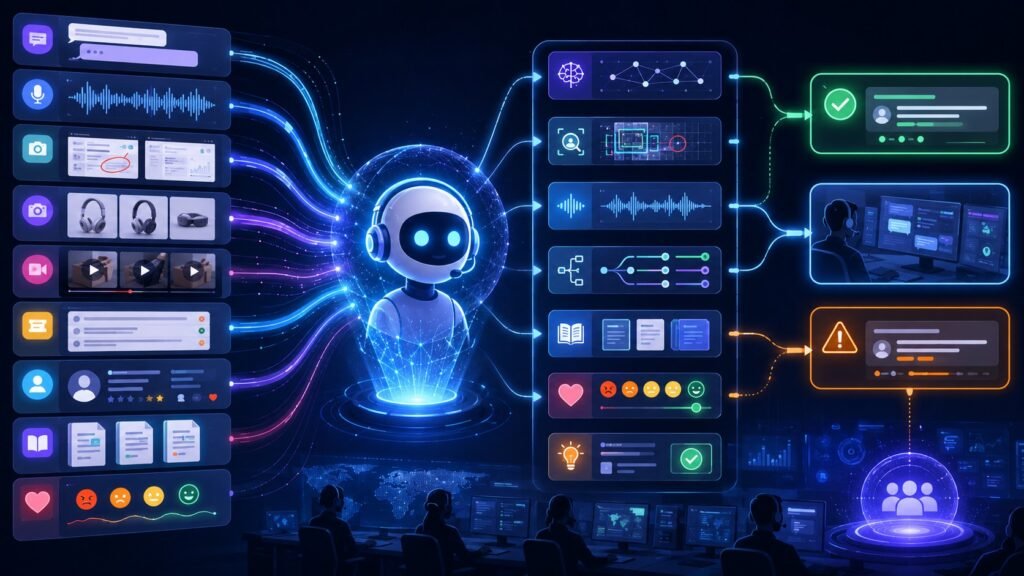
Multimodal AI in customer support uses text, voice, screenshots, product photos, videos, tickets, customer history, and knowledge-base content together to understand customer problems more clearly. Instead of forcing users to explain everything in words, multimodal support AI lets customers show, speak, upload, and describe the issue in one workflow.
In Simple Terms
Multimodal AI in customer support means AI that can understand more than one support signal at the same time. A traditional chatbot mainly reads typed messages. A multimodal customer support AI system can process a chat message, listen to a voice call, inspect a screenshot, analyze a product photo, read a receipt, and check customer history before suggesting a resolution.
This matters because customers rarely describe problems perfectly. Someone may say, “My app is not working,” but the screenshot may show the actual error. Another customer may send a photo of a damaged product instead of writing a long complaint. Multimodal AI helps support teams understand the real issue faster.
What Is Multimodal AI in Customer Support?
Multimodal AI in customer support refers to AI systems that combine multiple input types inside service workflows. These inputs may include live chat, email, voice calls, screenshots, short videos, product images, receipts, order data, CRM records, device logs, and knowledge-base articles.
The goal is not only automation. The stronger goal is better context. Rasa describes multimodal AI as processing different inputs such as voice, text, images, video, and sensor data to create more natural, context-aware interactions. In customer support, that context can help the AI diagnose issues, recommend next steps, escalate correctly, and reduce repeated questions.
How Multimodal Support AI Works
A multimodal support system usually starts by collecting the customer’s inputs. A message is processed by a language model. A screenshot or product photo goes through image understanding. A voice call may be transcribed and analyzed. A short video may be sampled into key frames. The system may also retrieve order details, warranty data, policy rules, and troubleshooting articles.
After that, the AI combines the signals. For example, it may connect an error screenshot with a customer’s chat message and the latest help-center article. It can then suggest a fix, draft a reply, route the ticket, or escalate to a human agent with a summary. Databricks describes a customer service example where multimodal AI can understand a text query, analyze voice tone, and interpret screenshots or videos of the issue.
Key Support Data Types
| Support Input | What It Adds | Example |
| Chat text | Customer intent and issue description | “My payment failed” |
| Voice | Urgency, spoken details, call context | Billing or delivery call |
| Screenshot | Exact visual error or UI state | App error message |
| Product photo | Physical product condition | Damaged package |
| Video | Step-by-step issue evidence | Device malfunction |
| CRM data | Customer history and account context | Past tickets |
| Knowledge base | Approved resolution guidance | Troubleshooting article |
Use Case 1: Screenshot Troubleshooting
Screenshot troubleshooting is one of the clearest use cases. Customers often struggle to describe technical problems, but a screenshot can show the exact error, button, form field, or failed step.
A multimodal AI support agent can inspect the screenshot, read visible error text, understand the customer’s written message, and suggest a relevant fix. This is useful for SaaS support, fintech apps, ecommerce checkout issues, telecom troubleshooting, device setup, and IT help desks. It also reduces back-and-forth because the support system does not need to ask the customer to manually type every detail.
Use Case 2: Voice AI for Customer Service
Voice support is changing quickly because customers often prefer speaking naturally instead of navigating menus. AI voice agents can understand spoken requests, route calls, summarize conversations, and help resolve common issues.
Recent customer service deployments show this trend. Salesforce launched Agentforce Contact Center with Agentforce Voice for AI-powered phone conversations and real-time context, while Home Depot introduced an AI-powered voice agent designed to replace traditional phone menus and route customers faster. Voice becomes even more powerful when combined with account data, product context, screenshots, and chat history.
Use Case 3: Product Photo and Damage Claims
Retail, ecommerce, insurance, logistics, and consumer electronics support often depend on visual evidence. A customer may upload a photo of a damaged item, incorrect product, broken part, or delivery issue.
A multimodal support AI system can analyze the image, compare it with order data, extract text from labels or receipts, and recommend the next step. For example, it may suggest refund review, replacement, warranty escalation, or human inspection. The AI should not make high-impact decisions alone, but it can reduce manual triage and help agents review claims faster.
Use Case 4: Smarter Ticket Routing and Human Handoff
Multimodal AI can improve ticket routing by understanding both the customer’s message and attached evidence. A text-only system may classify a ticket as “technical issue,” while a multimodal system may see from the screenshot that it is actually a login, payment, or browser compatibility issue.
Good handoff is important. The AI should summarize the customer’s problem, list the evidence reviewed, identify attempted steps, and pass the context to a human agent. Salesforce’s Agentforce Contact Center coverage emphasized unified customer context, transcripts, routing, analytics, and escalation tracking as part of modern support automation.
Benefits of Multimodal AI in Customer Support
The biggest benefit is faster issue understanding. Customers can show the problem instead of writing long explanations. Support teams can use screenshots, voice, product images, and account data together to reduce repeated questions.
Another benefit is better personalization. A support AI agent can consider customer history, warranty status, subscription tier, past tickets, and product usage context before recommending the next action. It can also improve accessibility by allowing customers to communicate through voice, images, or text depending on what is easiest for them.
Risks and Limitations
Multimodal support AI can make mistakes. It may misread screenshots, misunderstand voice, classify product damage incorrectly, or recommend the wrong help article. A confident AI response can frustrate customers if it ignores the real issue.
Privacy is also critical. Support workflows may contain faces, addresses, payment references, device IDs, invoices, order numbers, voice recordings, and sensitive screenshots. Businesses need strong access controls, retention policies, audit logs, secure storage, and human review for sensitive cases. AI should assist support teams, not become an unchecked gatekeeper.
Common Mistakes to Avoid
A common mistake is adding AI before fixing support knowledge. If the help center is outdated, the AI will retrieve outdated answers. Another mistake is automating escalation too aggressively. Some customers need a human quickly, especially for billing, safety, legal, medical, or account-access issues.
Teams should also avoid measuring only deflection. A support system that blocks customers from reaching humans may reduce tickets but damage trust. Better metrics include resolution quality, customer effort, first-contact resolution, escalation accuracy, agent time saved, and customer satisfaction.
Suggested Read:
- What Is Multimodal AI? Complete Beginner’s Guide to AI Beyond Text
- Multimodal AI Use Cases
- Multimodal AI Examples
- Multimodal Agents
- Image to Text AI
- Document Understanding AI
- Multimodal Evaluation
- AI Agents in Customer Support
FAQ: Multimodal AI in Customer Support
What is multimodal AI in customer support?
Multimodal AI in customer support is AI that uses chat, voice, screenshots, product photos, videos, tickets, customer history, and knowledge-base content together to understand and resolve support issues.
How is multimodal AI used in customer support?
It is used for screenshot troubleshooting, voice support, product damage review, ticket routing, knowledge retrieval, sentiment analysis, agent assist, and human handoff.
Why is multimodal AI useful for customer service?
It helps customers explain issues faster by showing or speaking instead of typing everything. It also gives support agents richer context.
Can multimodal AI replace human support agents?
It can automate simple tasks and assist agents, but human review is still important for complex, sensitive, emotional, or high-impact cases.
What are the risks of multimodal customer support AI?
Risks include wrong answers, privacy exposure, poor escalation, visual misunderstanding, voice transcription errors, biased routing, and over-automation.
What data does multimodal support AI use?
It may use chat messages, emails, voice calls, screenshots, product photos, videos, CRM data, tickets, order history, knowledge-base articles, and logs.
Final Takeaway
Multimodal AI in customer support helps support teams understand real customer problems by combining text, voice, screenshots, images, videos, tickets, and customer context. It can improve troubleshooting, routing, agent assist, and self-service when implemented carefully.
To continue learning, read What Is Multimodal AI, Multimodal AI Use Cases, and Multimodal Agents next.