
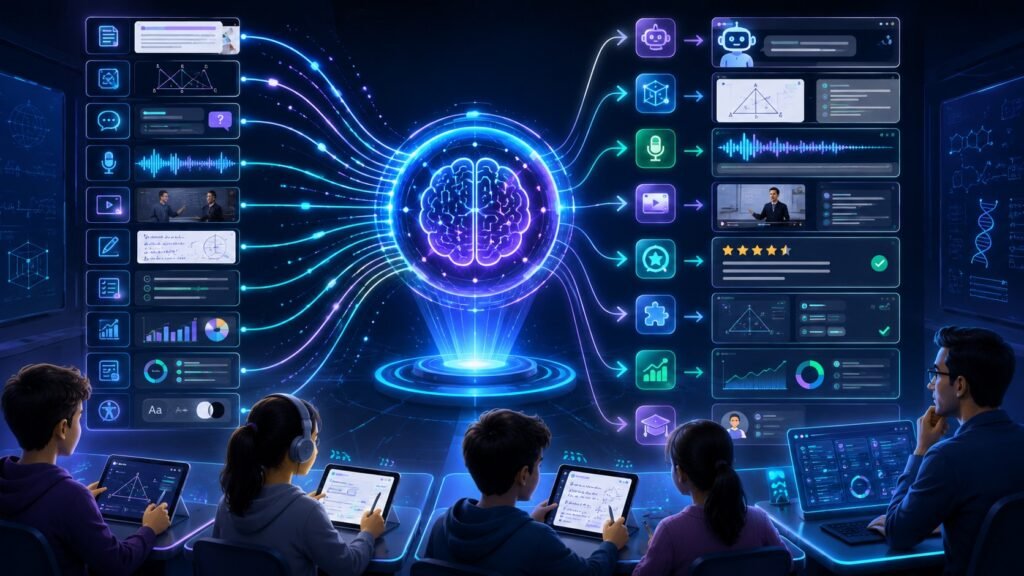
Multimodal AI in education uses text, images, voice, video, diagrams, documents, quizzes, and learning data together to support teaching and learning. Instead of only answering typed questions, it can explain a diagram, summarize a lecture, listen to a spoken question, analyze notes, and help teachers personalize support.
In Simple Terms
Multimodal AI in education means AI that can understand different learning formats together. A student might ask a typed question, upload a math diagram, record a voice note, or share a page from a textbook. A multimodal AI system can combine those inputs and respond in a way that fits the learning task.
This matters because students do not all learn in the same way. Some understand better through diagrams. Others need spoken explanations, examples, videos, or step-by-step feedback. Multimodal AI can support more flexible learning experiences when it is used carefully and supervised by teachers.
What Is Multimodal AI in Education?
Multimodal AI in education refers to AI systems that process several types of educational data. These may include written prompts, worksheets, textbook pages, diagrams, lecture videos, classroom audio, student writing, quizzes, handwriting, slides, and learning analytics.
A text-only AI tutor can answer typed questions. A multimodal education AI tool can inspect a geometry diagram, read a student’s handwritten solution, summarize a lecture clip, or explain a chart from a science lesson. This makes it useful for tutoring, accessibility, teacher support, feedback, and interactive learning.
How Multimodal AI Works in Learning
A multimodal learning system usually starts by receiving different input types. Text goes through a language model. Images or diagrams go through a vision model. Audio may be transcribed or analyzed. Video may be processed through frames, subtitles, and speech. Documents may be handled through OCR and layout analysis.
The AI then connects these signals. For example, it may link a student’s question with a diagram, compare a handwritten answer with the correct method, or summarize a lecture video using both audio and slides. The output may be a written explanation, quiz, hint, transcript, study summary, or teacher dashboard note.
Key Education Use Cases
| Use Case | Modalities Used | Example |
| AI tutoring | Text, diagrams, handwriting | Explain a math solution |
| Lecture support | Video, audio, slides | Summarize a recorded class |
| Accessibility | Audio, text, images | Convert diagrams into explanations |
| Teacher feedback | Essays, rubrics, comments | Draft feedback for review |
| Science learning | Charts, images, text | Explain experiment results |
| Language learning | Voice, text, video | Practice pronunciation and dialogue |
| Learning analytics | Quiz data, behavior, notes | Identify where students struggle |
Use Case 1: AI Tutors That Explain Diagrams and Problems
AI tutors become more useful when they can understand visuals. A student may upload a geometry problem, circuit diagram, chemistry structure, or graph and ask, “Why is my answer wrong?” The AI can inspect the visual content and guide the student through the reasoning.
This is stronger than text-only tutoring because many school subjects depend on visual material. Math, physics, biology, geography, design, and engineering often require diagrams, charts, or spatial understanding. The best use of multimodal AI here is not simply giving answers, but offering hints, explanations, and practice steps.
Use Case 2: Lecture Summaries and Study Notes
Multimodal AI can help students turn lecture recordings into useful study materials. A system may combine audio, video, slides, captions, and student notes to create summaries, flashcards, key concepts, and review questions.
For example, a student could upload a recorded lecture with slides and ask for a study guide. The AI can use the transcript, slide structure, and visual cues to organize the content. This helps students review faster, but they should still verify important details against official course materials.
Use Case 3: Accessibility and Inclusive Learning
Accessibility is one of the most valuable applications of multimodal AI in education. AI can help describe images, convert speech to text, read text aloud, summarize visual content, or translate between formats.
A visually impaired student may need a chart explained in words. A student with hearing difficulty may need captions and summaries. A student with writing challenges may prefer voice input. Multimodal AI can support these needs by allowing learning content to move between text, image, audio, and video formats.
Use Case 4: Teacher Support and Feedback
Teachers handle lesson planning, grading, feedback, documentation, and student support. Multimodal AI can help by reviewing essays, summarizing class discussions, organizing student questions, creating practice materials, or identifying common errors.
For example, a teacher may upload anonymized student answers and ask for common misconception patterns. The AI can help group mistakes and suggest review topics. Human review remains essential because student evaluation should be fair, contextual, and aligned with local teaching goals.
Use Case 5: Language Learning With Voice and Video
Language learning benefits from multimodal input because communication involves text, speech, listening, facial cues, and context. A multimodal AI language tutor can support pronunciation practice, dialogue simulation, listening exercises, and feedback on spoken responses.
A learner might speak a sentence, receive pronunciation feedback, view a corrected written version, and practice with a role-play video prompt. This creates a more interactive experience than text-only vocabulary drills.
Benefits of Multimodal AI in Education
The biggest benefit is flexibility. Students can learn through text, diagrams, voice, video, documents, or interactive examples. This supports different learning styles and can make difficult topics easier to understand.
Multimodal AI can also save time for teachers by helping with summaries, draft feedback, content adaptation, and practice materials. At the institution level, it can support accessibility, personalized learning, student support, and better use of learning analytics. UNESCO notes that AI can help innovate teaching and learning, while also warning that rapid AI development creates risks and policy challenges.
Risks and Limitations
Multimodal AI in education can make mistakes. It may misread a diagram, misunderstand a student’s handwriting, summarize a lecture incorrectly, or give a confident but wrong explanation. Students may also overuse AI and skip the thinking process.
Privacy is another concern. Education data may include minors, grades, recordings, faces, voices, disability-related information, or sensitive learning records. UNESCO’s guidance on generative AI in education highlights the need for human-centered implementation, data privacy, age-appropriate use, and policy safeguards.
Common Mistakes to Avoid
A common mistake is treating multimodal AI as a replacement teacher. It should support learning, not replace human instruction, classroom judgment, or student effort.
Another mistake is using AI outputs without verification. Students should compare explanations with textbooks, teacher guidance, and course materials. Schools should create clear policies for acceptable use, assessment integrity, data privacy, and teacher oversight.
Suggested
- What Is Multimodal AI? Complete Beginner’s Guide to AI Beyond Text
- Multimodal AI Use Cases
- Multimodal AI Examples
- Multimodal AI for Accessibility
- Vision-Language Models Explained
- Document Understanding AI
- Multimodal Evaluation
- Best Multimodal AI Tools in 2026
FAQ: Multimodal AI in Education
What is multimodal AI in education?
Multimodal AI in education is AI that uses different learning inputs such as text, images, voice, video, diagrams, documents, and learning data together.
How is multimodal AI used in education?
It is used for AI tutoring, diagram explanation, lecture summarization, accessibility, language learning, teacher feedback, study notes, and learning analytics.
How can multimodal AI help students?
It can explain visual material, answer questions in different formats, summarize lessons, create practice questions, and support students who learn better through audio or visuals.
How can multimodal AI help teachers?
It can help draft feedback, summarize class materials, identify common misconceptions, adapt content, and create practice resources for review.
What are the risks of multimodal AI in education?
Risks include inaccurate explanations, overreliance, privacy issues, bias, assessment misuse, and weak policies around student data.
Should multimodal AI replace teachers?
No. Multimodal AI should assist teachers and students, not replace human teaching, mentorship, assessment, or classroom judgment.
Final Takeaway
Multimodal AI in education can make learning more visual, interactive, accessible, and personalized by connecting text, diagrams, voice, video, documents, and learning data. Its strongest role is as a support system for students and teachers, not as an unsupervised replacement for education.
To continue learning, read What Is Multimodal AI, Multimodal AI Use Cases, and Multimodal AI for Accessibility next.