
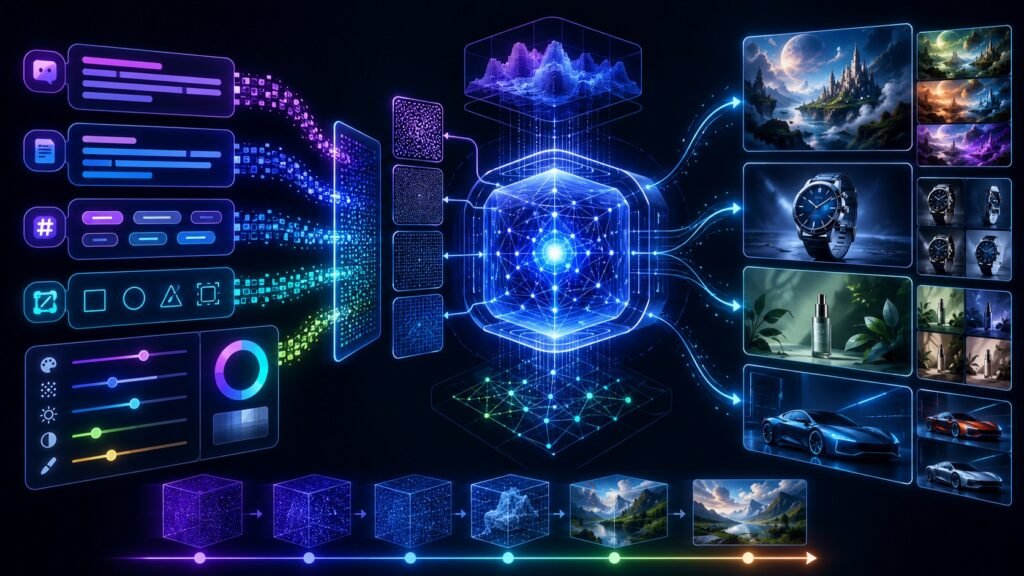
Text to image AI models are generative AI systems that create images from written prompts. A user describes what they want, and the model generates a visual output such as an illustration, product concept, marketing image, design mockup, or synthetic scene. Many modern systems use diffusion-based methods to create high-quality images step by step.
In Simple Terms
Text to image AI models turn words into pictures. You type a prompt like “a futuristic city at sunset in watercolor style,” and the model generates an image that tries to match that description.
These systems are part of both generative AI and multimodal AI. They are generative because they create new images. They are multimodal because they connect language and visual output. Unlike image-to-text AI, which reads an image and produces text, text-to-image AI starts with text and produces an image.
How Text to Image AI Models Work
Most text to image AI models begin by converting the prompt into a machine-readable representation. The model tries to understand objects, style, composition, colors, mood, and relationships described in the prompt. A prompt such as “a small robot reading a book under a tree, cinematic lighting” contains several visual instructions: subject, action, setting, and style.
Many modern image generators use diffusion models. In simple terms, diffusion models learn how to create an image by starting from noise and gradually removing that noise until a coherent picture appears. Hugging Face’s Diffusers documentation explains diffusion as a denoising process, and Google’s image generation course notes that diffusion models have become widely used in image generation.
The Basic Text-to-Image Workflow
A text-to-image model usually follows a workflow like this:
| Stage | What Happens | Simple Example |
| Prompt input | User writes an image description | “A robot chef in a neon kitchen” |
| Text encoding | Prompt becomes embeddings | Model understands objects and style |
| Image generation | Model creates image from noise or latent space | Visual scene is formed |
| Refinement | Details are improved | Lighting, textures, faces, layout |
| Output | Final image is shown | Generated image ready for use |
This process may happen in seconds, but the underlying system is doing complex work. It must connect language to visual concepts, choose a composition, generate pixels or latent image representations, and refine the output into a usable image.
Diffusion Models vs Older Image Generation Methods
Earlier text-to-image systems often struggled with realism, details, and prompt alignment. Diffusion models changed the field because they improved visual quality and controllability. Google’s Imagen research page describes Imagen as combining large transformer language models for text understanding with diffusion models for high-fidelity image generation.
However, not every text to image AI model works in exactly the same way. Some systems use diffusion, some use transformer-based approaches, and newer models may combine architectures. The practical takeaway is simple: the model must understand the prompt and then generate a visual representation that matches it.
Are Text to Image AI Models Multimodal?
Yes, text to image AI models are generally considered multimodal because they connect language and images. The input is text, while the output is visual. They are not the same as vision-language models that analyze images and answer questions, but they belong to the broader multimodal AI ecosystem.
This distinction matters. A vision-language model may inspect a screenshot and explain it. A text-to-image model creates a new image from a prompt. Both connect language and visuals, but they move in opposite directions.
Common Examples of Text to Image AI Models
Examples of text-to-image systems include models and platforms such as DALL·E, Imagen, Stable Diffusion, Adobe Firefly, and other image generation systems. OpenAI’s original DALL·E page described it as a model that receives text and image tokens and can generate images from text. Stability AI’s Stable Diffusion family popularized open text-to-image generation using diffusion techniques, while Google’s Imagen research highlighted photorealistic generation from natural-language prompts. Because model availability, licensing, and capabilities change over time, users should check official product pages before choosing a tool for commercial work.
Business Use Cases
Text to image AI models are useful in creative and business workflows. Marketing teams can generate campaign concepts, social visuals, ad variations, and mood boards. Product teams can create mockups before investing in full design work. Ecommerce teams can test visual styles, backgrounds, and product presentation ideas.
Designers may use text-to-image AI for brainstorming rather than final production. Educators can create visual learning aids. Game developers and filmmakers can explore concept art. Startups can quickly create visual prototypes. The strongest use case is not replacing human creativity, but accelerating early ideation and visual exploration.
Benefits of Text to Image AI Models
The biggest benefit is speed. A person can test several visual directions in minutes instead of waiting for a full design cycle. This is useful for brainstorming, prototyping, and exploring creative options.
Another benefit is accessibility. People who are not trained illustrators can communicate visual ideas more clearly. A founder, teacher, marketer, or researcher can generate rough visual concepts from plain language. For professionals, text-to-image AI can act as a creative assistant that expands possibilities before final human review.
Limitations and Risks
Text to image AI models can produce impressive results, but they still have limitations. They may misunderstand prompts, generate strange anatomy, distort text inside images, create inconsistent objects, or fail to follow precise layout instructions. Some models also struggle with exact branding, technical diagrams, complex hands, and detailed scene logic.
There are also copyright, bias, safety, and authenticity concerns. Models may reflect patterns from training data, generate stereotyped outputs, or create misleading synthetic images. The original Stable Diffusion model card notes that the model can mirror biases and misconceptions present in training data. For business use, teams should review outputs carefully and understand licensing, provenance, and disclosure requirements.
Common Mistakes to Avoid
One mistake is treating text-to-image AI as a perfect final-design tool. It is often better for ideation, drafts, storyboards, and concept exploration than for precise production assets.
Another mistake is writing vague prompts. “Make a nice image” gives the model little guidance. Better prompts specify subject, setting, style, lighting, mood, composition, and constraints. Users should also avoid asking for copyrighted styles, protected characters, misleading images, or brand assets they do not have permission to use.
Suggested Read:
- What Is Multimodal AI? Complete Beginner’s Guide to AI Beyond Text
- Vision-Language Models Explained
- Text and Image Models
- Image to Text AI
- Document Understanding AI
- Multimodal AI vs Generative AI
- Best Multimodal AI Tools in 2026
- Prompt Engineering for Beginners
FAQ: Text to Image AI Models
What are text to image AI models?
Text to image AI models are generative AI systems that create images from written prompts or descriptions.
How do text to image AI models work?
They convert text prompts into representations the model can understand, then generate an image using methods such as diffusion, transformer-based generation, or other image synthesis techniques.
Are text to image AI models multimodal?
Yes. They connect text input with image output, so they are part of the broader multimodal AI ecosystem.
What is the difference between image-to-text and text-to-image AI?
Image-to-text AI reads visual content and outputs text. Text-to-image AI starts with text and generates a new image.
What are text to image AI models used for?
They are used for concept art, marketing visuals, product mockups, education graphics, storyboards, design brainstorming, social content, and creative prototyping.
What are the limitations of text to image AI models?
Limitations include prompt misunderstanding, visual artifacts, weak text rendering, bias, copyright concerns, licensing uncertainty, and the need for human review.
Final Takeaway
Text to image AI models turn written prompts into generated visuals. They are useful for brainstorming, design exploration, marketing concepts, product mockups, education visuals, and creative prototyping.
To continue learning, read Text and Image Models, Image to Text AI, and Vision-Language Models Explained next.