
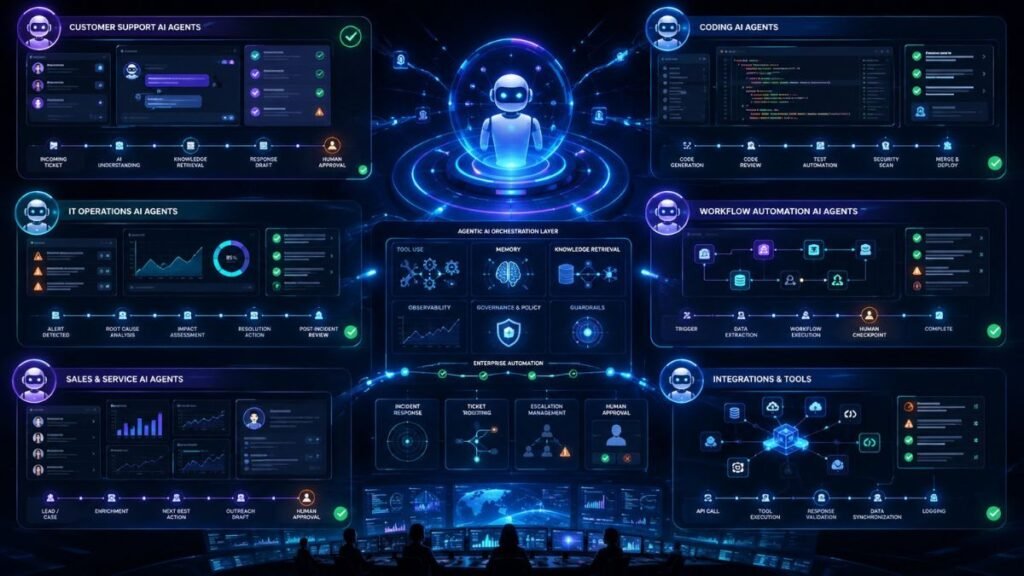
Real-World Agentic AI Use Cases in Customer Support, Coding, and Operations
Real-world agentic AI use cases are strongest where work has clear goals, repeatable steps, tool access, and measurable outcomes. Customer support, coding, and operations are three practical areas because agents can classify requests, retrieve context, use tools, draft actions, escalate risks, and help teams complete work faster.
In Simple Terms
Agentic AI is useful when AI needs to do more than answer a question.
A normal chatbot might tell a customer how to reset a password. An agentic AI system can identify the issue, check account status, retrieve the right policy, draft a response, create a ticket, and escalate the case if approval is needed.
That is why real-world agentic AI use cases are about workflows, not just conversations.
What Makes a Good Agentic AI Use Case?
A strong agentic AI use case usually has five traits:
| Trait | Why It Matters |
| Clear goal | The agent knows what success looks like |
| Repeatable process | The workflow can be tested and improved |
| Tool access | The agent can retrieve data or take steps |
| Measurable outcome | Teams can track time saved, accuracy, or resolution |
| Human review path | Risky cases can be escalated safely |
Agentic AI works best when the workflow is structured enough to guide the agent, but complex enough that simple automation is not enough.
Use Case 1: Customer Support Ticket Triage
Customer support is one of the most practical areas for agentic AI. IBM says AI agents in customer service can understand customer intent, resolve tickets, message customers, analyze consumer data, escalate complex issues, and provide personalized support experiences depending on their tool access and task design.
A support triage agent can read an incoming ticket, classify the issue, detect urgency, retrieve relevant help articles, and route the case to the right queue.
Example workflow: A customer writes, “My refund was approved but I still have not received the money.” The agent checks the ticket category, retrieves refund policy, looks for recent payment status, drafts a summary, and assigns it to billing if the case requires human review.
This use case is valuable because triage is repetitive, high-volume, and measurable.
Use Case 2: Customer Support Agent Assist
Agentic AI can also support human agents during live conversations. Instead of replacing support staff, the AI agent works beside them.
A real-time agent-assist system may transcribe the conversation, detect intent, retrieve answers, summarize context, suggest next steps, and prepare wrap-up notes.
A 2025 arXiv case study on Minerva CQ describes an agentic AI customer-experience system that combines real-time transcription, intent and sentiment detection, entity recognition, contextual retrieval, dynamic customer profiling, and partial conversation summaries for voice-based support.
The best use is not blind automation. The best use is reducing the cognitive load on support teams while keeping humans in control for sensitive situations.
Use Case 3: Human-in-the-Loop Support Automation
Fully automated support is risky when customer emotion, refunds, identity, or policy exceptions are involved. That is why human-in-the-loop design is essential.
A 2026 field experiment on Alibaba’s Taobao platform studied agentic AI in customer service operations and found that human intervention timing and the type of AI failure affect service outcomes. The study reported that early intervention was important for sustaining post-escalation effort, and that emotional escalations required different handling from technical escalations.
This shows an important lesson: customer support agents should not only know when to act. They should also know when to stop, escalate, and preserve customer trust.
Use Case 4: Coding Agents for Bug Fixing
Coding is another strong agentic AI use case because software tasks often have clear inputs and testable outputs.
A coding agent can read an issue, inspect files, search the codebase, suggest a fix, edit code, run tests, and prepare a pull request. IBM lists software design, IT automation, code generation, and conversational assistance among enterprise tasks where AI agents are applied.
Example workflow: A developer assigns a bug report to an AI coding agent. The agent locates the relevant module, identifies a failing test, proposes a patch, runs the test suite, and opens a draft pull request for human review.
The human remains responsible for review, security, and merge decisions.
Use Case 5: Code Review and Test Generation
Agentic AI can help review code by checking style, test coverage, possible regressions, and documentation gaps.
Unlike a basic code-generation tool, an agentic coding assistant can use tools. It may inspect repository history, run linters, compare test output, and propose changes. Microsoft’s GitHub Copilot desktop app coverage described a shift toward coordinating multiple AI agents for development workflows with workspaces and secure sandboxes.
This is useful when teams want faster review support, but it needs guardrails. Coding agents can introduce bugs, miss security issues, or follow unsafe external instructions.
Use Case 6: Secure Coding and Agent Risk Detection
Coding agents also create new risks because they can edit files, run commands, and access external artifacts. A 2026 arXiv paper on agentic coding assistants warns that hidden instructions in external artifacts can hijack assistants and turn them into an attacker-controlled shell for unauthorized commands.
That does not mean coding agents should be avoided. It means they need secure sandboxes, limited permissions, command allowlists, dependency review, and human approval before execution in sensitive environments.
For development teams, the best early use cases are draft fixes, test creation, documentation updates, and review assistance, not unsupervised production changes.
Use Case 7: IT Operations and Incident Triage
Operations teams handle alerts, logs, tickets, dashboards, and repeated diagnostic steps. Agentic AI can help by classifying incidents, gathering evidence, checking runbooks, summarizing logs, and suggesting next actions.
Example workflow: An alert fires for failed API requests. The operations agent checks recent deploys, retrieves related logs, compares error patterns, opens the relevant runbook, and drafts an incident summary.
The agent should not automatically restart systems or roll back deployments unless the workflow is narrow, tested, and approved.
Use Case 8: Business Operations and Workflow Automation
Agentic AI can help operations teams manage repetitive cross-system work. Examples include order status checks, vendor follow-ups, invoice exceptions, onboarding tasks, appointment scheduling, and lead qualification.
Reuters reported that Meta launched an enterprise-focused AI Business Agent designed to support daily business operations such as customer inquiries, lead qualification, appointment booking, and forwarding complex issues to human staff, with integrations planned across business systems.
This type of workflow is promising because agents can connect communication, data lookup, and task execution. The risk is that operations agents often touch customer data and business systems, so governance matters.
Which Use Cases Should Teams Start With?
Start with low-risk, high-volume workflows:
| Team | Good Starting Use Case | Avoid at First |
| Customer support | Ticket triage and draft replies | Fully autonomous refunds |
| Coding | Test generation and draft fixes | Unreviewed production commits |
| IT operations | Incident summaries and evidence gathering | Autonomous remediation |
| Business operations | Order lookups and task routing | High-impact financial actions |
The safest path is observe, advise, draft, approve, then act in narrow conditions.
Common Mistakes to Avoid
The first mistake is choosing use cases because they sound impressive. Choose workflows with clear inputs, clear outputs, and measurable value.
The second mistake is skipping human review. In customer support, coding, and operations, the agent should escalate when uncertainty, emotion, money, security, or compliance risk appears.
The third mistake is ignoring observability. Teams need traces, tool-call logs, retrieved context, latency, cost, errors, and human override data to improve the agent over time.
Suggested Read:
- What Is Agentic AI? A Practical Guide for Beginners
- How Agentic AI Works: Planning, Memory, Tools, and Action
- Agentic AI Architecture Explained Simply
- Agentic AI Governance: Risks, Controls, and Accountability
- How to Evaluate Agentic AI Systems
- Observability for Agentic AI: What Teams Need to Track
- Agentic AI Security Risks You Should Understand
- Best Agentic AI Frameworks for Developers in 2026
FAQ: Real-World Agentic AI Use Cases in Business
What are real-world agentic AI use cases?
Common real-world agentic AI use cases include customer support ticket triage, live agent assist, coding agents, code review, IT incident triage, workflow automation, lead qualification, and operations support.
How is agentic AI used in customer support?
It can classify tickets, retrieve policy context, draft responses, summarize conversations, escalate complex issues, and assist human agents during live support.
How are AI agents used in coding?
AI coding agents can inspect issues, search codebases, draft fixes, generate tests, run checks, review code, and prepare pull requests for human review.
How can agentic AI help business operations?
It can automate repetitive workflows such as order tracking, appointment scheduling, invoice exception handling, vendor follow-up, ticket routing, and data lookup.
What are the risks of agentic AI use cases?
Risks include wrong actions, poor escalation, unsafe tool use, data leakage, prompt injection, weak monitoring, and over-automation.
Which agentic AI use cases should teams start with?
Start with low-risk workflows such as summarization, triage, draft recommendations, evidence gathering, and supervised tool use.
Final Takeaway
Real-world agentic AI use cases are strongest in customer support, coding, and operations because these areas combine repeated tasks, tool access, clear workflows, and measurable outcomes. The best deployments start with supervised assistance, then expand carefully as evaluation, security, observability, and governance improve.
To continue learning, read How Agentic AI Works, Agentic AI Governance, and How to Evaluate Agentic AI Systems next.