
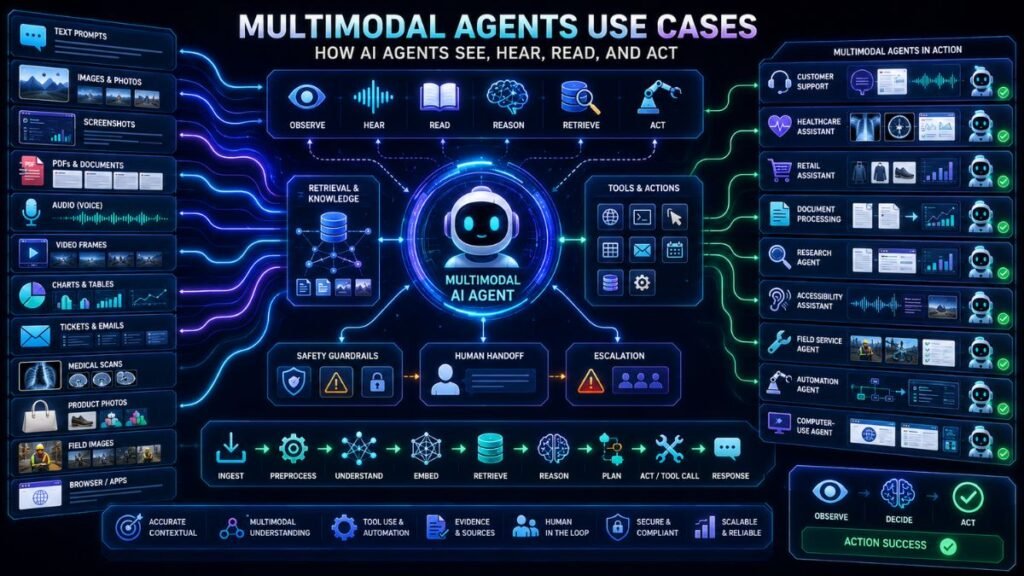
Multimodal agents use cases are growing because modern AI agents can work with more than text. They can inspect screenshots, listen to voice, read documents, analyze images, process videos, retrieve knowledge, use tools, and hand off to humans when a task needs approval or judgment.
In Simple Terms
A normal AI agent usually takes a text instruction and uses tools to complete a task. A multimodal AI agent can take mixed inputs, such as a voice request, product photo, PDF, screenshot, video frame, form, or document, and then decide what to do next.
For example, a customer can upload a screenshot and say, “Why is my payment failing?” A multimodal agent can read the screenshot, understand the spoken or typed question, retrieve the right help article, check account context if allowed, draft a response, and route the case to a human if needed.
What Are Multimodal Agents?
Multimodal agents are AI agents that can perceive and act using multiple data types. They may process text, images, audio, video, documents, tables, screenshots, sensor data, or application screens. They can also use tools such as search, databases, APIs, browsers, workflow systems, calendars, ticketing tools, or CRMs.
The agent part matters because it is not just answering a question. It can plan steps, call tools, inspect results, and continue working toward a goal. OpenAI’s voice agent documentation, for example, discusses using tools, durable state, orchestration, handoffs, guardrails, human review, integrations, and observability for spoken workflows.
How Multimodal Agents Work
A multimodal agent usually has five layers. First, it receives input: text, image, voice, video, file, or screen. Second, it interprets the input with models such as OCR, speech-to-text, vision-language models, or document parsers. Third, it retrieves context from knowledge bases, previous cases, databases, or files. Fourth, it decides what action to take. Fifth, it uses tools or hands the task to a human.
| Layer | What It Does | Example |
| Perception | Reads images, voice, documents, screens | Screenshot analysis |
| Reasoning | Understands goal and next steps | Diagnose issue |
| Retrieval | Finds relevant evidence | Help-center article |
| Tool use | Calls APIs or apps | Create ticket |
| Handoff | Escalates when needed | Human approval |
Use Case 1: Customer Support Agents With Screenshots and Voice
Customer support is one of the strongest multimodal agents use cases. Customers often cannot describe technical problems clearly, but they can upload a screenshot, photo, receipt, or short video.
A multimodal support agent can inspect the image, read visible text, understand the user’s message, retrieve troubleshooting steps, classify the ticket, and draft a response. If the issue involves billing, identity, safety, or a frustrated customer, the agent should escalate.
This is stronger than a text chatbot because it lets customers show the problem instead of typing every detail.
Use Case 2: Voice Agents for Service Workflows
Voice agents are becoming practical for support, scheduling, onboarding, and in-app assistance. A voice agent can listen to a user, call tools, maintain conversation state, and hand off to specialists when the workflow branches.
OpenAI’s voice-agent guide recommends using tools for external capabilities, running agents for spoken workflows that need streaming and durable state, orchestration for specialist handoffs, guardrails and human review for safety checks, and observability to inspect workflow behavior.
A strong voice agent use case is appointment scheduling: the agent listens to the user, checks calendar availability, confirms details, and sends a booking confirmation. If uncertainty or policy risk appears, it routes to a human.
Use Case 3: Document Processing Agents
Document agents can read forms, invoices, contracts, receipts, PDFs, tables, scanned pages, and supporting images. They do more than extract text. They can decide whether a document is complete, ask for missing files, route the document to approval, or update a business system.
For example, an accounts payable agent can read an invoice, extract line items, compare a purchase order, flag mismatches, and send the invoice for approval. A legal intake agent can classify a contract, extract parties and dates, and route it to the right reviewer.
This works best when paired with validation rules and human review for high-value decisions.
Use Case 4: Healthcare and Clinical Workflow Agents
In healthcare, multimodal agents can support administrative and clinical workflows by combining forms, images, notes, lab results, voice dictation, and patient history. A healthcare agent might summarize a patient intake form, organize referral documents, prepare a draft note, or help triage non-emergency messages.
The key word is support. Healthcare workflows require careful oversight. Multimodal agents should not make unsupervised diagnoses or high-stakes treatment decisions. Their safer role is helping clinicians and administrators manage context, reduce repetitive documentation, and surface relevant evidence.
Use Case 5: Retail and Ecommerce Shopping Agents
Retail agents can combine product photos, text preferences, voice requests, product reviews, inventory, size charts, and customer history. A shopper may upload a photo and ask, “Find something similar under ₹3,000.” The agent can use visual search, apply filters, compare products, and explain trade-offs.
In ecommerce support, the same agent can inspect a product damage photo, read an order receipt, check policy context, and route the case for refund or replacement review. This combines visual understanding, retrieval, and workflow action.
Use Case 6: Research and Knowledge Work Agents
Research agents can process papers, figures, tables, charts, datasets, lab notes, and PDFs. They can help researchers summarize literature, compare figures, extract methods, organize citations, and search across mixed evidence.
A multimodal research agent might answer, “Which paper has the chart showing the strongest improvement?” It would need to search paper text, inspect figures, and return source-grounded context. This is valuable, but it also needs strict citation behavior because research errors can spread quickly.
Use Case 7: Field Service and Maintenance Agents
Field service workers often collect photos, videos, voice notes, forms, sensor readings, and equipment history. A multimodal field agent can help create structured reports from messy field data.
For example, a technician photographs a damaged part and records a voice note. The agent can transcribe the note, inspect the image, retrieve equipment history, suggest possible next steps, and generate a repair ticket. If the repair affects safety, a human supervisor should approve.
Use Case 8: Computer-Use Agents
Computer-use agents can interact with software interfaces by observing screens and using mouse or keyboard actions. Anthropic’s Claude computer-use tool documentation describes screenshot capabilities and mouse/keyboard control for autonomous desktop interaction. Anthropic’s earlier computer-use announcement described the capability as a public beta and emphasized safety research.
This use case is powerful for repetitive UI tasks such as filling forms, navigating web apps, testing workflows, or moving data between systems. It is also risky. Agents with screen control need permission boundaries, isolated environments, allowlists, audit logs, and human approval for sensitive actions.
Use Case 9: Accessibility Agents
Accessibility agents can describe images, read documents aloud, generate captions, transcribe audio, simplify text, or help users navigate interfaces through voice. A visually impaired user might ask an agent to describe a form, read a sign, or identify an object through a camera.
This is a strong use case because multimodal agents can convert information from one mode to another: image to speech, audio to text, document to summary, or voice to action. Reliability and privacy are critical because assistive workflows may involve personal surroundings, faces, voices, or sensitive documents.
Benefits of Multimodal Agents
The biggest benefit is real-world context. People do not work only in text. They use screenshots, calls, forms, videos, images, PDFs, dashboards, and browser screens. Multimodal agents can understand these inputs and act more naturally.
Another benefit is workflow continuity. Instead of asking a user to copy data between tools, the agent can inspect evidence, retrieve knowledge, update systems, and escalate when needed. This can reduce repetitive work and improve response speed.
Risks and Limitations
Multimodal agents can make mistakes. They may misread an image, misunderstand a voice request, extract a wrong field, retrieve irrelevant context, click the wrong button, or take action too early.
The risks are higher when agents can use tools. A bad answer is one problem; a wrong action in a CRM, payment system, medical workflow, or browser is more serious. Production systems need permissions, logging, evaluation, human review, and clear rollback paths.
Suggested Read:
- What Is Multimodal AI? Simple Explanation With Examples
- Multimodal Agents
- Building Multimodal Apps
- Multimodal AI Frameworks
- Multimodal API Comparison
- Multimodal AI in Customer Support
- Multimodal AI for Automation
- Multimodal Evaluation
FAQ: Multimodal Agents Use Cases and Examples
What are multimodal agents?
Multimodal agents are AI agents that can process and act on multiple data types such as text, images, audio, video, documents, screenshots, and tool outputs.
What are the best multimodal agents use cases?
Strong use cases include customer support, voice service agents, document processing, healthcare workflows, ecommerce shopping, research assistants, field service, accessibility, and computer-use automation.
How do multimodal AI agents work?
They perceive multimodal inputs, reason about the goal, retrieve context, use tools or APIs, generate outputs, and hand off to humans when needed.
How are multimodal agents different from normal AI agents?
Normal agents often work mainly with text and tools. Multimodal agents can also interpret images, voice, video, documents, screenshots, and other real-world inputs.
How can multimodal agents use images and voice?
They can use vision models for images and screenshots, speech models for audio, and LLMs or agent frameworks to reason, retrieve, and take actions.
What are the risks of multimodal AI agents?
Risks include wrong visual interpretation, voice misunderstanding, poor retrieval, unsafe tool use, privacy exposure, over-automation, and weak human oversight.
Final Takeaway
Multimodal agents use cases are strongest when a task involves mixed inputs and real workflow actions. Support screenshots, voice calls, documents, product photos, research papers, field images, and browser screens all become more useful when agents can perceive, reason, retrieve, act, and hand off safely.
To continue learning, read Multimodal Agents, Building Multimodal Apps, and Multimodal Evaluation next.