
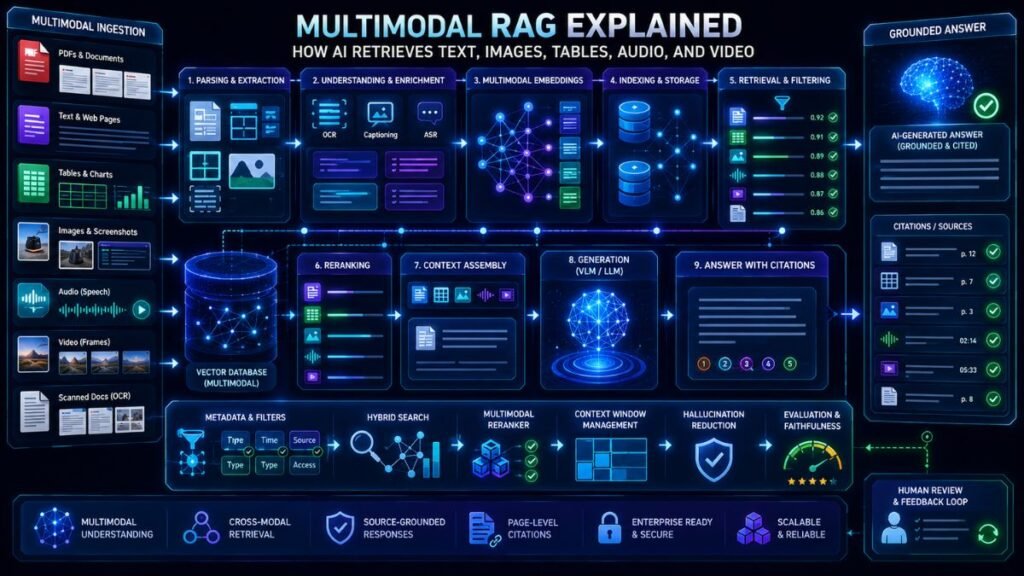
Multimodal RAG explained simply: it is retrieval-augmented generation that can search and use more than text. Instead of retrieving only written passages, multimodal RAG can retrieve images, tables, charts, screenshots, PDFs, audio, video frames, or document pages before generating a more grounded answer.
In Simple Terms
Traditional RAG gives an AI model relevant text before it answers. Multimodal RAG does the same thing, but with different data types.
For example, a normal RAG system may retrieve three text chunks from a PDF. A multimodal RAG system may retrieve a paragraph, a table, a chart image, and the page screenshot that supports the answer. This matters because many real documents and knowledge bases are not text-only. They contain diagrams, scanned pages, screenshots, product images, slide decks, video clips, and audio records.
What Is Multimodal RAG?
Multimodal RAG means multimodal retrieval-augmented generation. It combines retrieval with AI generation across multiple modalities such as text, images, tables, audio, video, documents, and structured data.
IBM describes multimodal RAG as an advanced RAG system that expands traditional RAG by incorporating data types such as text, images, tables, audio, and video files. In practice, this means the system can search across mixed evidence, pass the relevant context to a multimodal model, and generate an answer that is grounded in retrieved sources.
How Multimodal RAG Is Different From Traditional RAG
Traditional RAG usually works like this: split documents into text chunks, create embeddings, retrieve relevant chunks, and ask an LLM to answer using those chunks.
Multimodal RAG extends the pipeline. It may parse PDF pages, extract tables, OCR scanned text, caption images, embed screenshots, sample video frames, transcribe audio, and store metadata. LlamaIndex explains that indexing, retrieval, and synthesis can be extended into image settings, where the input, stored knowledge base, response-generation input, and final response may involve text or images.
| Feature | Traditional RAG | Multimodal RAG |
| Main data type | Text | Text, images, tables, audio, video, documents |
| Retrieval target | Text chunks | Text chunks, images, pages, charts, frames |
| Model type | LLM | LLM or multimodal model |
| Best for | Text knowledge bases | Visual, document, and media-heavy knowledge |
| Key challenge | Text relevance | Cross-modal relevance and grounding |
Core Multimodal RAG Pipeline
A multimodal RAG pipeline usually has six stages.
First, the system ingests data. This may include PDFs, images, screenshots, audio files, video clips, tables, slides, or web pages.
Second, it preprocesses each modality. PDFs may need OCR and layout parsing. Audio may need transcription. Videos may need key-frame extraction. Images may need captions, object detection, or visual embeddings.
Third, it creates searchable representations. Some systems create text embeddings, image embeddings, or multimodal embeddings. Google’s Gemini API File Search documentation says multimodal File Search can natively embed and search images for multimodal RAG, using a multimodal embedding model for both text and images.
Fourth, it retrieves relevant evidence. A user query may retrieve text, images, pages, captions, tables, or frames.
Fifth, the model generates an answer using the retrieved context.
Finally, the system evaluates the answer for relevance, faithfulness, grounding, and source quality.
Example: Multimodal RAG for PDFs and Charts
Imagine a financial PDF that contains paragraphs, tables, and charts. A text-only RAG system may retrieve the surrounding paragraph but miss the chart trend. A multimodal RAG system can retrieve the relevant page, chart image, table, and text together.
The final answer can explain the trend and cite the page or source. Google’s Gemini API File Search update added multimodal support, custom metadata, and page-level citations, which are useful for verifiable RAG over unstructured data.
This is important for reports, contracts, research papers, invoices, slide decks, medical records, product manuals, and compliance documents.
Example: Multimodal RAG for Images and Visual Search
Multimodal RAG can also support visual search. A user may upload an image and ask, “Find documents or products related to this.” The system converts the image into an embedding, searches a database, retrieves similar images or related text, and generates an answer.
This is useful for ecommerce product discovery, design search, insurance claims, support screenshots, manufacturing inspection, and media archives. NVIDIA’s multimodal RAG introduction discusses how image and text data can be combined in retrieval-augmented pipelines.
Example: Multimodal RAG for Audio and Video
Video and audio create extra challenges because they include time. A video RAG system may transcribe speech, sample key frames, store timestamps, and retrieve only relevant clips.
For example, a training platform can answer, “Where does the instructor explain model evaluation?” The system retrieves transcript segments and video timestamps, then generates a concise answer. A meeting assistant could retrieve both spoken content and shared-screen frames.
The key is not to send the whole video blindly. Good multimodal RAG retrieves the right moments.
Why Multimodal RAG Matters
Multimodal RAG matters because enterprise knowledge is messy. Useful information may live inside slides, screenshots, scanned documents, product images, charts, voice calls, video tutorials, support tickets, and PDFs.
A text-only RAG system often loses visual context. It may miss chart evidence, table structure, handwritten notes, or image-based information. Multimodal RAG helps AI assistants work with knowledge closer to how humans actually store and use information.
Benefits of Multimodal RAG
The biggest benefit is richer grounding. The model can answer from text plus visual or media evidence. This can improve document Q&A, visual search, customer support, research workflows, education tools, and enterprise assistants.
Another benefit is better retrieval. A system can search by text, image, or mixed query. For example, a user can upload a screenshot and retrieve related documentation, or ask a text question and retrieve the right chart.
Limitations and Risks
Multimodal RAG is harder than text-only RAG. OCR may fail. Charts may be misread. Images may be retrieved because they look similar but are not relevant. Audio transcripts may contain errors. Video frame sampling may miss the key moment.
Evaluation is also more complex. You need to measure retrieval quality, answer faithfulness, visual grounding, OCR accuracy, latency, cost, and privacy. Multimodal inputs may include faces, voices, financial documents, medical records, internal dashboards, or sensitive screenshots.
Common Mistakes to Avoid
The biggest mistake is treating multimodal RAG as “just add images to RAG.” The system needs good preprocessing, metadata, retrieval design, and evaluation.
Another mistake is flattening everything into text too early. Captions and OCR are useful, but sometimes the image, page screenshot, or chart itself should remain available to the model.
Also avoid sending too much context. A strong system retrieves the most relevant evidence instead of loading entire PDFs, videos, or slide decks into the prompt.
Suggested Read:
- What Is Multimodal AI? Simple Explanation With Examples
- Multimodal Embeddings
- Document Understanding AI
- Multimodal AI in Document Processing
- Multimodal AI for Visual Search
- Multimodal Evaluation
- Building Multimodal Apps
- Multimodal API Comparison
FAQ: Multimodal RAG Explained
What is multimodal RAG?
Multimodal RAG is retrieval-augmented generation that retrieves and uses multiple data types, such as text, images, tables, charts, audio, video, and documents.
How does multimodal RAG work?
It ingests multimodal data, preprocesses it, creates embeddings or searchable representations, retrieves relevant evidence, and passes that context to a model for grounded generation.
How is multimodal RAG different from traditional RAG?
Traditional RAG usually retrieves text chunks. Multimodal RAG can retrieve text, images, charts, tables, document pages, audio transcripts, video frames, or other media evidence.
What data types can multimodal RAG use?
It can use PDFs, images, screenshots, tables, charts, audio, video, scanned documents, slides, product photos, and structured metadata.
What are examples of multimodal RAG?
Examples include PDF Q&A with charts, visual product search, screenshot-based support, video lecture search, research paper assistants, and document RAG over image-heavy files.
What are the limitations of multimodal RAG?
Limitations include OCR errors, weak visual grounding, poor image retrieval, video sampling issues, higher cost, latency, privacy concerns, and harder evaluation.
Final Takeaway
Multimodal RAG explained simply: it helps AI retrieve the right evidence across text, images, tables, audio, video, and documents before answering. It is especially useful when important knowledge is stored in visual, scanned, or media-heavy formats.
To continue learning, read Multimodal Embeddings, Document Understanding AI, and Multimodal Evaluation next.