
OpenAI Gives Companies New Controls Over ChatGPT and Codex Spending
OpenAI introduced expanded analytics and spending controls for ChatGPT Enterprise on June 18, 2026, giving organizations a consolidated way to monitor credit use across ChatGPT and Codex.
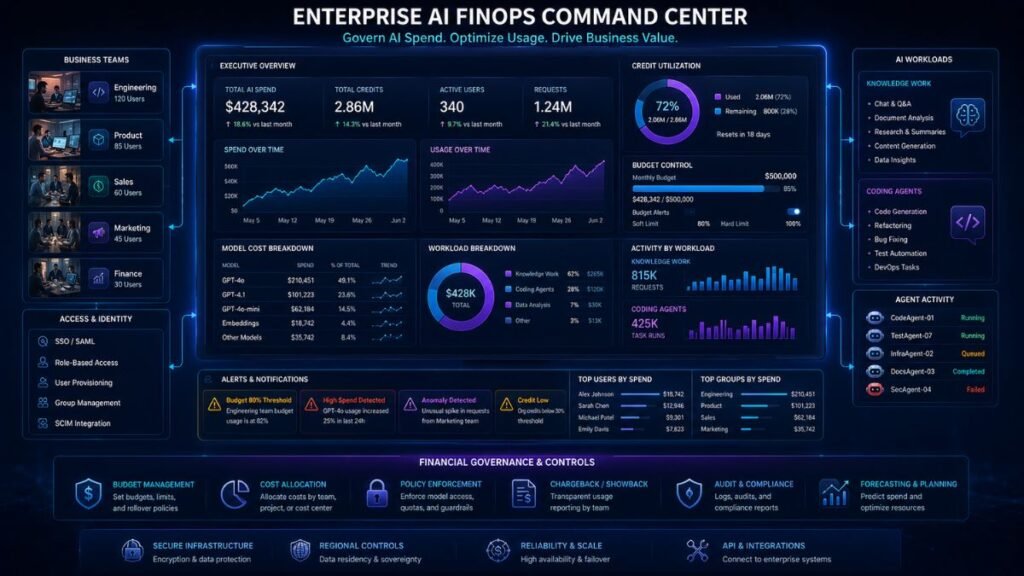
The update places product, model, and user-level credit data inside the Global Admin Console. Administrators can now identify major users, follow consumption trends, apply monthly limits, review requests for additional capacity, and export data into their own financial systems.
The OpenAI enterprise spend controls arrive as companies move from small generative-AI trials to broader deployments involving advanced models, coding agents, research tools, and automated workflows. Greater adoption can create value, but it can also produce unpredictable credit consumption when teams lack budgets, ownership rules, or usage monitoring.
What OpenAI Actually Added
The update has two main components.
The first is a unified analytics view. The Global Admin Console brings ChatGPT and Codex credit usage into one interface and lets eligible administrators break consumption down by user, product, and model. It also shows trends over time and identifies top users or emerging spending patterns.
The second component is a more flexible limit system. Administrators can set a default monthly limit, assign separate limits to groups, and create overrides for individual users who require more capacity. Employees can see how much of their available credit allowance they have used and request an increase with an explanation of the work they are performing.
This is more useful than a single organization-wide cap because AI demand is rarely evenly distributed. A software-engineering group using Codex throughout the day may require more credits than a contractor group using ChatGPT occasionally.
How the Global Admin Console Fits In
The Global Admin Console acts as a tenant-level management layer across eligible OpenAI environments.
OpenAI’s documentation describes it as a central location for identity, access, analytics, and administrative functions across workspaces and organizations. Global administrators can manage verified domains, configure single sign-on, add other global admins, and control selected forms of external access.
The June update expands its billing and analytics areas. Eligible administrators can view plan information, balances, grant activity, invoices, alerts, overage settings, and usage broken down across ChatGPT and Codex features. OpenAI also supports analytics-viewer roles for users who need reporting access without full administrative authority.
That separation is useful for enterprises where finance analysts need cost data but should not control identity settings or workspace permissions.
What Unified Usage Analytics Can Reveal
The new analytics layer can answer practical questions such as:
- Which teams consume the most credits?
- Is spending rising because more employees are adopting AI?
- Which models or products account for the increase?
- Are a small number of users responsible for most consumption?
- Did usage change after a training program or product rollout?
- Are Codex agents creating a different cost pattern from normal ChatGPT use?
Workspace analytics can also expose adoption signals such as active users, messages, model families, tool use, projects, custom GPT activity, and optional credit-use fields for eligible workspaces.
OpenAI’s Codex analytics include additional developer-oriented measures such as active users, tokens, threads, turns, plugin use, accepted lines of code, and model usage. These can help organizations understand where adoption is occurring, although none of these metrics alone proves productivity.
How Monthly Limits Work
OpenAI’s updated limits operate over a calendar month using UTC.
Admins and workspace owners can configure three levels:
| Limit type | Purpose | Example |
| Workspace default | General per-user guardrail | Standard allowance for most employees |
| Group limit | Different allowance for a team or role | Higher cap for engineering |
| User override | Exception for one person | Additional capacity for a power user |
When multiple settings apply, an individual override takes priority, followed by the highest applicable group setting and then the workspace default.
The controls are hard limits rather than informational budgets. Once a user reaches the applicable ceiling, additional credit-based use can be restricted unless an increase is approved.
OpenAI lets administrators enable an in-product request process. Users can explain why they need more capacity, and admins can approve or reject the request. Approved increases become persistent individual overrides until changed later, rather than one-time temporary allowances.
A Practical Enterprise AI FinOps Workflow
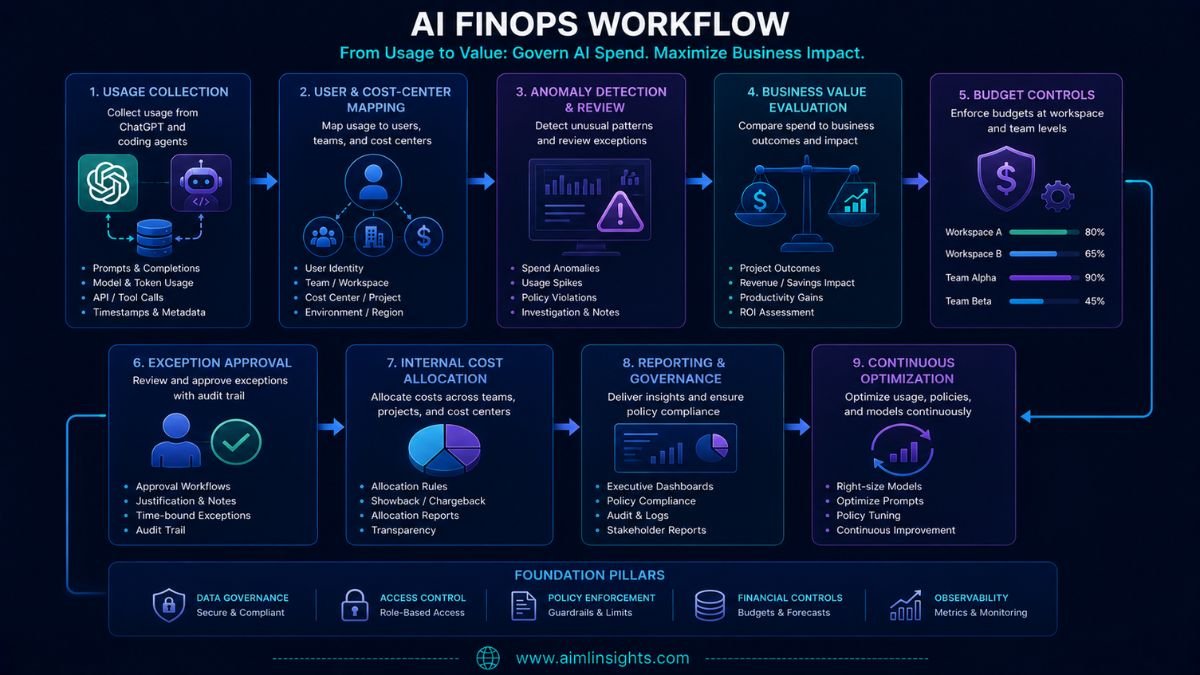
A mature implementation should go beyond setting one cap.
Collect ChatGPT and Codex usage
↓
Map users to teams and cost centers
↓
Separate normal adoption from anomalies
↓
Compare spend with workflow outcomes
↓
Set workspace, group, and user guardrails
↓
Review exceptions and high-value users
↓
Allocate or report costs internally
↓
Adjust budgets, training, and model access
OpenAI supplies usage and credit information. The enterprise must connect that information with internal finance, HR, identity, project, and productivity data.
Budgeting Without Blocking Productive Users
A common cost-control mistake is applying identical limits to everyone.
AI use is often concentrated among a relatively small number of employees who build automations, conduct deep research, analyze large datasets, or run coding agents. Restricting those users may reduce the very value the organization hoped to create.
A better structure is tiered:
- A basic allowance for occasional users
- A larger allocation for trained role-based users
- Higher limits for approved automation or development teams
- Individual exceptions for proven high-value workflows
- Separate review for experimental or unusually expensive projects
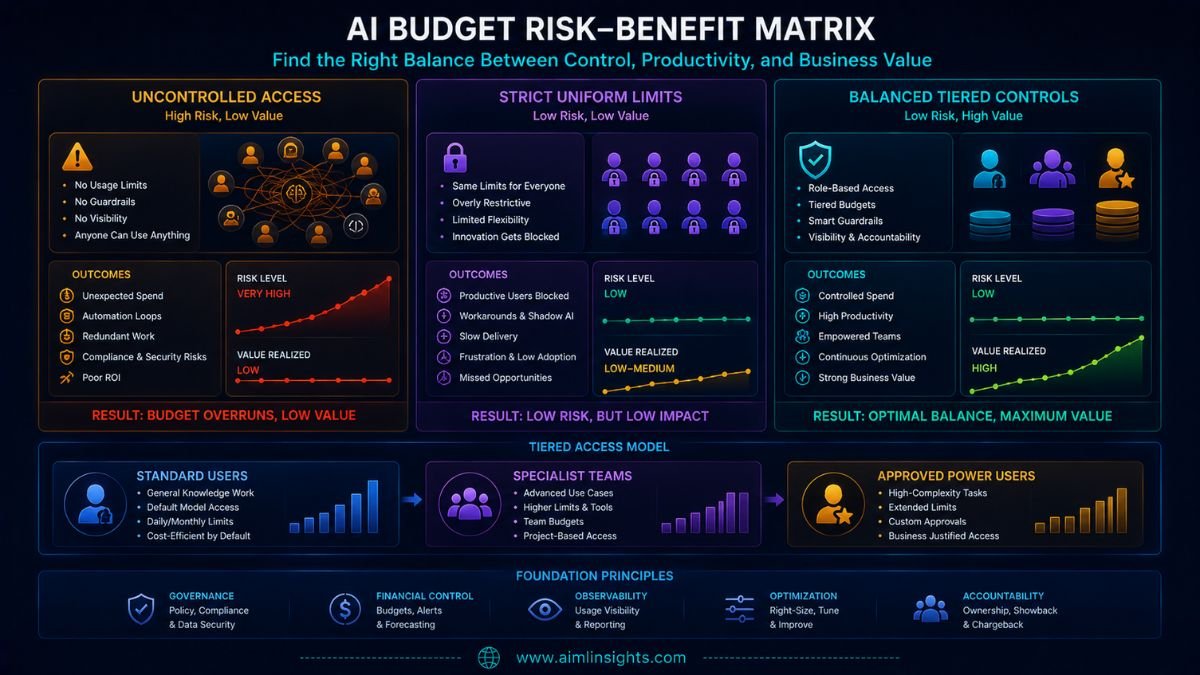
OpenAI’s group and user override controls support this structure. The harder work is deciding which users or workflows deserve more capacity.
Chargebacks and Showbacks
OpenAI does not automatically create an enterprise chargeback policy.
A showback reports consumption to departments without moving money between budgets. A chargeback assigns the cost directly to the consuming team, project, or business unit.
Organizations can export credit data through OpenAI’s unified Cost API and combine it with internal cost-center mappings. OpenAI says the same credit-usage data visible in the console is available through this API for deeper analysis in company systems.
A practical allocation model might attribute spend by:
- User and department
- Product, such as ChatGPT or Codex
- Model family
- Project or internal initiative
- Environment, such as production or experimentation
- Approved workflow or business owner
Allocation becomes difficult when one user performs work for several teams or when shared agents serve many departments. Enterprises may need project tags, service accounts, workflow identifiers, or internal allocation rules to avoid misleading reports.
Detecting Anomalies and Misuse
Usage analytics can support anomaly detection, but OpenAI’s announcement does not describe a complete automated fraud or anomaly-detection system.
Administrators should investigate patterns such as:
- A sudden increase from one account
- Large overnight usage outside normal workflows
- Repeated agent runs with no useful output
- A sharp shift toward more expensive models
- Unexpected activity from contractors or inactive teams
- Automation loops repeatedly consuming credits
- Usage growth without corresponding adoption or output
Not every spike is waste. It could reflect a product launch, deadline, migration, security investigation, or successful automation.
The correct response is therefore investigation rather than automatic blocking. Limits, alerts, identity logs, and business context should be reviewed together.
Why Cost Visibility Is Not ROI
The new controls tell an organization where credits are being consumed.
They do not reveal whether that consumption created value.
A developer may use many Codex credits and save several days of work. Another user may consume fewer credits while producing low-quality output that requires extensive correction.
Useful ROI measures include:
- Time saved on a defined workflow
- Output quality
- Human-review effort
- Defect or rework rate
- Revenue influenced
- Support cases resolved
- Cycle-time reduction
- Risk avoided
- Total cost per successful outcome
Prompt counts, token totals, accepted code, and active-user numbers are operational signals. They should not be treated as financial returns without outcome data.
Benchmark and Evidence Audit
This release is an administrative product update, not a performance benchmark.
| Evaluation question | Published evidence |
| Can admins view ChatGPT and Codex usage together? | Yes |
| Can usage be broken down by user, product, and model? | Yes |
| Can admins apply group and individual limits? | Yes |
| Can data be exported through an API? | Yes |
| Are invoices and balances visible? | Available for eligible environments |
| Does the system calculate business ROI? | No |
| Does it automatically perform chargebacks? | Not disclosed |
| Does it prove cost savings? | No |
| Are anomaly-detection accuracy figures published? | No |
| Is there an independent enterprise outcome study? | No |
The most important missing capability is direct linkage between spend and business outcome.
Governance and Privacy Considerations
Usage analytics create their own governance responsibilities.
Per-user reporting can help identify adoption gaps and costly patterns, but it can also become employee surveillance if metrics are used without clear policy or context.
Organizations should define:
- Who can access user-level analytics
- How long reports are retained
- Whether data is used for performance management
- How employees are informed
- Which teams can approve limit increases
- How disputes are handled
- Whether sensitive project names appear in exports
- How exported billing data is protected
OpenAI offers role separation, including analytics-viewer access, but internal policy determines whether those permissions are used responsibly.
Why This Matters
Enterprise AI is moving toward usage-based economics.
A fixed software seat is relatively predictable. Agentic coding, advanced models, deep research, and automated workflows can generate variable consumption depending on task length, model choice, and frequency.
That makes AI FinOps increasingly similar to cloud FinOps: organizations need visibility, allocation, guardrails, anomaly review, and value measurement.
OpenAI’s update provides more of the foundational data and control surface required for that work.
Simple Explanation for Beginners
Imagine a company gives every employee access to a shared electricity supply.
The new OpenAI dashboard shows who is using the most electricity, which machines consume it, and how usage changes over time.
Admins can set different limits for different teams and approve extra capacity for people doing important work.
But the meter cannot tell whether the electricity produced a valuable product. The company still has to measure the result.
Conclusion: OpenAI Enterprise Spend Controls
The OpenAI enterprise spend controls give companies a clearer view of ChatGPT and Codex consumption and more flexible ways to manage monthly credit use.
Unified analytics, product and model breakdowns, group limits, user overrides, billing views, and API exports make large deployments easier to govern.
The update does not complete the enterprise AI FinOps process.
Organizations must still allocate costs, detect suspicious patterns, avoid blocking productive users, protect employee analytics, and connect AI spending with measurable business outcomes.
Final Takeaways
- OpenAI released the new controls on June 18, 2026.
- ChatGPT and Codex credit usage now appears in one administrative view.
- Admins can analyze consumption by user, product, and model.
- Monthly limits can be set at workspace, group, and individual levels.
- Users may request additional credits with business context.
- Cost data can be exported through the unified Cost API.
- The console can support showback and chargeback systems but does not define them.
- Usage spikes require investigation, not automatic assumptions of waste.
- High consumption may indicate high value rather than misuse.
- OpenAI’s analytics do not automatically calculate productivity or ROI.
Suggested Read:
- ChatGPT Enterprise Explained
- OpenAI Codex for Business
- LoRA Alternatives PEFT Benchmark: Which Methods Perform Better?
- How to Measure Generative AI ROI
- China’s Cheap AI Model Is Making Claude Look Expensive
- AI Agents Can Now Work for Hours
FAQ: OpenAI Enterprise Spend Controls
What are OpenAI enterprise spend controls?
They are administrative tools that help ChatGPT Enterprise organizations monitor credit use and set monthly limits for workspaces, groups, and individual users.
How can admins track ChatGPT and Codex costs?
The Global Admin Console combines credit usage from both products and supports breakdowns by user, model, and product, along with trends, balances, invoices, and exports.
Can companies set limits for individual users?
Yes. Admins can apply a workspace default, create group-specific limits, and add user-level overrides.
What is the OpenAI Global Admin Console?
It is a centralized administrative interface for eligible organizations, covering areas such as identity, access, analytics, billing, domains, and workspace management.
How should enterprises allocate AI costs?
Companies can combine OpenAI’s exported credit data with internal departments, projects, cost centers, or workflow owners to create showback or chargeback reports.
Do OpenAI analytics measure AI ROI?
No. They measure adoption and consumption signals. Enterprises must connect that data with time saved, quality, revenue, risk, and total workflow cost.
References: