
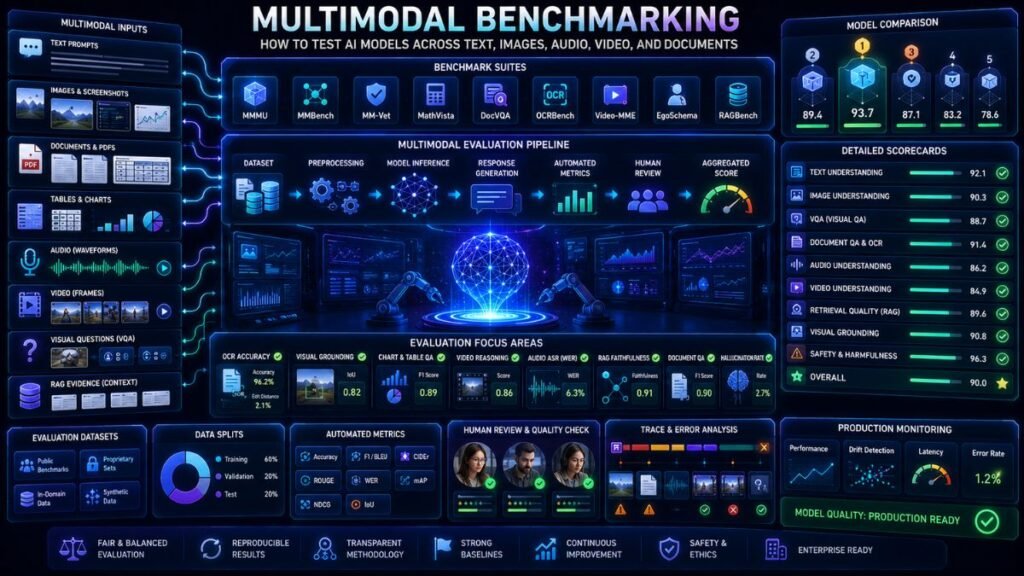
Multimodal benchmarking is the process of testing AI systems that work with more than text, including images, screenshots, PDFs, charts, audio, video, and documents. It helps teams compare models, measure reliability, find failure cases, and decide whether a multimodal AI system is ready for real users.
In Simple Terms
Multimodal benchmarking means giving an AI model a structured set of test tasks across different data types and measuring how well it performs.
For example, a vision-language model may be tested on image question answering, chart reasoning, OCR, spatial understanding, document analysis, and visual math. A multimodal RAG system may be tested on whether it retrieves the right page, table, image, or video segment before answering.
The goal is not just to get a high score. The goal is to understand what the model can and cannot do.
What Is Multimodal Benchmarking?
Multimodal benchmarking is a structured evaluation process for models or applications that combine different modalities such as text, images, audio, video, documents, tables, charts, and screenshots.
This is different from simple text-only LLM benchmarking. A multimodal model may fail because it misreads a chart, misses small text in an image, retrieves the wrong PDF page, ignores audio context, or samples the wrong video frame. A useful benchmark should reveal those failure modes before the system reaches production.
Multimodal Benchmarking vs Multimodal Evaluation
These terms overlap, but they are not identical.
| Term | Meaning | Best Use |
| Multimodal benchmarking | Testing against fixed datasets or benchmark suites | Model comparison |
| Multimodal evaluation | Broader quality testing across custom workflows | Production readiness |
| Human review | Expert judgment on outputs and failures | High-risk tasks |
| Monitoring | Tracking real-world performance after launch | Production systems |
Benchmarking is usually standardized. Evaluation is broader and often includes your own data, business rules, latency, cost, and user feedback.
Popular Multimodal AI Benchmarks
Several benchmarks are commonly used for vision-language and multimodal model testing.
MMMU tests multimodal models on college-level subject knowledge and reasoning. The official benchmark page says it includes 11.5K multimodal questions from exams, quizzes, and textbooks across Art & Design, Business, Science, Health & Medicine, Humanities & Social Science, and Tech & Engineering.
MMBench is designed for robust and holistic evaluation of vision-language models using multiple-choice questions in English and Chinese.
MM-Vet focuses on integrated vision-language abilities, including recognition, OCR, knowledge, language generation, spatial awareness, and math.
MMBench-Video targets long-form video understanding because many older VideoQA benchmarks do not fully test temporal comprehension.
MMMU-Pro strengthens MMMU by filtering text-only-answerable questions, expanding candidate options, and adding a vision-only input setting.
What Metrics Matter in Multimodal Benchmarking?
The right metrics depend on the task. Accuracy may work for multiple-choice benchmarks, but it is not enough for open-ended answers, RAG systems, or production apps.
| Metric | What It Checks |
| Accuracy | Whether the model selects or generates the correct answer |
| OCR accuracy | Whether text in images or documents is read correctly |
| Visual grounding | Whether the answer is supported by the right visual region |
| Retrieval precision | Whether the right image, page, table, or clip was retrieved |
| Faithfulness | Whether the answer stays supported by retrieved context |
| Latency | Whether the model is fast enough for users |
| Cost per task | Whether the workflow is affordable at scale |
| Human preference | Whether users or reviewers prefer the output |
A good multimodal benchmarking workflow usually combines automated scoring with manual review.
How to Benchmark Multimodal AI Step by Step
Start by defining the task. Do not benchmark “multimodal ability” in general. Benchmark chart question answering, screenshot troubleshooting, document Q&A, visual search, video summarization, or OCR extraction separately.
Next, choose a benchmark or create a small custom test set. Public benchmarks help compare models, but custom tests show whether the system works for your actual users.
Then run the same inputs through each model or pipeline. Keep prompts, preprocessing, image resolution, retrieval settings, and scoring rules consistent.
Finally, analyze failures. Group errors into categories such as OCR failure, wrong object recognition, weak reasoning, irrelevant retrieval, hallucination, missed table structure, or video timestamp error.
Benchmarking Vision-Language Models
Vision-language model benchmarking should test more than image captioning. A VLM may describe a picture well but fail on charts, diagrams, small text, spatial relationships, or multi-step reasoning.
Use benchmark suites such as MMMU, MMBench, MM-Vet, and related VLM test sets to get a broad picture. Tools like VLMEvalKit can help standardize evaluation across large multimodal models and many benchmarks.
For practical use, always add your own samples. If your app works with invoices, screenshots, medical-style images, product photos, or slide decks, public benchmarks are only a starting point.
Benchmarking Multimodal RAG
Multimodal RAG benchmarking needs two layers: retrieval quality and answer quality.
For retrieval, check whether the system finds the right text chunk, table, page image, screenshot, chart, audio segment, or video frame. For generation, check whether the answer is faithful to the retrieved evidence.
Useful multimodal RAG metrics include context relevance, retrieval recall, retrieval precision, answer faithfulness, citation accuracy, visual grounding, and latency. The key question is: did the system use the right evidence before answering?
Benchmarking Documents, OCR, and Charts
Document-heavy multimodal systems need special tests. A model may answer general image questions well but fail on dense PDFs, multi-column layouts, tables, scanned pages, or small fonts.
Test OCR accuracy, table extraction, key-value extraction, page-level citation quality, chart interpretation, and answer traceability. Include messy examples: rotated scans, blurry screenshots, handwritten notes, low contrast, long tables, and mixed-language documents.
This is especially important for finance, healthcare, legal, insurance, procurement, and compliance workflows.
Benchmarking Audio and Video Models
Audio and video benchmarking requires time-aware evaluation. For audio, test transcription accuracy, speaker handling, event recognition, and summary quality. For video, test frame sampling, scene understanding, temporal reasoning, object persistence, and timestamp accuracy.
A video model may identify what appears in a frame but fail to understand sequence. That is why video benchmarks should include questions about “before,” “after,” “during,” cause and effect, and changing visual context.
Common Mistakes in Multimodal Benchmarking
The biggest mistake is relying only on leaderboard scores. A model may perform well on one benchmark but fail on your domain.
Another mistake is testing clean examples only. Real user uploads are often blurry, noisy, compressed, rotated, long, ambiguous, or incomplete.
A third mistake is ignoring cost and latency. A model that scores well may be too expensive or slow for production. Benchmarking should include practical constraints, not only accuracy.
Limitations and Risks
Benchmarks can become outdated as models improve and benchmark data leaks into training sets. Some benchmarks are multiple-choice, which may not reflect real open-ended user workflows. Others focus on images but not documents, audio, video, or agentic tasks.
Multimodal benchmarking also raises privacy issues when custom test data includes faces, voices, medical records, financial files, customer screenshots, or internal documents. Use anonymized datasets and secure evaluation pipelines when possible.
Suggested Read:
- What Is Multimodal AI? Simple Explanation With Examples
- Multimodal Evaluation
- Multimodal AI Datasets
- Best Vision Language Models in 2026
- Multimodal AI Model Comparison
- Building Multimodal Apps
- Multimodal RAG Explained
- Document Understanding AI
FAQ: Multimodal Benchmarking: Metrics and Testing Guide
What is multimodal benchmarking?
Multimodal benchmarking is structured testing for AI models or applications that process multiple data types such as text, images, audio, video, documents, tables, and charts.
How do you benchmark multimodal AI models?
Define the task, choose public and custom datasets, run consistent tests, score outputs, analyze failures, and compare quality, latency, cost, and safety.
What are the best multimodal AI benchmarks?
Common benchmarks include MMMU, MMBench, MM-Vet, MMMU-Pro, and video-focused benchmarks such as MMBench-Video.
How are vision-language models benchmarked?
They are tested on tasks such as image question answering, OCR, spatial reasoning, chart understanding, visual math, recognition, and multimodal reasoning.
What metrics are used in multimodal benchmarking?
Useful metrics include accuracy, OCR accuracy, visual grounding, retrieval precision, faithfulness, citation quality, latency, cost, and human preference.
How do you benchmark multimodal RAG systems?
Test retrieval quality and answer quality separately. Check whether the right text, image, page, table, audio, or video evidence was retrieved and used faithfully.
Final Takeaway
Multimodal benchmarking helps teams move beyond demos by testing whether AI models can handle real text, images, documents, audio, video, charts, and retrieval workflows. Use public benchmarks for comparison, custom tests for production fit, and human review for high-risk decisions.
To continue learning, read Multimodal Evaluation, Multimodal AI Datasets, and Building Multimodal Apps next.