
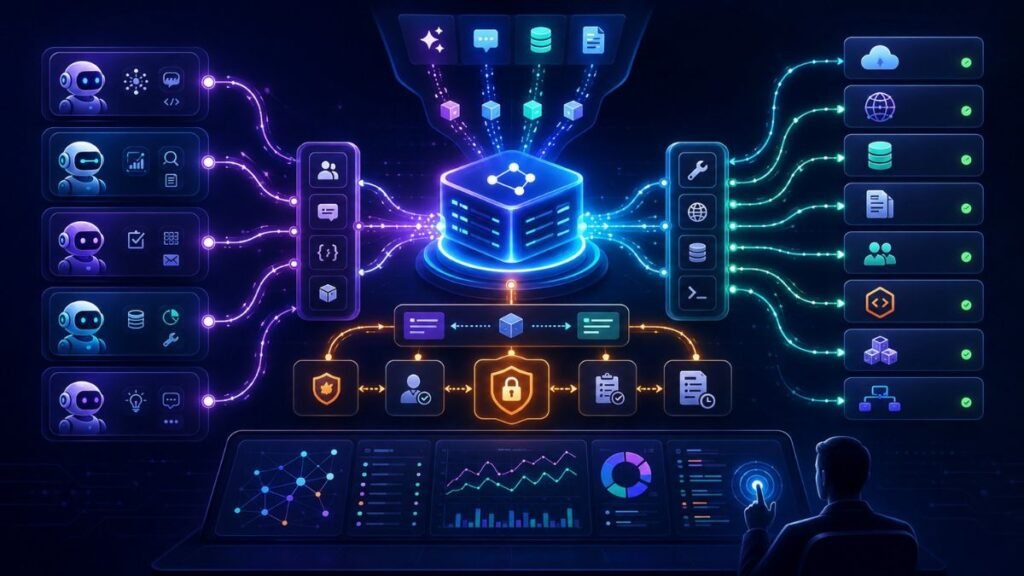
MCP servers improve agentic AI workflows by giving AI agents a standard way to connect with tools, APIs, files, databases, prompts, and external systems. Instead of building custom integrations for every agent, teams can expose reusable MCP servers that agents can discover, call, monitor, and govern more consistently.
In Simple Terms
An MCP server is like a standardized connector between an AI agent and the outside world.
Without MCP, every agent app may need its own custom integration for GitHub, Slack, databases, CRMs, file systems, or internal APIs. With MCP, those capabilities can be exposed through a common protocol that AI applications understand.
That makes agentic AI workflows easier to build, reuse, and control.
What Is an MCP Server?
An MCP server is a server that exposes tools, resources, or prompts to an AI application through the Model Context Protocol.
The official MCP introduction defines MCP as an open-source standard for connecting AI applications to external systems. It lets AI applications connect to data sources, tools, and workflows through a shared protocol rather than one-off integrations.
The MCP specification describes a structure with hosts, clients, and servers. Hosts are LLM applications that initiate connections, clients maintain connections, and servers expose capabilities such as tools, resources, and prompts.
In practical terms, an MCP server can expose capabilities such as “search files,” “query a database,” “create a ticket,” “read a calendar,” or “run a code tool.”
Why MCP Servers Matter for Agentic AI
Agentic AI systems are useful because they can act. But to act, they need access to external systems.
That access gets messy fast. Each tool may have a different API, authentication model, data format, permission rule, and error behavior. MCP servers reduce this integration mess by creating a more standard interface between agents and external capabilities.
This matters for developers, enterprises, and platform teams because agentic workflows often depend on many tools: document stores, APIs, customer systems, code repositories, analytics tools, calendars, and internal services.
MCP Tools, Resources, and Prompts
MCP servers can expose different types of capabilities.
| MCP Capability | What It Does | Example |
| Tools | Actions the model can invoke | Query database, call API, run computation |
| Resources | Data the client can read | Files, documents, records, logs |
| Prompts | Reusable prompt templates | Standard workflow instructions |
The MCP tools specification says servers can expose tools that language models can invoke to interact with external systems, including querying databases, calling APIs, or performing computations. MCP resources let servers expose data that provides context, while MCP prompts let servers expose reusable prompt templates that clients can discover and use.
This is important because agentic workflows need more than raw APIs. They need usable actions, relevant context, and repeatable instructions.
How MCP Servers Improve Agent Workflows
MCP servers improve agentic workflows in five practical ways.
First, they standardize integrations. Developers can expose a capability once and let different MCP-compatible clients use it.
Second, they improve reuse. A Git, database, documentation, or ticketing MCP server can support multiple agents.
Third, they make tool discovery easier. Agents and clients can inspect available tools and resources instead of relying on hardcoded integrations.
Fourth, they separate concerns. The agent focuses on reasoning and workflow, while the MCP server handles the external system interface.
Fifth, they support better governance. Teams can centralize access rules, tool descriptions, logs, and security controls around MCP servers.
MCP vs Custom Tool Integrations
| Criteria | Custom Tool Integration | MCP Server |
| Reuse | Often app-specific | Reusable across clients |
| Standardization | Varies by project | Shared protocol |
| Maintenance | Duplicated logic | Centralized server logic |
| Tool discovery | Usually hardcoded | Discoverable capabilities |
| Governance | App-by-app | Easier to centralize |
| Best for | One-off workflows | Reusable agent ecosystems |
Custom integrations still make sense for simple apps. MCP becomes more valuable when teams build many agents, many tools, or enterprise-wide agent workflows.
Example: MCP Server in a Customer Support Agent
A support agent may need to check customer records, retrieve order data, search policy documents, and create tickets.
Without MCP, each agent app may need separate custom code for the CRM, order system, document store, and ticketing platform.
With MCP servers, the workflow can be cleaner:
The CRM MCP server exposes customer lookup.
The order MCP server exposes order status.
The policy MCP server exposes relevant resources.
The ticketing MCP server exposes ticket creation.
The agent chooses the right tool during the workflow.
This improves maintainability because business systems can be wrapped once and reused across support, sales, and operations agents.
Example: MCP Server in a Coding Agent
A coding agent may need to inspect files, search a repository, run tests, check issues, and prepare code changes.
OpenAI’s Agents SDK documentation says its Python SDK understands multiple MCP transports, letting developers reuse existing MCP servers or build new servers to expose filesystem, HTTP, or connector-backed tools to an agent.
That matters because coding agents are tool-heavy. A well-designed MCP server can expose repository tools, build tools, test tools, and documentation search in a structured way.
MCP in Commercial Agent Platforms
MCP is becoming relevant across commercial platforms because enterprises want agents to connect to existing systems without rebuilding every integration.
OpenAI documents MCP and connectors as usable through the mcp built-in tool type, including support for remote MCP servers. Microsoft Copilot Studio documentation says a single MCP server can integrate and manage multiple tools and resources, and Copilot Studio agents can access each tool. Microsoft also documents creating new MCP servers for services and adding MCP server tools and resources to agents.
For buyers, this means MCP support can become an important platform-selection factor when comparing agent builders, frameworks, and enterprise AI stacks.
Security Risks and Governance Needs
MCP servers make agent integrations easier, but they also introduce security questions.
A server that exposes database queries, file access, code execution, or customer records can become risky if permissions, authentication, validation, and logging are weak.
Recent research on Secure Model Context Protocol argues that MCP adoption creates security and privacy challenges such as unauthorized access, tool poisoning, prompt injection, privilege escalation, and supply-chain attacks. The paper proposes stronger identity management, mutual authentication, policy enforcement, and audit logging as possible improvements. Another 2026 preprint argues that MCP standardizes tool discovery and invocation, but production deployments still need stronger infrastructure around identity propagation, tool budgets, structured errors, and observability.
The practical lesson: MCP is an integration standard, not a complete security strategy.
When Should Teams Use MCP Servers?
Use MCP servers when your agents need repeated access to external systems, especially across multiple apps or teams.
Good use cases include:
Enterprise knowledge agents.
Coding assistants.
Customer support workflows.
Data analysis agents.
Operations agents.
Internal automation tools.
Multi-agent systems that share tools.
Avoid MCP overhead for very small one-off prototypes where a simple direct API call is easier. MCP makes more sense when reuse, governance, and tool standardization matter.
Commercial Buying Criteria
When evaluating MCP for AI agents, compare:
| Criteria | Why It Matters |
| MCP client support | Your agent platform must connect to MCP servers |
| Authentication | Tools need identity-aware access control |
| Tool permissions | Agents should not receive broad write access |
| Observability | Tool calls and errors must be traceable |
| Server quality | Poorly designed tools create unreliable agents |
| Error handling | Agents need structured failures, not vague outputs |
| Deployment model | Local, remote, cloud, or enterprise-hosted matters |
| Security review | MCP servers expand the agent attack surface |
For commercial teams, MCP value is not only “can it connect?” The real value is “can it connect safely and repeatedly?”
Common Mistakes to Avoid
The first mistake is treating MCP as magic. MCP standardizes connection patterns, but it does not automatically make tools safe, useful, or reliable.
The second mistake is exposing too many tools. Agents perform better when tools are clearly described, narrow, and relevant.
The third mistake is ignoring permissions. Start with read-only tools, then draft actions, then supervised writes.
The fourth mistake is skipping observability. Teams should log tool calls, arguments, failures, approvals, and final outcomes.
The fifth mistake is assuming every integration needs MCP. If one agent calls one simple API, direct integration may be enough.
Suggested Read:
- What Is an AI Agent? A Simple Explanation With Examples
- MCP Explained: Why It Matters for AI Agents
- Tool Use in Agentic AI: Function Calling, APIs, and External Actions
- How Orchestration Works in Agentic AI Systems
- Best Platforms for Building Agentic AI Applications
- Open Source vs Managed Platforms for Agentic AI
- Agentic AI Security Risks You Should Understand
- How to Evaluate Agentic AI Systems
FAQ: How MCP Servers Improve Agentic AI Workflows
How do MCP servers improve agentic AI workflows?
MCP servers improve agentic AI workflows by standardizing how agents access tools, APIs, documents, databases, prompts, and external systems.
What is an MCP server?
An MCP server is a server that exposes tools, resources, or prompts through the Model Context Protocol so AI applications can connect to external systems.
Why do AI agents need MCP servers?
AI agents need MCP servers when they must use external capabilities repeatedly, such as querying data, searching files, calling APIs, or triggering workflow actions.
What is the difference between MCP tools and APIs?
An API is an external service interface. An MCP tool is a capability exposed to an AI agent through the MCP protocol, often backed by an API.
Are MCP servers secure for enterprise AI agents?
They can be secure if implemented with authentication, permissions, validation, audit logs, policy controls, and careful tool design. MCP alone does not guarantee security.
When should teams use MCP servers in agentic AI applications?
Teams should use MCP servers when they need reusable, governed, and standardized integrations across multiple agents, tools, teams, or enterprise workflows.
Final Takeaway
How MCP servers improve agentic AI workflows comes down to standardized integration. MCP servers let AI agents discover and use tools, resources, prompts, APIs, and business systems more consistently. They can reduce integration duplication and improve reuse, but teams still need strong security, observability, permissions, and governance.
To continue learning, read MCP Explained: Why It Matters for AI Agents, Tool Use in Agentic AI, and Best Platforms for Building Agentic AI Applications next.