

8 Free Google AI Tools That Could Replace Apps You Pay For
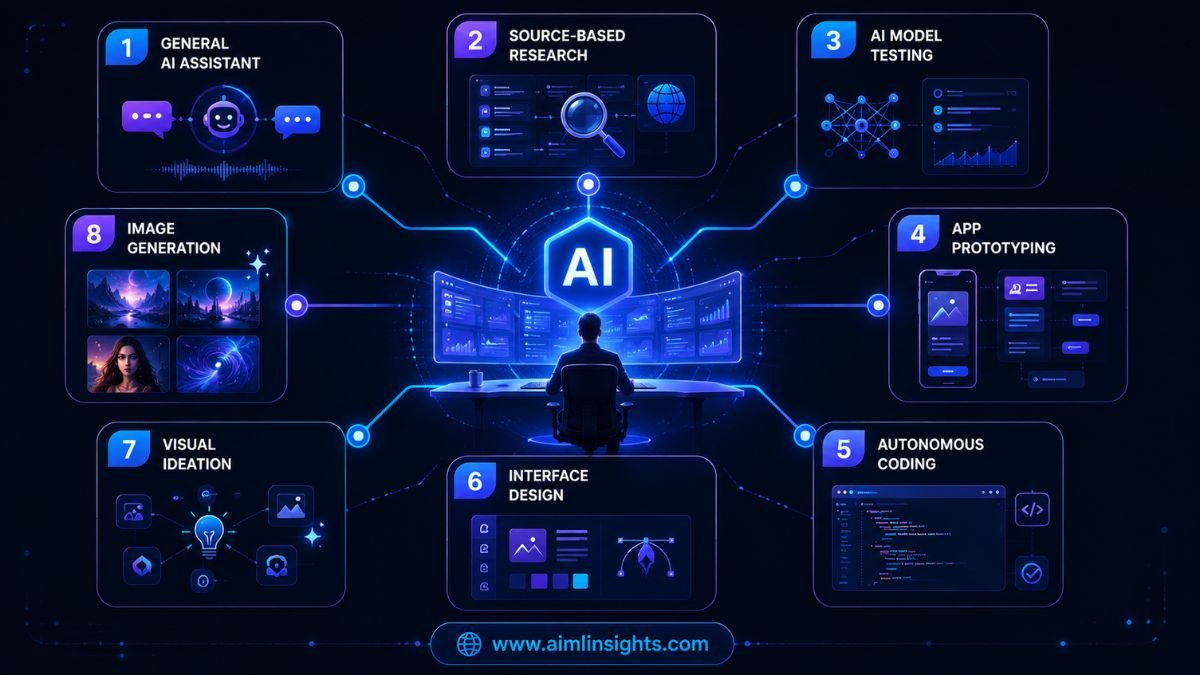
Google now offers enough free Google AI tools to cover writing, research, coding, app development, interface design and image creation without requiring an upfront subscription.
That does not mean every paid AI platform has suddenly become unnecessary. Free plans come with limits, and some advanced features still require Google AI Pro, Ultra or cloud billing.
But for students, creators, developers, freelancers and small businesses, Google’s free AI ecosystem has become surprisingly capable.
Why Google’s Free AI Tools Matter Now
Google is no longer offering just one AI chatbot.
Its current AI ecosystem includes consumer assistants, research tools, developer platforms, autonomous coding agents and experimental creative products. Google’s own AI products directory highlights Gemini, Google AI Studio and Antigravity alongside its wider collection of AI services.
The advantage is that many of these tools connect naturally with Google accounts, Drive files, web research, source documents and development platforms.
The limitation is that “free” usually means one of three things:
- A permanent free plan with usage limits.
- A free developer tier for testing and prototypes.
- An experimental product that may change, restrict access or introduce paid features later.
With that distinction clear, these are eight of the most useful options.
1. Google Gemini for Everyday AI Work
Google Gemini is the broadest tool in the free stack.
The free Gemini plan includes access to Gemini’s AI assistant, image generation and editing, Deep Research, Gemini Live, Canvas and Gems, although access levels can vary by model, feature and region. Google currently lists the free plan in India at ₹0 per month with a Google Account.
Gemini can help users:
- Draft emails and articles.
- Summarize information.
- Brainstorm business ideas.
- Analyze uploaded files.
- Generate and edit images.
- Plan projects and study topics.
For many casual users, it can reduce the need for a separate writing assistant, brainstorming tool or basic research chatbot.
However, paid plans still offer higher usage limits and access to more advanced models and features.
2. NotebookLM for Source-Based Research
NotebookLM is one of Google’s strongest free AI tools for students, researchers and professionals.
Unlike a general chatbot, NotebookLM answers questions using sources the user provides. Those sources may include documents, websites, notes and other supported material. This helps users build summaries, study guides, explanations and research outputs grounded in information they trust.
Google allows users to sign up for NotebookLM Standard free of charge with a Gmail account. Higher plans increase limits and add premium capabilities.
NotebookLM is useful for:
- Researching a set of reports.
- Studying class materials.
- Comparing long documents.
- Preparing briefing notes.
- Turning sources into structured explanations.
It can replace parts of a paid research or document-summary workflow, especially when accuracy to supplied sources matters more than broad web searching.
3. Google AI Studio for Testing and Building With Gemini
Google AI Studio is designed for people who want direct access to Gemini models and development tools.
Users can test prompts, work with multimodal inputs, experiment with model settings, generate code and build AI-powered prototypes. Google states that AI Studio usage remains free unless a user links a paid API key for paid features.
The Gemini API also has free tiers for supported models, although rate limits apply and free-tier data handling differs from paid usage.
Google AI Studio is valuable for:
- Testing AI app ideas.
- Building simple Gemini-powered tools.
- Comparing prompts and model outputs.
- Working with text, images, audio and video.
- Generating starter code.
For developers and technical founders, it may reduce the need for a separate model playground or early prototyping subscription.
4. Firebase Studio for Building Full-Stack Apps
Firebase Studio combines AI-assisted app creation with a cloud development workspace.
Users can describe an application, generate a prototype and then move into the code to refine the result. Google says access is available at no cost, with three workspaces for users who do not have a Google Developer Program profile. Some integrations and deployments can still require cloud billing.
Firebase Studio can help with:
- Building web-app prototypes.
- Generating application structure.
- Editing code in a browser workspace.
- Connecting Firebase services.
- Testing ideas before hiring a development team.
It is particularly useful for founders and beginners who want to move from an idea to a working prototype.
One important limitation is that Google plans to sunset Firebase Studio on March 22, 2027, and recommends migrating projects to Google AI Studio or Google Antigravity.
5. Jules for Autonomous Coding Tasks
Jules is Google’s autonomous coding agent.
Instead of only suggesting code, Jules can import a GitHub repository, work on a separate branch and help with tasks such as bug fixes, tests, version updates and feature development. Google currently lists an entry plan with 15 tasks per day and three concurrent tasks.
Jules is useful for:
- Fixing smaller software issues.
- Creating tests.
- Updating dependencies.
- Handling routine repository tasks.
- Working asynchronously while a developer focuses elsewhere.
It will not replace an experienced engineer, but it can reduce the need for a separate paid coding agent for occasional or lightweight development work.
6. Google Stitch for UI and Website Design
Google Stitch is an AI interface-design tool.
It can turn natural-language descriptions, screenshots or wireframes into user-interface concepts and front-end code. Google says Stitch can generate designs for mobile and web applications and support workflows such as interactive refinement and transferring designs into Figma.
Stitch can help users:
- Create website layouts.
- Generate mobile app screens.
- Turn sketches into digital designs.
- Explore different visual themes.
- Produce front-end starting points.
For non-designers, this can reduce reliance on paid mock-up tools during the early design stage.
Professional designers will still need more control for detailed design systems, accessibility and production-ready interfaces.
7. Whisk for Visual Ideation and Image Remixing
Whisk is an experimental Google Labs tool that uses images as prompts.
Instead of relying only on written descriptions, users can provide visual references for the subject, scene or style they want to explore. Google describes Whisk as a way to visualize ideas and tell stories using images as prompts.
Whisk is useful for:
- Mood boards.
- Product concept exploration.
- Story and campaign ideas.
- Style experiments.
- Rapid visual brainstorming.
Google’s Labs FAQ makes clear that these experimental tools remain works in progress and are designed partly to collect user feedback.
That means Whisk is best treated as an ideation tool, not a guaranteed production platform.
8. ImageFX for Free AI Image Generation
ImageFX is Google’s dedicated text-to-image experiment.
Users can sign in with a Google account and create images from written prompts. It is designed for fast image exploration and works well for blog concepts, social visuals, creative references and early campaign ideas.
ImageFX may help replace a basic paid image generator when users need:
- Concept images.
- Blog visual ideas.
- Background artwork.
- Social media graphics.
- Creative prompt experiments.
Availability can differ by country, and users should still review image-use rules, factual accuracy and commercial requirements before publishing generated visuals.
Can These Free Google AI Tools Replace Paid Apps?
For some users, yes.
A student may use Gemini, NotebookLM and ImageFX instead of paying for separate writing, study and image tools.
A founder may combine Gemini, Stitch and Firebase Studio to research, design and prototype a product.
A developer may use AI Studio and Jules before paying for higher-capacity development platforms.
But free tools usually have lower usage limits, fewer premium models and less predictable availability. Paid products may still offer stronger team collaboration, privacy controls, commercial licensing, support and professional workflow features.

The best approach is not to cancel every subscription immediately. Start by identifying which paid tools handle simple tasks that Google’s free stack can already cover.
Simple Explanation for Beginners
Think of Google’s AI ecosystem as a toolbox.
Gemini is the general assistant.
NotebookLM helps you study trusted sources.
AI Studio helps you experiment with AI models.
Firebase Studio helps build apps.
Jules works on coding tasks.
Stitch designs app and website interfaces.
Whisk helps explore visual ideas.
ImageFX creates images from prompts.
Each tool solves a different problem. Together, they can cover much of a basic AI workflow without an upfront monthly payment.
Risks and Limitations
Free Google AI tools still require careful use.
Usage limits may change. Experimental tools may disappear or move behind subscriptions. Free API data may be handled differently from paid enterprise data. Generated code may contain bugs, and generated images may not be suitable for every commercial use.
Users should also avoid uploading confidential business, customer, medical or financial information without first reviewing the relevant privacy and data-use terms.
Free access is valuable, but it should not replace human review.
Conclusion: 8 Free Google AI Tools for Work, Research, Coding and Design
These eight free Google AI tools can handle a surprising amount of writing, research, coding, app building, interface design and visual creation.
They do not replace every paid AI product. But they can replace enough basic subscriptions to make Google’s ecosystem worth testing before spending more money.
For beginners, the easiest starting point is Gemini and NotebookLM. Developers should explore Google AI Studio, Firebase Studio and Jules. Creators and designers can begin with Stitch, Whisk and ImageFX.
The real advantage is not that one tool does everything. It is that Google now offers a connected AI stack covering most stages of digital work.
Final Takeaways
- Google offers several capable AI tools with free plans or limited free tiers.
- Gemini is the best general-purpose starting point.
- NotebookLM is useful for source-grounded research.
- Google AI Studio offers free model testing within rate limits.
- Firebase Studio can build app prototypes at no cost, but some deployment services require billing.
- Jules helps developers complete autonomous coding tasks.
- Stitch supports interface design and front-end ideation.
- Whisk and ImageFX help with visual concepts and image generation.
- These tools can replace some paid workflows, but not every professional platform.
Suggested Read:
- Google Gemini AI Updates
- Best AI Tools for Productivity
- Free Google AI tools
- AI Coding Agents Explained
- Google AI Studio Guide
- Latest AI News Today
FAQ: 8 Free Google AI Tools for Work, Research, Coding and Design
What are the best free Google AI tools?
The strongest options include Gemini, NotebookLM, Google AI Studio, Firebase Studio, Jules, Stitch, Whisk and ImageFX.
Is Google Gemini free?
Yes. Google offers a free Gemini plan with access to its AI assistant and selected features, although usage limits and model access vary.
Can NotebookLM be used for free?
Yes. Google allows users to sign up for NotebookLM Standard free of charge with a Gmail account.
Is Google AI Studio free?
Google says AI Studio remains free unless a paid API key is linked for access to paid usage. Free API tiers are subject to rate limits.
Can Google AI tools replace paid apps?
They can replace some basic writing, research, coding, prototyping, design and image workflows. Paid tools may still offer higher limits, stronger privacy, support and professional collaboration.
What is the best free Google AI tool for coding?
Google AI Studio is useful for model-based development, Jules handles autonomous repository tasks, and Firebase Studio supports app prototyping.
Are free Google AI tools safe to use?
They can be used safely for normal tasks, but users should review privacy terms, permissions and data policies before uploading sensitive information.
References:
- Google Gemini plans and free access.
- NotebookLM plans and free Standard account.
- Gemini API and Google AI Studio pricing.
- Firebase Studio access, pricing and limits.
- Jules official product and task limits.
- Google Stitch official product information.
- Google Whisk official page.
- Google ImageFX official page.