
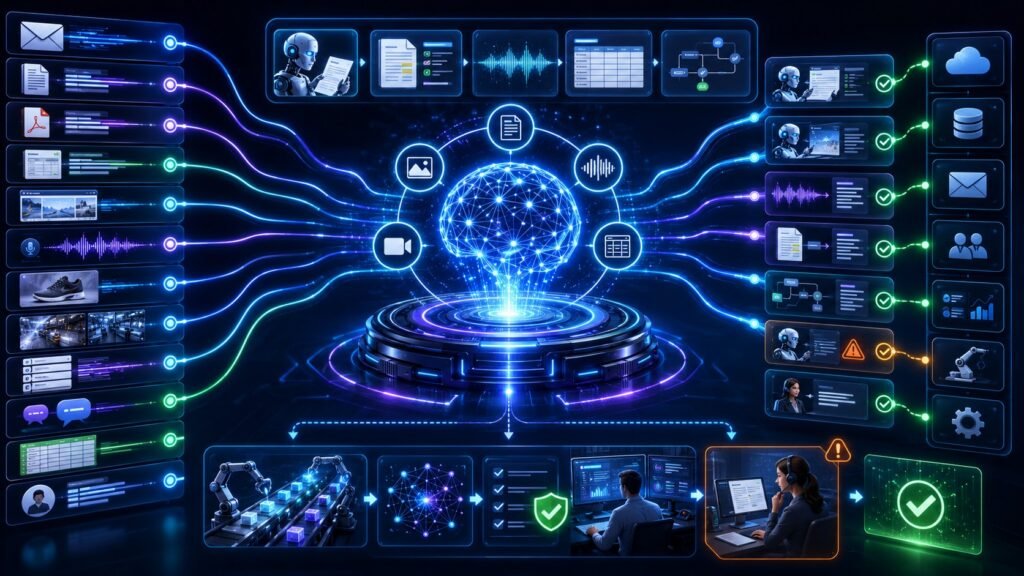
Multimodal AI for automation uses text, images, voice, video, documents, forms, screenshots, and business data together to automate workflows. Instead of automating only structured clicks or typed inputs, multimodal AI can understand messy real-world information and help route tasks, extract data, trigger actions, and support human review.
In Simple Terms
Multimodal AI for automation means AI can automate tasks using more than one kind of input. A traditional automation script may follow fixed rules: copy this field, click that button, send this email. A multimodal automation system can read an invoice, inspect a screenshot, understand a voice request, summarize a video clip, extract form data, and decide the next workflow step.
This matters because business work is rarely clean. A process may begin with an email, include a PDF, require a screenshot, depend on a spreadsheet, and end with an approval in a workflow tool. Multimodal AI helps connect those scattered inputs.
What Is Multimodal AI for Automation?
Multimodal AI for automation refers to AI systems that use multiple data types to complete or assist business processes. These systems may process chat messages, emails, PDFs, forms, images, voice calls, videos, dashboards, tickets, CRM records, and database entries.
The automation layer may include AI agents, workflow tools, robotic process automation, APIs, databases, approval flows, and human handoff. Google Cloud describes AI agents as systems that can use reasoning, planning, and memory to pursue goals and complete tasks on behalf of users. When those agents can also understand documents, images, audio, and video, they become much more useful for real-world automation.
How Multimodal AI Automation Works
A multimodal automation workflow usually starts with intake. The input may be an email, support ticket, scanned document, call recording, product photo, dashboard screenshot, or video feed. The system processes each modality: OCR for documents, vision models for images, speech models for audio, and language models for text.
Next, the AI extracts meaning. It may identify fields, summarize a message, classify the issue, detect a visual defect, or interpret a spoken request. Then the automation layer applies business logic. It may update a CRM, create a ticket, route an approval, send a notification, trigger a refund review, or ask a human for confirmation.
Multimodal Automation vs Traditional Automation
Traditional automation works best when inputs are structured and predictable. Multimodal automation is better when inputs are messy, mixed, or human-generated.
| Automation Type | Best For | Limitation |
| Rule-based automation | Repetitive structured tasks | Breaks with messy inputs |
| RPA | UI-based process automation | Fragile if screens change |
| Text-only AI automation | Emails, summaries, chat | Misses images, voice, documents |
| Multimodal AI automation | Documents, screenshots, voice, video, forms | Needs evaluation and guardrails |
The best systems often combine these approaches. Multimodal AI understands the content, while workflow automation tools execute predictable steps safely.
Use Case 1: Document Automation
Document automation is one of the clearest use cases. Businesses process invoices, receipts, contracts, purchase orders, tax forms, claims, onboarding files, and compliance documents. These documents contain text, tables, signatures, stamps, checkboxes, and layout structure.
Multimodal AI can extract fields, understand layout, classify document types, validate totals, and send data into business systems. This is stronger than basic OCR because the AI does not only read words. It understands how document elements relate to the workflow.
Use Case 2: Customer Support Automation
Customer support workflows often include text, screenshots, product photos, voice calls, order history, and knowledge-base articles. A multimodal AI system can inspect the evidence, classify the issue, retrieve guidance, and route the ticket.
For example, a customer uploads a screenshot of a failed payment page and writes, “This is not working.” The AI can read the screenshot, identify the error, check account context, suggest a fix, or escalate to the billing team. Rasa notes that multimodal AI supports more natural interactions by combining voice, text, images, video, and contextual signals.
Use Case 3: Field Service and Maintenance
Field service teams often work with photos, inspection forms, device readings, voice notes, and repair histories. Multimodal AI can help automate triage and reporting.
A technician may upload a photo of damaged equipment, dictate a note, and attach sensor readings. The AI can summarize the issue, identify possible parts, check previous maintenance records, and create a repair ticket. A human technician still makes the final decision, but the system reduces manual documentation and routing time.
Use Case 4: Video and Image Monitoring
Some automation workflows depend on visual monitoring. Manufacturing teams may use video feeds and sensor signals to detect defects or equipment issues. Logistics teams may inspect packages, labels, or loading areas. Retail teams may monitor shelves and stock gaps.
Multimodal AI can combine image or video input with rules, inventory records, and alerts. For example, a system may detect a missing shelf item, check inventory, and notify staff. This is not only computer vision; it becomes automation when visual understanding triggers a workflow.
Use Case 5: Meeting, Voice, and Email Automation
Many business processes start with conversations. A call, meeting, or email may contain action items, customer requests, approvals, or follow-ups. Multimodal AI can transcribe speech, summarize key points, extract tasks, and create workflow actions.
Google Cloud’s 2026 use-case coverage includes companies building vertical AI agent platforms to automate B2B workflows across departments, which reflects the broader move from simple assistants to task-completing automation. The practical value is turning unstructured communication into structured follow-up.
Use Case 6: Enterprise Workflow Orchestration
Multimodal AI becomes especially powerful when connected to enterprise systems. An agent may read a document, check a database, inspect a dashboard, summarize a call, and update a workflow tool. n8n describes AI agent integrations that connect LLM–powered applications with hundreds of apps and services, including files, websites, databases, and automated scenarios.
This type of orchestration can support finance, HR, procurement, IT, support, operations, compliance, and sales. The AI handles interpretation, while business systems handle execution.
Benefits of Multimodal AI for Automation
The biggest benefit is handling messy inputs. Businesses receive work through emails, PDFs, photos, calls, forms, screenshots, and videos. Multimodal AI can turn those inputs into structured decisions and workflow actions.
Another benefit is better human-AI collaboration. Instead of replacing every process owner, multimodal automation can prepare summaries, extract fields, flag exceptions, and recommend next steps. Humans can focus on judgment, approvals, customer-sensitive issues, and edge cases.
Risks and Limitations
Multimodal AI automation can make mistakes. It may misread a document, misunderstand a voice request, interpret a screenshot incorrectly, or trigger the wrong workflow. Errors become more serious when AI is allowed to take action.
Security and privacy also matter. Automation systems may process invoices, contracts, customer data, call recordings, internal screenshots, or financial records. Businesses need access controls, approval gates, audit logs, fallback paths, and clear limits on what AI can do without human review.
Common Mistakes to Avoid
A common mistake is automating before understanding the workflow. If the process is unclear, AI will only speed up confusion. Teams should map the process, identify inputs, define success criteria, and decide where human approval is required.
Another mistake is using one general-purpose model for every task. Some workflows need document AI, others need image understanding, speech recognition, retrieval, or structured business rules. The best automation systems combine the right models with the right workflow tools.
Suggested Read:
- What Is Multimodal AI? Complete Beginner’s Guide to AI Beyond Text
- Multimodal Agents
- Document Understanding AI
- Multimodal AI in Document Processing
- Multimodal AI in Customer Support
- Multimodal Inference
- Multimodal Evaluation
- Best AI Workflow Automation Tools for Teams
FAQ: Multimodal AI for Automation
What is multimodal AI for automation?
Multimodal AI for automation is AI that uses text, images, voice, video, documents, forms, screenshots, and business data to automate or assist workflows.
How does multimodal AI improve automation?
It helps automation systems understand messy real-world inputs such as PDFs, emails, product photos, voice calls, videos, and screenshots instead of relying only on structured data.
What are examples of multimodal AI automation?
Examples include invoice processing, screenshot-based support routing, voice-to-task automation, field service reports, video monitoring, and document approval workflows.
How do multimodal AI agents automate tasks?
They process different inputs, reason about the goal, use tools or APIs, update systems, route tasks, and ask humans for approval when needed.
Can multimodal AI automate document and image workflows?
Yes. It can extract fields from documents, interpret images, classify issues, detect visual evidence, and trigger workflow actions.
What are the risks of multimodal automation?
Risks include incorrect extraction, wrong workflow actions, privacy exposure, security issues, poor escalation, biased decisions, and over-automation without human review.
Final Takeaway
Multimodal AI for automation helps businesses automate workflows that involve documents, screenshots, voice, video, images, forms, emails, and enterprise systems. Its real strength is turning messy inputs into structured next steps.
To continue learning, read What Is Multimodal AI, Multimodal Agents, and Document Understanding AI next.