

The best AI tool for business is the one that removes a real bottleneck: slow writing, scattered knowledge, missed follow-ups, weak reporting, repetitive workflows, or inconsistent customer communication. For most companies, the smartest choice is not one “perfect” AI app. It is a practical stack that combines a general AI assistant, workflow automation, CRM intelligence, and team-specific tools.
In Simple Terms
AI tools for business help teams do routine work faster and make better use of company knowledge.
A business can use AI to draft emails, summarize meetings, search internal files, create marketing assets, update CRM records, automate follow-ups, analyze spreadsheets, or support customer service. The key is choosing tools by workflow, not by hype.
Best AI Tools for Business: Quick Comparison
| AI Tool | Best For | Strong Business Use Case | Watch-Out |
| ChatGPT Business | General productivity | Writing, research, analysis, coding, company knowledge | Needs clear usage rules |
| Microsoft 365 Copilot | Microsoft-heavy teams | Outlook, Teams, Word, Excel, PowerPoint workflows | Best if your team already uses Microsoft 365 |
| Gemini for Google Workspace | Google Workspace teams | Gmail, Docs, Sheets, Meet, NotebookLM workflows | Value depends on Workspace adoption |
| Zapier | AI automation | Connecting apps, automating workflows, building AI agents | Requires process clarity |
| HubSpot Breeze | Marketing, sales, CRM | Lead follow-up, customer context, content, service workflows | Best inside HubSpot ecosystem |
| Notion AI | Knowledge and projects | Docs, meetings, knowledge base, team search | Needs organized workspace data |
| Canva AI | Design and marketing assets | Social posts, presentations, ads, branded visuals | Not a full business operations tool |
| Jasper | Marketing content | Brand-aligned campaigns, content workflows, team copy | More useful for marketing-heavy teams |
| Grammarly Business | Writing quality | Emails, proposals, support replies, internal communication | Does not replace strategy |
| Perplexity Enterprise | Research and business answers | Web research, internal research, source-backed discovery | Verify important claims |
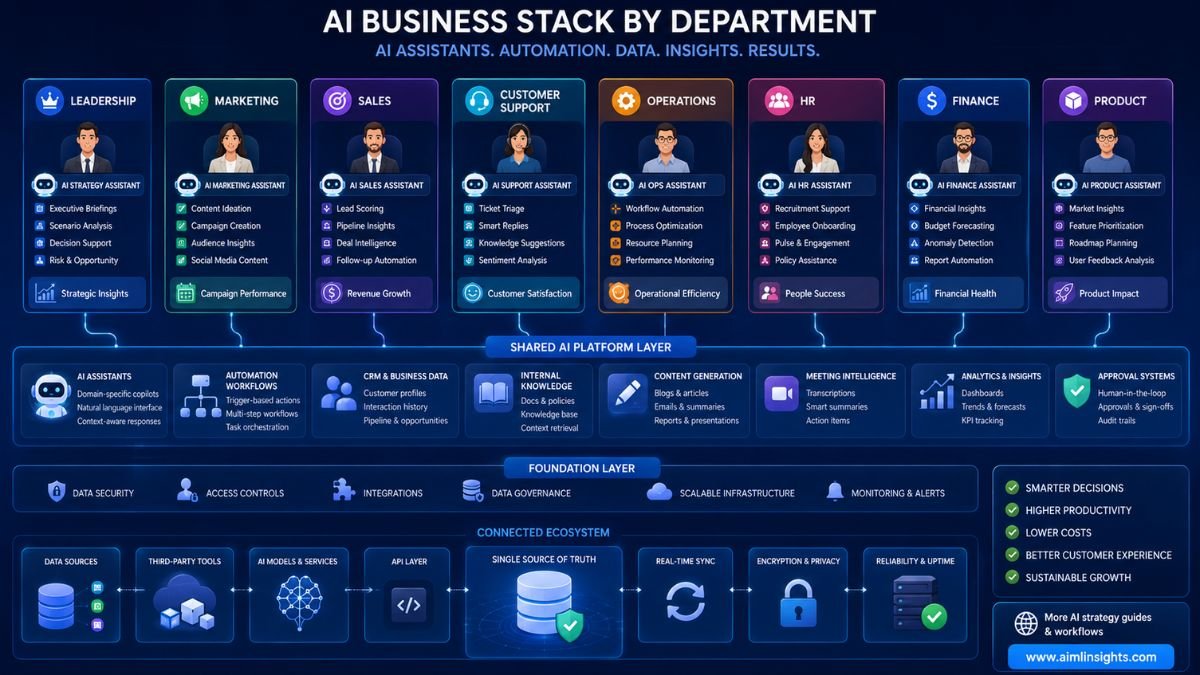
ChatGPT Business: Best General AI Tool for Business
ChatGPT Business is one of the strongest starting points for companies that want one flexible AI assistant for many workflows. OpenAI describes ChatGPT Business as a shared workspace with admin controls and apps for company tools.
Businesses can use it for email drafts, meeting summaries, data analysis, code help, sales scripts, SOP drafts, customer-response templates, and brainstorming. It is especially useful when teams are still learning where AI fits into daily work.
Best for: general business productivity, writing, research, analysis, internal AI adoption.
Avoid using it for: unsupervised legal, financial, medical, or compliance decisions.
Microsoft 365 Copilot: Best for Microsoft-Based Companies
Microsoft 365 Copilot is a strong choice if your business already runs on Outlook, Teams, Word, Excel, and PowerPoint. Microsoft positions Copilot as an AI tool for business productivity, workflows, and business intelligence across Microsoft 365 apps.
It can help draft emails, summarize Teams meetings, create presentations, analyze spreadsheets, and generate first drafts in Word. For companies already paying for Microsoft infrastructure, Copilot’s biggest advantage is that it works close to where employees already spend time.
Best for: office productivity, executive workflows, spreadsheets, meetings, document creation.
Avoid using it for: teams that do not use Microsoft 365 heavily.
Gemini for Google Workspace: Best for Google Workspace Teams
Gemini for Google Workspace is a natural fit for companies using Gmail, Docs, Sheets, Slides, Meet, and Google Drive. Google describes Gemini as an AI-powered assistant built directly into Gmail, Docs, Sheets, and more, with enterprise-grade security and privacy.
It can help draft emails, summarize documents, support meeting workflows, analyze spreadsheet content, and improve team collaboration inside Google’s ecosystem. Workspace plans also include access to the Gemini app, NotebookLM, and Gemini in Gmail, Docs, Meet, and more.
Best for: Google-native teams, email productivity, document work, collaborative writing.
Avoid using it for: companies with most work outside Google apps.
Zapier: Best AI Tool for Business Automation
Zapier is one of the best AI tools for business automation because it connects many apps and workflows. Zapier says it supports AI workflows, agents, chatbots, tables, forms, and more than 9,000 app integrations.
For example, a business can automatically turn a form submission into a CRM lead, draft a follow-up email, notify a sales channel, and create a task. The value is not just AI writing. It is workflow movement across tools.
Best for: repetitive workflows, app integrations, AI agents, operations automation.
Avoid using it for: messy processes that have not been defined clearly.
HubSpot Breeze: Best AI Tool for Marketing, Sales, and CRM
HubSpot Breeze is useful for companies that want AI inside customer-facing workflows. HubSpot describes Breeze as a built-in AI platform for marketing, sales, and customer service teams, with agents, an assistant, and embedded AI features across the platform.
This makes it a strong option for lead management, sales follow-ups, customer support content, campaign assistance, and CRM-based insights. It is especially relevant for small and mid-sized businesses that want sales and marketing workflows in one system.
Best for: CRM, marketing, sales, support, lead follow-up.
Avoid using it for: companies not using or planning to use HubSpot.
Notion AI: Best for Company Knowledge and Project Work
Notion AI is useful when teams need one workspace for docs, projects, meeting notes, knowledge bases, and internal search. Notion describes its AI workspace as supporting custom agents, search across apps, and automation of busywork.
For business teams, this is valuable because many AI failures come from scattered information. If your SOPs, project notes, meeting decisions, and strategy docs are organized in Notion, AI can help retrieve and reshape that knowledge faster.
Best for: knowledge bases, documentation, project notes, meeting summaries, internal search.
Avoid using it for: teams with poorly maintained workspaces.
Canva AI: Best for Business Design and Marketing Assets
Canva AI is a practical choice for small businesses and marketing teams that need quick visual assets. Canva describes its AI tools as supporting design, writing, brand, coding, and creative workflows, and says Canva AI 2.0 is designed to work alongside users inside the editor.
Use it for social media posts, presentations, ads, thumbnails, simple brand visuals, campaign layouts, and business documents. It is especially useful when a company does not have a full-time designer.
Best for: marketing graphics, presentations, social content, brand visuals.
Avoid using it for: complex brand systems that need professional creative direction.
Jasper: Best for Marketing Content Teams
Jasper is built mainly for marketing use cases. Its official site positions it as an AI platform for marketing success, supporting brand voice, audience profiles, style guides, product knowledge, campaigns, and multi-channel workflows.
This makes Jasper stronger for marketing teams than for general business operations. If your biggest bottleneck is blog drafts, landing pages, email campaigns, product messaging, or social content at scale, Jasper can fit well.
Best for: marketing campaigns, brand-consistent content, content pipelines.
Avoid using it for: non-marketing teams that only need basic writing help.
Grammarly Business: Best for Business Writing Quality
Grammarly Business is useful for improving everyday communication. Grammarly says its AI writing assistance helps businesses communicate effectively while keeping company data safe, and it highlights writing support across teams and companies.
It can help with emails, proposals, customer replies, internal updates, HR messages, and sales communication. It is not a replacement for a strategy tool, but it can improve clarity and consistency across a company.
Best for: communication quality, grammar, tone, emails, proposals.
Avoid using it for: research-heavy or automation-heavy workflows.
Perplexity Enterprise: Best for Business Research
Perplexity Enterprise is useful for teams that need fast research and source-backed answers. Perplexity describes its enterprise product as a secure platform that can work across files and tools for tasks, deep research, and complex projects.
This can help consultants, analysts, founders, product managers, and marketing teams explore competitors, markets, technical questions, and customer trends. The main rule is simple: use it to speed up research, then verify important claims.
Best for: business research, market scanning, source-backed exploration.
Avoid using it for: final decisions without review.
How to Choose the Best AI Tool for Business
Start with the problem, not the product.
If your team spends too much time writing and analyzing, start with ChatGPT Business, Copilot, or Gemini. If work gets stuck between apps, start with Zapier. If sales and marketing follow-ups are weak, look at HubSpot Breeze. If knowledge is scattered, consider Notion AI or Slack enterprise search. If visual production is slow, Canva AI may bring faster value.
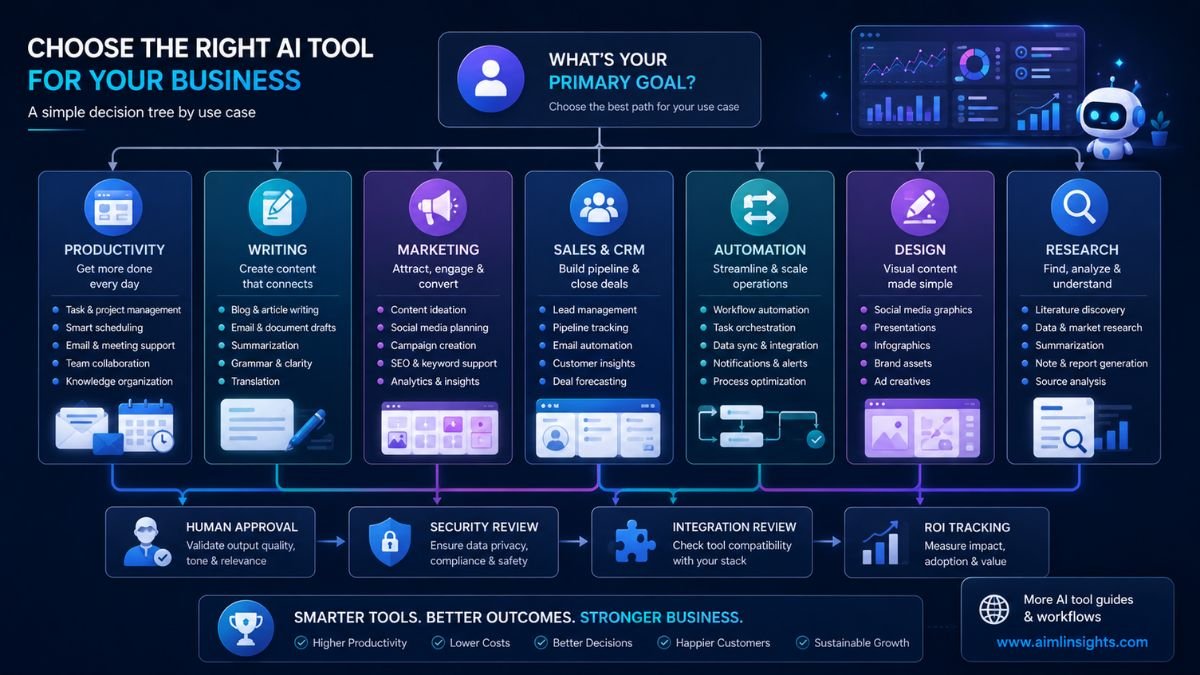
A good business AI stack usually has four layers:
- A general assistant for thinking and drafting.
- An office assistant inside Microsoft or Google tools.
- An automation layer that connects apps.
- A department-specific tool for marketing, sales, support, or design.
Common Mistakes Businesses Should Avoid
The first mistake is buying too many AI subscriptions before defining workflows. This creates cost without adoption.
The second mistake is using AI without data rules. Businesses should decide what information employees can upload, which tools are approved, and which tasks require human review.
The third mistake is assuming AI agents are fully reliable. Recent research on business automation benchmarks shows that cross-application workflow orchestration is still difficult for frontier models, especially when tasks require API discovery, business-rule following, and correct end-state execution.
The fourth mistake is measuring AI only by speed. A fast wrong answer, incorrect CRM update, or off-brand customer email can create more work. Track quality, review time, error rate, and actual business outcomes.
Suggested Read:
- Best AI Tools for Beginners in 2026
- Best AI Workflow Automation Tools for Teams
- AI Tools With Free Plans Worth Using in 2026
- Best AI Tools for Bloggers and Content Writers
- ChatGPT vs Perplexity vs Claude for Research Tasks
- Prompt Engineering for Beginners: A Practical Guide
- What Is an AI Agent? A Simple Explanation With Examples
- What Is a Large Language Model? Explained Simply
FAQ: Best AI Tool for Business in 2026
What is the best AI tool for business?
The best AI tool for business depends on your workflow. ChatGPT Business is strong for general productivity, Microsoft 365 Copilot for Microsoft teams, Gemini for Google Workspace users, Zapier for automation, HubSpot Breeze for CRM, and Canva AI for design.
Which AI tools are best for small businesses?
Small businesses usually benefit from practical tools such as ChatGPT Business, Canva AI, Zapier, HubSpot Breeze, Grammarly Business, Notion AI, and Gemini or Copilot depending on their office suite.
What AI tool should a business use first?
Start with the area where your team loses the most time. For writing and analysis, use a general AI assistant. For repetitive tasks, use automation. For sales follow-up, use CRM AI. For design bottlenecks, use Canva AI.
Are AI tools worth it for business?
AI tools are worth it when they reduce manual work, improve response speed, support better decisions, or help teams produce consistent work. They are not worth it when companies buy them without training, policies, or workflow ownership.
Which AI tool is best for business automation?
Zapier is one of the strongest options for business automation because it connects thousands of apps and supports AI workflows, agents, chatbots, and automation systems.
Can AI tools replace employees?
AI tools should support employees, not replace judgment. They are best for drafts, summaries, routine tasks, search, analysis support, and workflow automation. Humans should still handle strategy, approvals, sensitive decisions, and quality control.
Final Takeaway
The best AI tool for business in 2026 is not the tool with the loudest marketing. It is the tool that fits your team’s daily work.
For most businesses, start with one general assistant, one office-suite AI, one automation tool, and one department-specific platform. Keep the stack small, train the team, define data rules, and measure real workflow improvement. That is how AI tools become useful business infrastructure instead of another unused software subscription.