
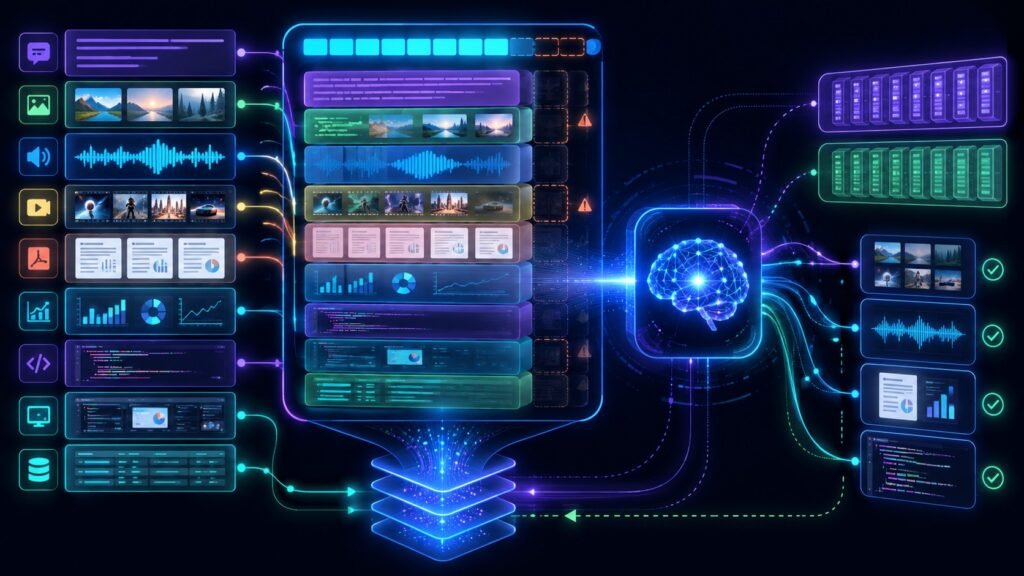
Multimodal context windows define how much information an AI model can process at once when the input includes text, images, audio, video, code, or documents. They matter because multimodal AI systems must manage different input types inside one limited working space before generating an answer.
In Simple Terms
A context window is the model’s working area. It is the amount of information the AI can “see” in one request or conversation turn. In text-only models, this usually means prompts, previous messages, documents, and outputs measured in tokens.
A multimodal context window extends that idea beyond text. It may include a long prompt, uploaded images, PDF pages, screenshots, audio clips, video frames, code, or document extracts. Google’s Gemini 1.5 announcement explains that context windows are made of tokens, and those tokens can represent parts of words, images, videos, audio, or code.
What Are Multimodal Context Windows?
Multimodal context windows are the input capacity limits of multimodal AI models. They determine how much mixed information a model can process together before it starts losing access to older or excess content.
For example, a user may ask an AI assistant to analyze a PDF, compare two screenshots, summarize a video clip, and answer a text question. All of that content must fit into the model’s available context. If the context window is too small, the system may need to compress, crop, summarize, retrieve, or discard some input.
How Multimodal Context Windows Work
The exact process depends on the model, but the core idea is similar: every input consumes part of the context budget. Text consumes tokens. Images, audio, and video may be converted into internal representations that also count against the model’s processing limit.
Long-context models can handle more information at once. Google’s Gemini API documentation describes long context as useful for models with context windows of 1 million tokens or more. OpenAI’s GPT-4.1 model page lists a 1,047,576-token context window and supports text and image input with text output. The practical lesson is simple: bigger context windows allow more input, but they do not remove the need for careful context management.
Why Context Windows Matter in Multimodal AI
Context windows matter because multimodal inputs can become large quickly. A few pages of text may be manageable, but a video, scanned PDF, image-heavy slide deck, or multiple screenshots can consume much more processing space.
This affects answer quality. If the relevant page, frame, image region, or earlier instruction falls outside the effective context, the model may miss it. A larger context window can help with long documents, codebases, videos, transcripts, and multi-file analysis, but the model still needs to attend to the right parts of the input.
Multimodal Context Window Examples
| Input Type | What It Adds to Context | Example Use |
| Text | Prompts, documents, chat history | Summarizing policy text |
| Image | Visual features and image regions | Screenshot troubleshooting |
| Video | Frames, movement, audio, transcript | Video question answering |
| Audio | Speech, timing, tone, transcript | Meeting summary |
| Text, layout, tables, images | Document analysis | |
| Code | Files, comments, errors | Debugging large projects |
Long Context Does Not Mean Perfect Memory
A common mistake is assuming a large context window gives the model perfect memory. It does not. A model may accept a large amount of input but still struggle to focus on the most relevant detail. This is sometimes called attention dilution: the model has more material available, but important evidence may be buried.
Long context is useful when the task genuinely needs broad information. It is less useful when the system dumps irrelevant files, noisy transcripts, or redundant images into the prompt. The goal is not to fill the context window. The goal is to give the model the right context.
Multimodal Context Windows vs RAG
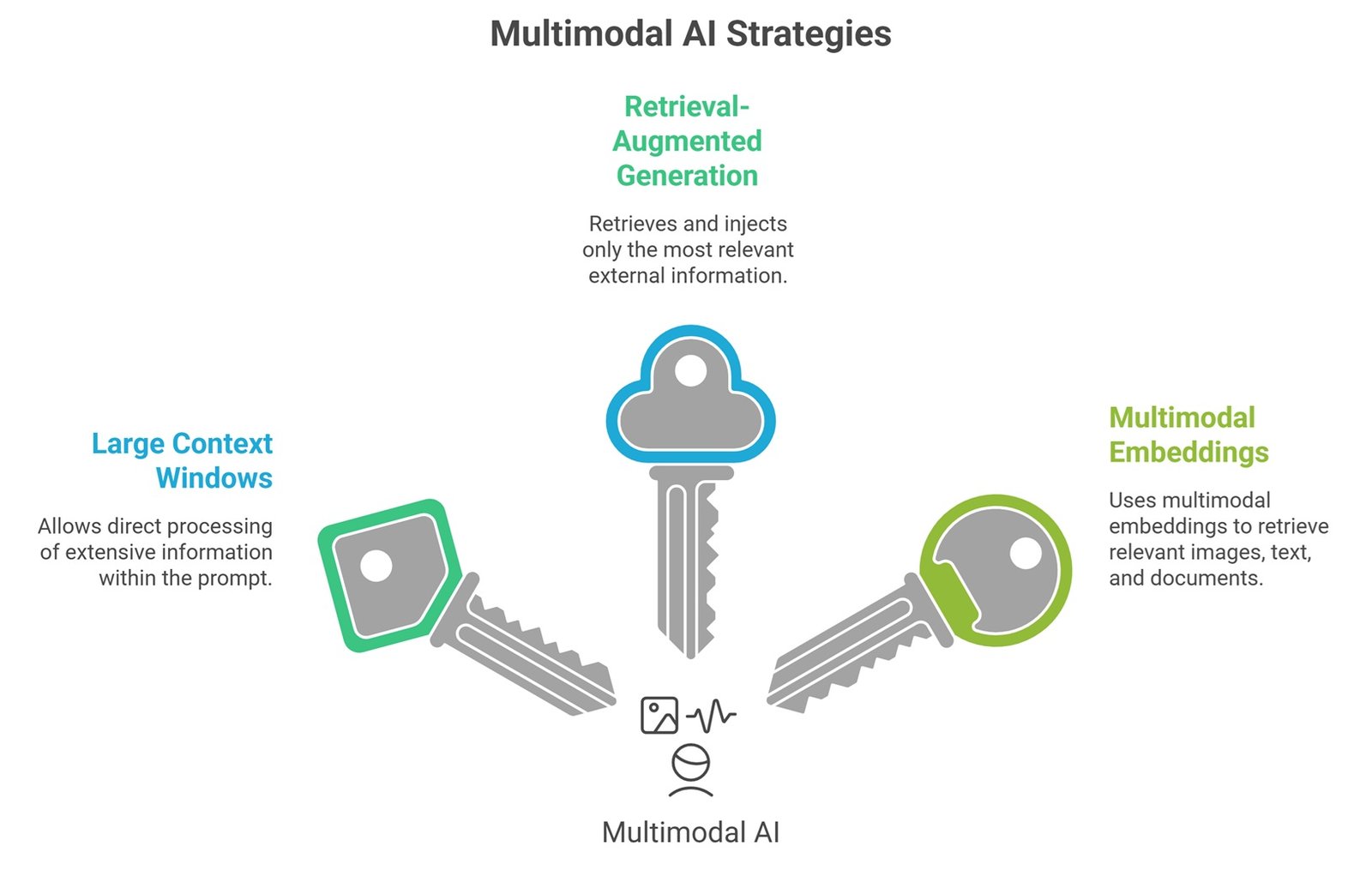
A large context window and Retrieval-Augmented Generation solve related but different problems. A large context window lets the model process more information directly in the prompt. RAG retrieves selected information from an external source and passes only the most relevant pieces into context.
For multimodal AI, both approaches can work together. A system may use multimodal embeddings to retrieve relevant images, text passages, or document pages, then place those results into the context window. This is usually more efficient than loading an entire file library into the model every time.
Real-World Use Cases
Multimodal context windows are important for enterprise assistants that analyze documents, screenshots, dashboards, meeting recordings, and chat history together. They also matter for legal review, where long contracts may include text, tables, exhibits, scanned pages, and comments.
In education, a student may upload lecture slides, diagrams, and notes. In healthcare administration, a workflow may involve scanned forms, clinical notes, lab reports, and images. In software engineering, a model may need code files plus screenshots of errors. In each case, the model’s useful answer depends on whether the relevant context fits and stays accessible.
How to Use Multimodal Context Windows Better
Good context management starts with selecting only what matters. Instead of uploading everything, provide the most relevant files, images, pages, timestamps, or screenshots. Use clear instructions that tell the model what to focus on.
For production systems, context engineering becomes important. Teams may use chunking, retrieval, summarization, metadata filters, compression, and reranking to place the best evidence into the context window. Anthropic’s engineering guidance for AI agents describes using a hybrid approach where some context is loaded up front while tools retrieve files just in time, which helps avoid stale or excessive context.
Limitations and Risks
Multimodal context windows have several limits. Large windows can increase latency and cost. They may also make prompts harder to debug. Models can overlook details, misread visual inputs, or incorrectly connect information across modalities.
Privacy is another concern. Uploading more context may mean exposing more sensitive information, including faces, voices, documents, screenshots, customer data, or internal files. Teams should avoid sending unnecessary sensitive material and should use access controls, data governance, and human review for high-risk workflows.
Suggested Read:
- What Is Multimodal AI? Complete Beginner’s Guide to AI Beyond Text
- Vision-Language Models Explained
- Multimodal Embeddings
- Multimodal Inference
- Multimodal Reasoning
- Document Understanding AI
- Multimodal RAG Explained
- What Is a Large Language Model? Explained Simply
FAQ: Multimodal Context Windows Explained Simply
What are multimodal context windows?
Multimodal context windows are the input capacity limits of AI models that process mixed data types such as text, images, audio, video, documents, and code.
How do multimodal context windows work?
They convert different input types into model-readable representations that consume part of the model’s available context budget.
Can context windows include images and video?
Yes. Some multimodal models can process images, video, audio, text, code, and documents inside the broader context system, depending on model capabilities.
Why do context windows matter in multimodal AI?
They affect how much information the model can consider when answering. If key context is missing, buried, or outside the window, answer quality may drop.
Are bigger context windows always better?
No. Bigger context windows help with large inputs, but irrelevant or noisy context can still reduce answer quality, increase cost, and make debugging harder.
What is the difference between context windows and RAG?
A context window is what the model can process directly. RAG retrieves relevant information from external sources and places selected evidence into the context window.
Final Takeaway
Multimodal context windows are the working space that lets AI models process text, images, audio, video, documents, code, and other inputs together. They are essential for multimodal assistants, document workflows, video analysis, visual troubleshooting, and enterprise AI.
For the next step, read What Is Multimodal AI, Multimodal Embeddings, and Multimodal Inference to understand how context, retrieval, and model execution work together.