
Modern enterprises rely heavily on spreadsheets for operational decision-making.
Across industries, organizations store critical business information inside:
- Excel files
- CSV datasets
- financial spreadsheets
- analytics sheets
- operational trackers
- inventory reports
- sales dashboards
- forecasting models
- compliance spreadsheets
- customer data tables
Even in large enterprises with advanced databases, spreadsheets remain one of the most widely used operational tools.
As AI adoption accelerates, businesses increasingly want AI systems capable of:
- understanding spreadsheets
- analyzing tabular data
- retrieving business insights
- answering spreadsheet questions conversationally
- generating grounded analytics
- automating reporting workflows
However, traditional Large Language Models struggle with spreadsheet intelligence because:
- spreadsheets contain structured tabular data
- files may exceed context limits
- operational data changes constantly
- LLMs hallucinate without grounding
- spreadsheet relationships are highly contextual
This is why:
RAG with spreadsheets
became one of the most important enterprise AI architecture patterns.
Retrieval-Augmented Generation allows AI systems to retrieve spreadsheet information dynamically before generating responses.
This enables organizations to build:
- conversational spreadsheet assistants
- AI analytics systems
- Excel copilots
- business intelligence agents
- operational AI dashboards
- grounded reporting systems
- spreadsheet search platforms
- enterprise data copilots
Understanding how RAG works with spreadsheets is becoming essential because spreadsheet-aware AI systems are rapidly becoming foundational for enterprise analytics and operational intelligence.
In this guide, you will learn how RAG with spreadsheets works, architecture design, Excel ingestion, CSV retrieval, embeddings, vector databases, semantic search, grounded analytics, hallucination reduction, enterprise use cases, implementation strategies, optimization workflows, and why spreadsheet retrieval systems are transforming enterprise AI.
In Simple Terms
What Is RAG?
Retrieval-Augmented Generation improves AI systems by retrieving external information before generating responses.
Instead of relying only on pretrained model memory, RAG retrieves contextual data dynamically.
What Does “RAG With Spreadsheets” Mean?
RAG with spreadsheets means using spreadsheet files such as:
- Excel documents
- CSV files
- tabular reports
- operational sheets
as knowledge sources for AI retrieval systems.
The AI retrieves spreadsheet information before generating answers.
Easy Analogy
Imagine asking an employee:
“Which products had the highest revenue growth last quarter?”
A standalone LLM guesses based on general knowledge.
A spreadsheet-aware RAG system first searches operational spreadsheets before answering.
This dramatically improves factual reliability.
Why Enterprises Use RAG With Spreadsheets
Modern organizations increasingly depend on spreadsheets for:
- operational reporting
- financial forecasting
- customer analytics
- supply chain tracking
- sales performance
- compliance management
- inventory analysis
Traditional AI systems struggle with spreadsheet reasoning.
RAG solves this challenge by grounding responses using real spreadsheet data.
The Core Problem With Spreadsheet AI
Spreadsheets create several challenges for standalone AI systems:
- tabular relationships are complex
- rows exceed prompt limits
- context windows are limited
- spreadsheet semantics vary
- formulas add operational complexity
- data changes constantly
Without retrieval grounding, AI systems hallucinate operational information.
Understanding Spreadsheet Data in AI Systems
Spreadsheet data is structured and tabular.
Examples include:
| Spreadsheet Type | Example |
| Financial Sheets | Revenue reports |
| CRM Exports | Customer data |
| Inventory Files | Product tracking |
| Forecasting Models | Business planning |
| Operational Dashboards | KPI monitoring |
| CSV Datasets | Analytics exports |
These files often contain highly valuable enterprise intelligence.
Why Spreadsheet Retrieval Is Different From PDF Retrieval
Spreadsheet retrieval focuses heavily on:
- rows
- columns
- relationships
- metrics
- aggregations
- structured values
PDF retrieval focuses more on semantic text understanding.
Spreadsheet AI requires both structured and semantic reasoning.
Understanding How RAG With Spreadsheets Works
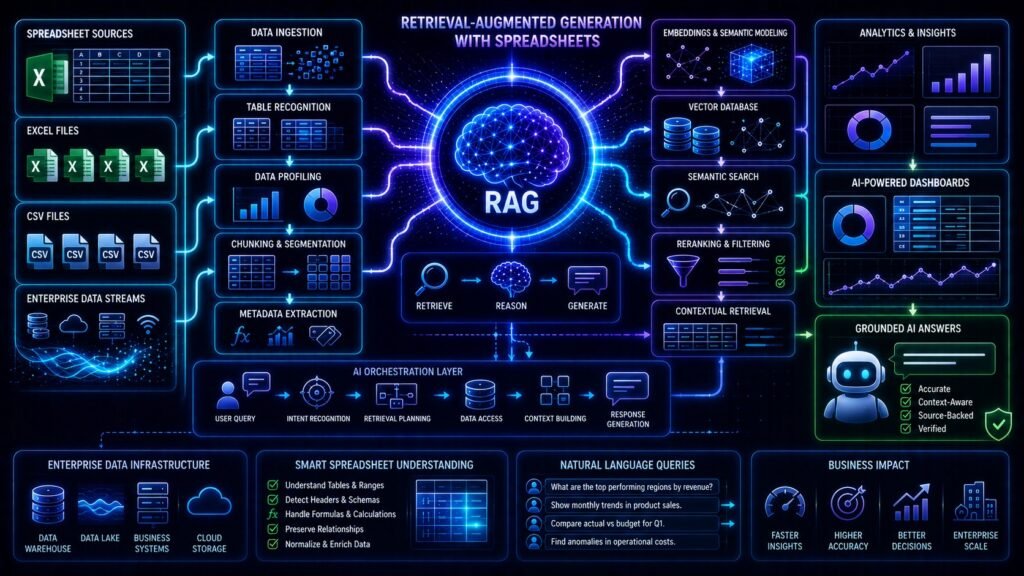
A spreadsheet-based RAG pipeline usually includes:
- spreadsheet ingestion
- parsing
- row normalization
- chunking
- embeddings
- vector storage
- semantic retrieval
- grounded generation
Each stage affects analytics quality significantly.
Step 1: Spreadsheet Ingestion
The first stage collects spreadsheet files.
Organizations may ingest:
- Excel files
- CSV exports
- Google Sheets
- reporting spreadsheets
- analytics dashboards
- operational workbooks
The ingestion pipeline prepares spreadsheet data for retrieval.
Step 2: Spreadsheet Parsing
The system extracts structured information from spreadsheets.
This includes:
- rows
- columns
- formulas
- sheet names
- metadata
- relationships
Spreadsheet parsing quality directly affects retrieval performance.
Why Spreadsheet Metadata Matters
Metadata improves retrieval precision significantly.
Useful metadata includes:
- worksheet names
- departments
- reporting periods
- business units
- timestamps
- categories
Metadata filtering improves enterprise analytics retrieval.
Step 3: Spreadsheet Chunking
Large spreadsheets exceed LLM context windows.
Chunking becomes necessary.
However, spreadsheet chunking differs from document chunking because row relationships matter heavily.
Common Spreadsheet Chunking Strategies
| Strategy | Purpose |
| Row-Based Chunking | Preserves table structure |
| Semantic Chunking | Groups related records |
| Hierarchical Chunking | Preserves worksheet organization |
| Window-Based Chunking | Maintains contextual continuity |
Proper chunking improves grounded analytics dramatically.
Why Chunking Is Critical for Spreadsheet AI
Poor chunking may create:
- fragmented tables
- missing relationships
- weak analytics reasoning
- retrieval failures
- inaccurate calculations
Good chunking preserves operational context.
Step 4: Embedding Generation
Spreadsheet chunks are converted into embeddings.
Embeddings represent semantic meaning numerically.
This allows AI systems to understand contextual relationships between spreadsheet records.
Why Embeddings Matter for Spreadsheet AI
Embeddings enable semantic retrieval across spreadsheet data.
For example:
A query about:
“high-risk customers”
may retrieve spreadsheet rows containing:
“low retention probability”
because embeddings understand semantic similarity.
Step 5: Vector Database Storage
Embeddings are stored inside vector databases.
Popular vector databases include:
These systems enable semantic spreadsheet retrieval at scale.
Why Vector Databases Matter
Traditional spreadsheet search depends heavily on exact filtering.
Vector databases enable:
- semantic retrieval
- similarity search
- contextual ranking
- intelligent spreadsheet querying
This dramatically improves enterprise AI analytics.
Step 6: Semantic Retrieval
When users ask questions, the retrieval system searches spreadsheet embeddings semantically.
Instead of exact keyword matching, retrieval uses contextual similarity.
This improves spreadsheet intelligence significantly.
Step 7: Reranking
Reranking improves retrieval precision.
Retrieved spreadsheet chunks are reordered based on contextual relevance.
This improves grounded analytics generation dramatically.
Step 8: Grounded AI Generation
Retrieved spreadsheet data becomes grounding context for the LLM.
The model generates responses using retrieved spreadsheet evidence.
This reduces hallucinations substantially.
Why RAG With Spreadsheets Reduces Hallucinations
Standalone LLMs generate responses probabilistically.
Without spreadsheet grounding, they may hallucinate:
- revenue metrics
- operational trends
- forecasting results
- customer insights
- inventory numbers
Spreadsheet retrieval improves factual reliability dramatically.
Why Semantic Spreadsheet Search Is Better Than Traditional Filtering
Traditional spreadsheet filtering depends heavily on exact values.
Semantic retrieval understands contextual meaning.
For example:
A query about:
“underperforming regions”
may retrieve spreadsheet rows involving:
“declining sales growth”
even when wording differs.
This dramatically improves analytics workflows.
RAG With Spreadsheets vs Traditional Spreadsheet Search
| Category | Traditional Search | Spreadsheet RAG |
| Search Method | Exact Filtering | Semantic Retrieval |
| Conversational AI | Weak | Excellent |
| Contextual Reasoning | Weak | Strong |
| Grounded Analytics | Weak | Strong |
| Enterprise Intelligence | Moderate | Excellent |
| Semantic Understanding | Weak | Strong |
| AI Explainability | Weak | Strong |
Spreadsheet RAG systems dramatically improve enterprise analytics accessibility.
Enterprise Use Cases for Spreadsheet RAG Systems
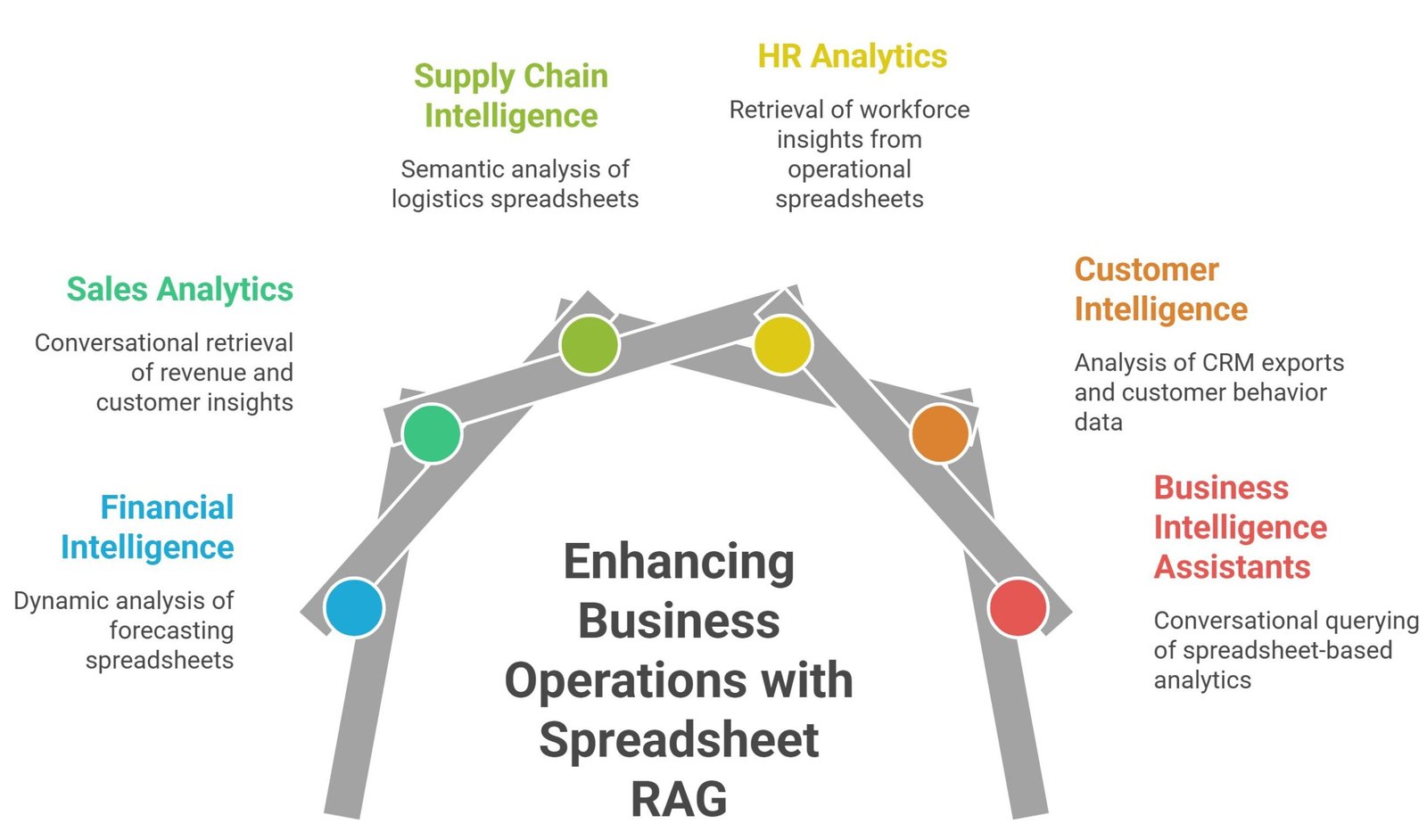
Financial Intelligence Systems
AI systems analyze forecasting spreadsheets dynamically.
Sales Analytics Platforms
AI retrieves revenue and customer insights conversationally.
Supply Chain Intelligence
AI systems analyze logistics spreadsheets semantically.
HR Analytics Systems
AI retrieves workforce insights from operational spreadsheets.
Customer Intelligence Platforms
AI systems analyze CRM exports and customer behavior data.
Business Intelligence Assistants
Executives query spreadsheet-based analytics conversationally.
Why Conversational Spreadsheet AI Is Growing Rapidly
Organizations increasingly want conversational access to spreadsheet intelligence.
Instead of manually filtering spreadsheets, users ask:
- “Which products are underperforming?”
- “Show highest-growth regions.”
- “Which customers are at risk?”
- “What inventory needs replenishment?”
Spreadsheet RAG systems enable these workflows.
Why Hybrid Retrieval Is Becoming Common
Modern spreadsheet AI systems increasingly combine:
- semantic retrieval
- metadata filtering
- SQL querying
- vector search
- analytics orchestration
- AI agents
This improves enterprise analytics significantly.
Common Challenges in Spreadsheet RAG Systems
Despite their advantages, spreadsheet RAG systems introduce operational challenges.
Formula Interpretation Problems
Complex spreadsheets contain difficult formula relationships.
Data Freshness Challenges
Operational spreadsheets change continuously.
Large File Complexity
Massive spreadsheets create retrieval overhead.
Schema Inconsistency
Spreadsheet structures vary significantly across departments.
Retrieval Noise
Irrelevant spreadsheet chunks may weaken grounded generation.
Why Access Control Matters
Enterprise spreadsheets often contain sensitive information.
Production AI systems must support:
- role-based permissions
- retrieval restrictions
- compliance policies
- audit logging
- access-aware retrieval
Security becomes critical for operational AI systems.
Why Evaluation Matters for Spreadsheet AI
Organizations increasingly benchmark:
- retrieval precision
- answer faithfulness
- groundedness
- analytics accuracy
- hallucination rates
- contextual relevance
- latency
Continuous evaluation improves reliability significantly.
Best Practices for Building Spreadsheet RAG Systems
Preserve Spreadsheet Structure
Table relationships should remain intact.
Optimize Chunk Sizes
Balanced chunking improves retrieval quality.
Use Metadata Filtering
Metadata improves analytics precision.
Add Reranking Pipelines
Reranking improves contextual relevance.
Monitor Hallucination Rates
Grounded evaluation remains critical.
Implement Access Controls
Enterprise security must remain a priority.
Why Spreadsheet AI Is Becoming Foundational
Enterprise AI increasingly depends on:
- operational analytics
- conversational intelligence
- grounded reporting
- semantic enterprise search
- contextual reasoning
- AI-driven analytics
Spreadsheet-aware RAG systems enable these capabilities effectively.
Future of RAG With Spreadsheets
Spreadsheet AI systems are evolving rapidly.
Major trends include:
- multimodal spreadsheet AI
- AI analytics agents
- autonomous business intelligence
- GraphRAG for tabular systems
- spreadsheet copilots
- retrieval-aware analytics
- enterprise memory architectures
Future enterprise AI systems will increasingly combine:
- spreadsheet retrieval
- semantic reasoning
- grounded generation
- workflow orchestration
- contextual analytics
- autonomous AI agents
into unified operational intelligence systems.
Suggested Read:
- What Is RAG in AI
- How RAG Works
- RAG With Structured Data
- RAG With PDFs
- Vector Database for RAG
- Chunking Strategies for RAG
- RAG Evaluation Metrics
- Reducing Hallucinations in RAG
FAQ: RAG With Spreadsheets
Can RAG work with spreadsheets?
Yes. RAG systems can ingest Excel files, CSV datasets, and spreadsheet data for grounded AI retrieval.
How does RAG analyze spreadsheets?
RAG parses spreadsheets, creates embeddings, retrieves relevant chunks semantically, and generates grounded responses.
Does RAG reduce hallucinations in spreadsheet AI systems?
Yes. Spreadsheet retrieval grounds responses using real operational data.
Can enterprises build spreadsheet AI assistants?
Yes. Many organizations deploy conversational spreadsheet intelligence systems using RAG.
What is the best architecture for spreadsheet RAG systems?
Modern systems usually combine embeddings, vector databases, semantic retrieval, metadata filtering, and grounded LLM generation.
Final Takeaway
Understanding RAG with spreadsheets is becoming essential because enterprise AI systems increasingly depend on operational analytics, grounded reporting, semantic retrieval, and conversational access to spreadsheet intelligence.
Traditional spreadsheet search and standalone LLMs struggle with contextual analytics reasoning, while spreadsheet-aware RAG systems enable grounded AI retrieval, semantic analytics, conversational intelligence, and scalable operational AI architectures.
Organizations that understand how to build spreadsheet RAG systems can create more reliable, intelligent, explainable, and production-ready enterprise AI analytics platforms.
That capability is becoming foundational for business intelligence assistants, financial AI systems, operational copilots, customer analytics platforms, enterprise reporting systems, and next-generation AI-driven analytics architectures.