
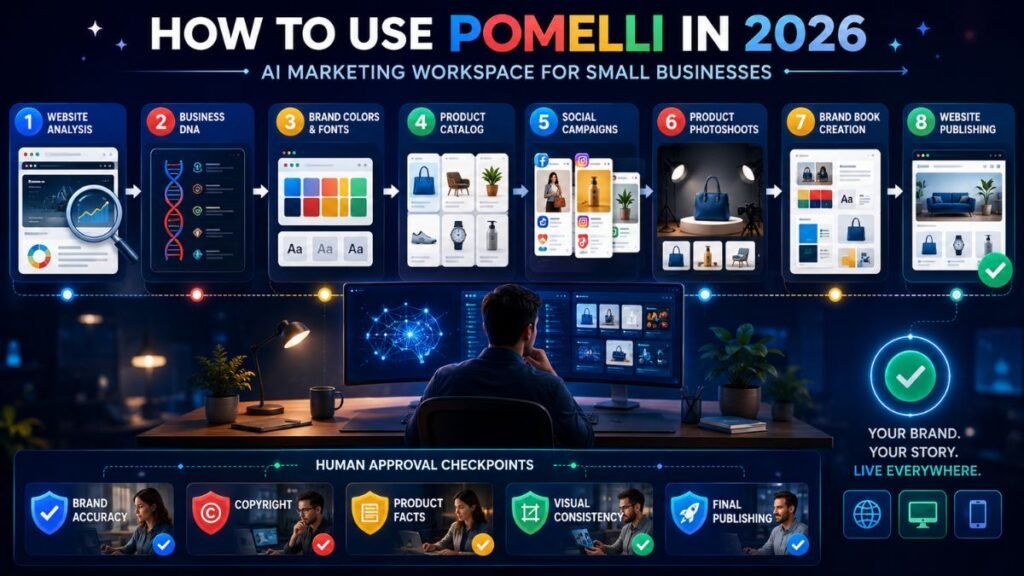
Pomelli is a Google Labs AI marketing tool that helps businesses turn brand information into campaigns, product imagery, brand guidelines, and website drafts. To use Pomelli effectively, first build an accurate Business DNA, add products to the Catalog, generate the required asset, and then review every claim, image, layout, and call to action before publishing.
In Simple Terms
Pomelli acts like an AI-assisted marketing workspace for small businesses.
It studies your website or uploaded brand information, creates a structured profile called Business DNA, and uses that profile to generate marketing content that follows your colors, fonts, images, values, and tone.
The tool originally focused on social campaigns. It now also supports product Photoshoots, Catalog items, Brand Books, and websites.
What Can You Create With Pomelli?
| Pomelli Feature | What It Creates | Best Use Case |
| Business DNA | Brand identity profile | Keeping content consistent |
| Catalog | Product and service records | Grounding campaigns in real offers |
| Campaigns | Social and advertising creatives | Promotions and product launches |
| Photoshoot | Studio and lifestyle product images | Ecommerce and social visuals |
| Brand Book | Fonts, colors, images, and guidelines | Brand consistency |
| Websites | Generated and publishable business sites | Fast online presence |
Step 1: Open Pomelli and Check Availability
Open Pomelli through Google Labs and sign in with a Google account.
Pomelli is available only in supported countries and currently supports English. Google’s present country list includes India, the United States, the United Kingdom, Canada, Australia, much of Europe, and many additional markets. Users must be at least 18, and some features can differ by country.
Google says Pomelli is currently available at no charge and allows several hundred image and video generations. Because it remains an experiment, those limits and pricing could change.
Step 2: Build Your Business DNA
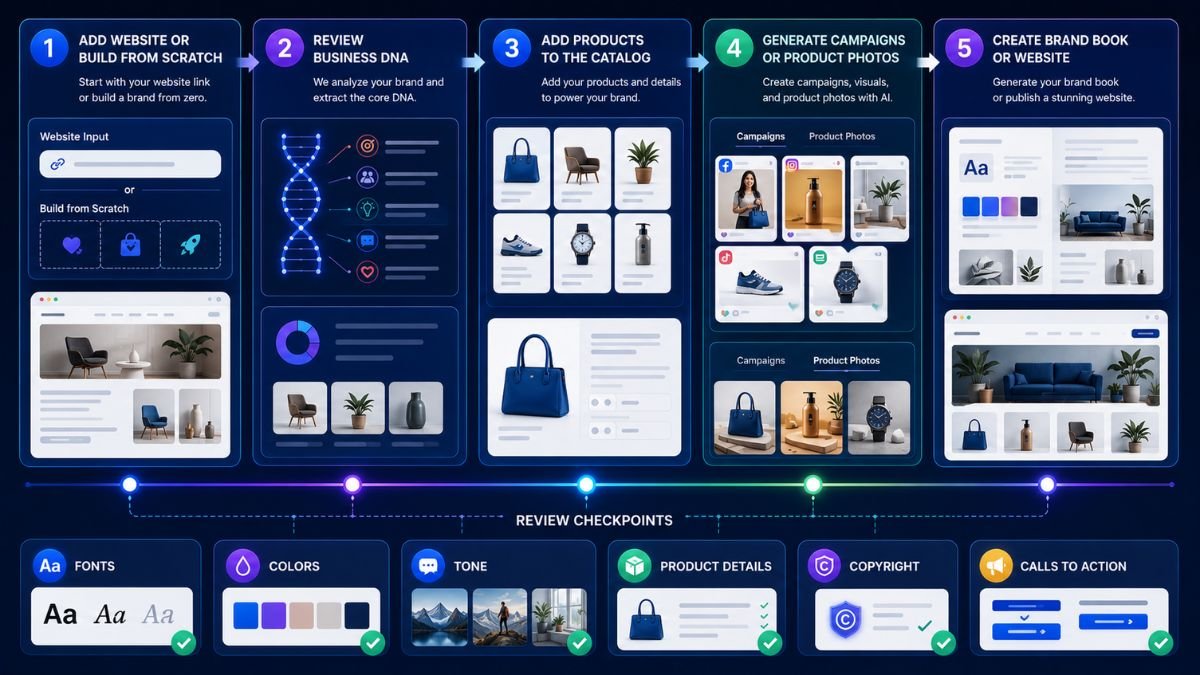
Business DNA is the foundation of Pomelli. It stores information such as brand fonts, colors, values, images, assets, and Catalog items.
You can create it in three ways.
Build Business DNA from a Website
Select Let’s go, enter your business website, and continue. Pomelli analyzes the site and creates a draft brand profile. Google says this analysis may take up to eight minutes.
Review everything carefully. Check:
- Brand description and values
- Colors and font choices
- Images and logo usage
- Tone of voice
- Product and service information
A website with bot protection or CAPTCHA may not work because Pomelli needs access to analyze it. Build Business DNA Without a Website
Select No website yet? and then From scratch.
You can upload product documents and photos or chat with Pomelli Agent to explain your business. The agent can then generate a Business DNA profile from those materials. Google added this workflow so new businesses can use Pomelli before they have an established website.
Start From a Template
Businesses with limited brand material can also choose a template. Treat the result as a starting point, not a finished identity. Replace generic values, imagery, and tone with information specific to your business.
Step 3: Add Products or Services to the Catalog
The Catalog helps Pomelli generate more relevant campaigns and photoshoots.
You can add a product by entering its specific page URL. Alternatively, add it from scratch by providing its name, description, and an image. Pomelli stores these records so they can be reused in later campaigns.
Write factual descriptions. Include the intended customer, main benefit, differentiator, materials or specifications, and any restrictions. Avoid exaggerated claims that cannot be proven.
Step 4: Create a Marketing Campaign
Open Campaigns, select a product, and generate a campaign. Pomelli first creates a campaign brief that you can edit before confirming it.
A stronger prompt should include:
Create a launch campaign for our handmade ceramic coffee mugs. Target design-conscious home buyers. Emphasize small-batch production and dishwasher-safe materials. Use a calm, premium tone. Create a vertical social creative with a clear “Explore the collection” call to action.
After generation, review each creative. Pomelli lets you change the image, headline, description, call to action, typography, and other visual elements. A Fix layout option can correct obvious layout problems. Animation is currently available for 9:16 campaign creatives.
You can also add up to three images and a product URL as campaign ingredients to ground the result in actual product information.
Step 5: Use Pomelli Photoshoot
Photoshoot turns a basic product image into studio-style or lifestyle imagery.
Choose a product, select a professionally curated template or a suggested option, generate the image, and refine the result. Pomelli applies the business’s visual identity and lets users download the result or save it to Business DNA for later campaigns.
Use clear source photos with the complete product visible. Inspect generated images for changed labels, distorted packaging, incorrect materials, unrealistic proportions, or added product features.
Step 6: Generate a Brand Book
After completing Business DNA, Pomelli can create a brand book containing brand fonts, colors, custom images, and identity guidance.
Review whether the guidelines genuinely represent the business. A generated brand book should document approved decisions; it should not invent the positioning, customer promise, or legal rules for the brand.
Step 7: Create and Publish a Website
Pomelli can generate, customize, preview, and publish a website after Business DNA is ready.
Open Websites, select Create Website, and regenerate if you need another version. You can request changes through prompts, edit the Business DNA used across the site, preview the result in a new tab, set a custom URL suffix, and turn publishing on or off.
Before publishing, check mobile layout, product details, contact information, privacy requirements, accessibility, forms, image rights, and whether the site accurately represents your business.
What to Check Before Publishing Pomelli Content
Do not publish the first generation automatically.
Confirm that product claims are accurate, prices and offers are current, spelling is correct, calls to action lead to the right destination, images do not misrepresent products, and the asset follows platform dimensions.
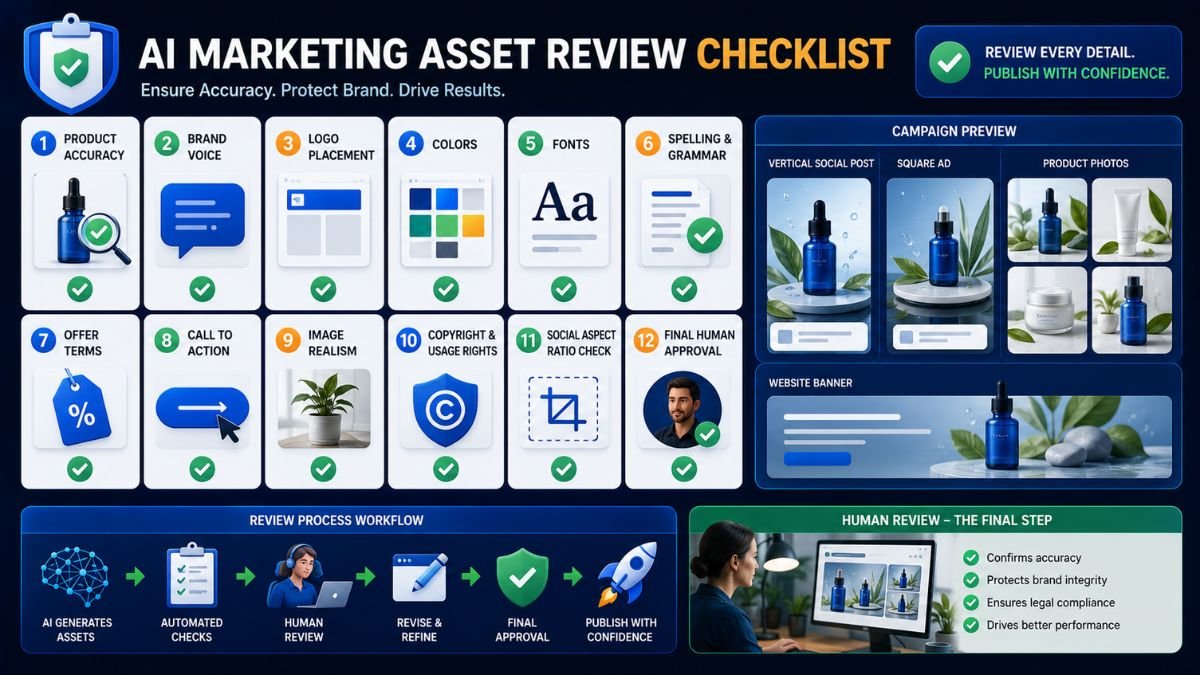
You must also have the necessary rights to uploaded and generated materials. Google’s help guidance says users should not share copyrighted content without the required rights.
Common Pomelli Mistakes
The biggest mistake is accepting an inaccurate Business DNA. Every later asset depends on it.
Other common mistakes include vague prompts, incomplete Catalog descriptions, too many messages in one creative, publishing unrealistic product photos, and assuming AI-generated marketing claims are automatically safe.
Pomelli is still an experimental product, so delays, failed image generations, interface changes, and inconsistent outputs can occur.
Suggested Read:
- Best AI Tools for Beginners in 2026
- Best AI Tools for Product Marketing
- Best AI Tools for Business
- Best AI Tools for Free Image Generation
- Best AI Tools for Free Video Generation
- Best AI Workflow Automation Tools for Teams
- Prompt Engineering for Beginners: A Practical Guide
- AI Tools With Free Plans Worth Using in 2026
FAQ: How to Use Pomelli
Is Pomelli free?
Google currently says Pomelli can be used at no charge, with several hundred image and video generations available. Limits may change during the experimental phase.
Can I use Pomelli without a website?
Yes. You can build Business DNA from scratch with Pomelli Agent or begin with a template.
Can Pomelli create social media posts?
Yes. Pomelli creates editable campaign assets that can be downloaded and used across major social platforms.
Can Pomelli create product photographs?
Yes. Photoshoot can convert a basic product image into generated studio or lifestyle imagery.
Can Pomelli build a complete website?
Pomelli can generate, edit, preview, publish, unpublish, and share a website. Businesses should still perform legal, technical, accessibility, and content reviews before relying on it publicly.
Is Pomelli only for small businesses?
Google designed Pomelli mainly for small and medium-sized businesses, but its brand and campaign workflow may also suit freelancers, creators, ecommerce sellers, agencies, and early-stage founders.
Final Takeaway
The best way to use Pomelli is to treat Business DNA as the source of truth. Build it carefully, add accurate products, generate one focused campaign or asset, and review the output before publishing.
Pomelli can reduce the work required to create branded marketing materials, but it does not replace product knowledge, positioning, legal review, or human creative judgment.