

Claude Cowork is becoming one of the most important examples of how AI agents are moving beyond simple chat.
Instead of only answering questions, Claude can now work more like an AI coworker for documents, files, apps, coding tasks, and multi-step workflows. For users, this means AI may not just help you think through work. It may help you finish more of it.
The bigger shift is clear: Anthropic Claude is moving from chatbot to agentic productivity platform.
Claude Cowork Is Built for Knowledge Work
Claude Cowork is Anthropic’s agentic AI system for knowledge work. Anthropic describes it as a system where users give Claude a goal, and Claude works on their computer, local files, and applications to return a finished deliverable.
That sounds simple, but it is a major change.
A normal chatbot waits for prompts. Claude Cowork is designed to handle larger tasks. It can help users work through files, prepare outputs, and complete multi-step workflows with less manual back-and-forth.
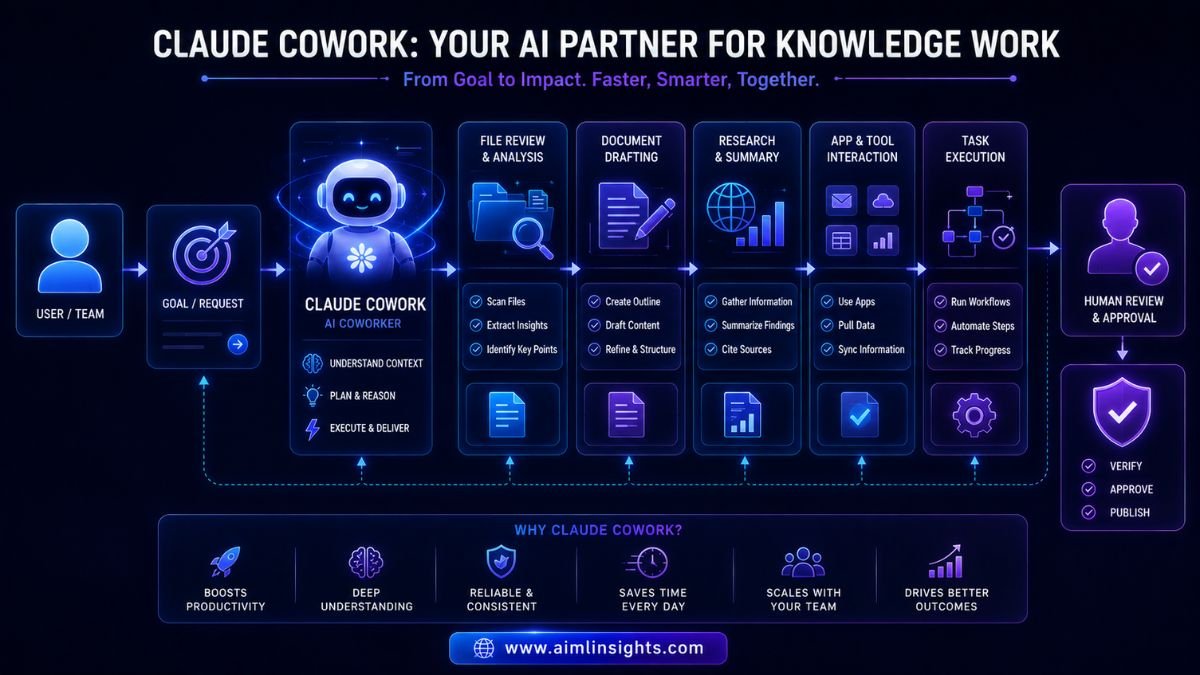
For example, a user may need to organize research notes, draft a report, summarize files, prepare a project plan, or clean up a folder of documents. Instead of copying everything into a chat window, an AI coworker can work closer to where the files and applications already exist.
This is why Claude Cowork matters. It brings AI closer to real desktop work.
Why Claude Cowork Could Help Users Get More Done
The main value of Claude Cowork is not that it makes AI more exciting. The value is that it can reduce repetitive digital work.
Knowledge workers often spend hours moving between documents, emails, spreadsheets, PDFs, notes, and browser tabs. Much of that work is not deep strategy. It is organizing, summarizing, comparing, formatting, and preparing drafts.
Claude Cowork is aimed at this exact problem. Anthropic’s Cowork page says it can handle tasks autonomously and return finished professional work from a user’s goal.
That makes it useful for people who do not want to code but still want AI agents to help with work.
A student could use it to organize study files. A freelancer could use it to turn client notes into a proposal draft. A manager could use it to prepare a weekly update. A researcher could use it to summarize documents into a briefing.
The important point is that Claude Cowork is not only for developers. It is designed for broader knowledge work.
Claude Code Shows the Developer Side of the Same Trend
Claude Cowork is part of a wider Anthropic strategy that also includes Claude Code.
Claude Code is built for software development. Anthropic’s desktop app documentation says users can work in parallel with multiple sessions, open new sessions from the sidebar, and use separate Git worktrees so changes in one session do not affect another until committed.
This matters because modern AI work is becoming parallel.
Instead of one chat thread, users may run several sessions at once. One session can fix a bug. Another can write tests. Another can update documentation. Another can check a design issue.
Anthropic’s desktop quickstart also mentions parallel sessions, subagents, background commands, side chats, and the ability to send long-running work to the cloud so it continues even if the app is closed.
That is a big signal. AI agents are no longer only answering prompts. They are starting to manage workflows.
Claude Scheduled Tasks Make AI More Like a Work Assistant
Another important Claude feature is scheduled tasks.
Anthropic’s Claude Code documentation says users can set up scheduled tasks in Claude Code Desktop to run Claude automatically on recurring workflows such as daily code reviews, dependency audits, or morning briefings.
This is where AI agents start to feel more like assistants.
A scheduled task can run without a user manually prompting every time. For developers, that could mean regular code checks. For managers, the same idea could apply to recurring summaries or operational reports as AI agent platforms expand.
The value is consistency. Many useful tasks are not difficult. They are just easy to forget. Scheduled AI workflows can help users maintain routine reviews, audits, and briefings without starting from scratch every day.
But users should still review the output. Automation is helpful, not perfect.
Is Claude Cowork Free?
This is where the answer needs to be careful.
Anthropic offers Claude plans including Free, Pro, Max, Team, and Enterprise. The Free plan is listed as $0 with limited usage, while Pro and Max plans offer higher usage capacity.
However, feature access can change by product, region, platform, and rollout stage. Claude Cowork and advanced desktop-agent workflows may not be available to every free user in every situation.
So the safest way to say it is this: Claude has a free plan, but users should check current Claude Cowork and Claude Code availability inside their account before relying on specific features.
That is important because AI companies update access quickly. A headline may say “free,” but a serious user should always check plan limits, usage caps, and supported platforms.
Claude Cowork vs Claude Code: What Is the Difference?
Claude Cowork and Claude Code are related but not identical.
Claude Code is mainly for developers. It helps with coding, repositories, terminal workflows, files, app previews, GitHub pull requests, and technical tasks. Anthropic’s desktop docs describe features such as integrated terminal, file editor, visual diff review, live app preview, GitHub PR monitoring, and parallel sessions.
Claude Cowork is broader. It is aimed at knowledge work: documents, files, applications, research, planning, and professional deliverables. Anthropic describes Cowork as Claude Code power for knowledge work.
A simple way to understand it:
Claude Code is for building and managing software.
Claude Cowork is for completing knowledge work.
Both point in the same direction: AI agents are becoming workers inside digital environments.
Why This Matters for Businesses
For businesses, Claude Cowork could become useful because many teams are overloaded with repeated knowledge work.
Teams need reports, meeting summaries, internal documentation, customer research, sales prep, policy drafts, and file organization. These tasks are important, but they are time-consuming.
AI productivity tools like Claude Cowork could reduce the manual load.
A small team may use an AI coworker to prepare first drafts, summarize long documents, organize project materials, or build status updates. A larger company may use agentic workflows to standardize repeated internal processes.
This does not mean businesses should hand over everything to AI. Sensitive tasks still require access controls, approvals, and human review.
But it does mean AI agents may help teams spend less time on preparation and more time on decisions.
The Safety Question: Should You Trust AI Coworkers?
AI coworker agents are useful, but they also create new risks.
When an AI agent can access files, apps, folders, and workflows, users need to think carefully about permissions. What can it read? What can it edit? What can it send? What happens if it misunderstands a task?
Coverage of Claude Cowork has highlighted both the promise and the safety concerns. Wired reported that Cowork was designed for digital tasks such as organizing files, generating reports, browsing the web, and managing inboxes or calendar events, while noting risks such as prompt injection and malicious web content.
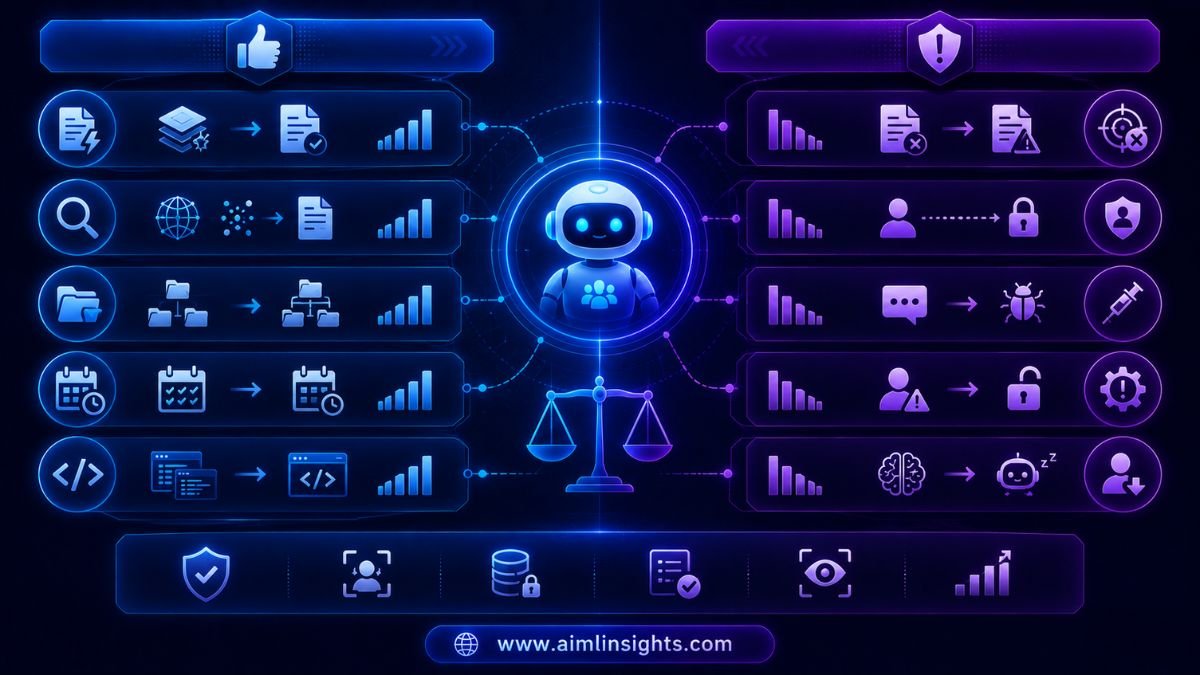
The practical rule is simple: give AI agents limited access, review outputs, and require human approval for sensitive actions.
AI should help users move faster, not quietly make risky decisions.
Simple Explanation for Beginners
Think of Claude Cowork as an AI assistant that can help with files and work tasks.
A chatbot answers a question.
An AI coworker can help complete a task.
For example, you might ask a chatbot, “How should I organize these notes?” But with an AI coworker, you may ask it to review the notes, group them by topic, create a summary, and prepare a draft report.
You are still the manager. Claude is not replacing your judgment. It helps with the repetitive parts so you can focus on the final decision.
That is the future of AI agents: humans set the goal, AI handles more of the steps, and humans approve the result.
Benefits, Risks, and Limitations
The benefits of Claude Cowork are clear.
It can help users save time, organize files, prepare documents, summarize research, and work through repeated tasks. Claude Code can also help developers run parallel software tasks and manage longer coding workflows.
For professionals, this could make AI more practical. For small teams, it could create more leverage. For beginners, it could make advanced automation easier without needing to learn command-line tools.
But there are limits.
AI can misunderstand instructions. It can produce incomplete or wrong work. It can make changes that need correction. It can also create security and privacy concerns if users connect too much data without clear boundaries.
The best approach is human plus AI. Let Claude Cowork help with drafts, organization, and first-pass work. Keep human review for anything important.
What Comes Next
Claude Cowork shows where AI productivity is heading.
The next phase will likely include more app connections, better task memory, stronger approval controls, improved scheduled workflows, and more specialized agents for business roles.
The most important shift is not that AI can answer better. It is that AI can work longer, across more tools, with more context.
For users, the best skill will be learning how to give clear goals, set boundaries, and review outputs.
Conclusion: Claude Cowork: Anthropic’s AI Agent for More Work in Less Time
Claude Cowork could help users get more work done with AI by turning Claude into a more practical AI coworker for files, apps, documents, research, and multi-step workflows.
Anthropic is also improving Claude Code for developers with parallel sessions, desktop workflows, scheduled tasks, and long-running work. Together, these updates show that AI agents are moving from chat windows into real work environments.
The opportunity is big: less repetitive work, faster drafts, better organization, and more productivity.
But the responsibility is just as important. Users should check plan availability, control permissions, review outputs, and keep human judgment in charge.
Claude Cowork is not magic. It is a sign that AI agents are becoming real productivity partners.
Key Takeaways
- Claude Cowork is Anthropic’s AI agent system for knowledge work.
- It helps users move beyond chat into files, apps, and finished deliverables.
- Claude Code supports developers with parallel sessions, worktrees, desktop workflows, and scheduled tasks.
- Claude has a Free plan, but Claude Cowork and advanced feature access may vary by plan and rollout.
- AI coworker agents can save time on research, documents, reports, and repeated tasks.
- Businesses should use Claude Cowork with clear access controls and review steps.
- Human judgment remains essential for sensitive or high-stakes work.
Suggested Read:
- AI Agents Explained Simply
- AI Agents Can Now Work for Hours Without You Watching
- AI Agents Are Becoming Digital Workers
- OpenAI News: Latest ChatGPT Updates
- Best AI Tools for Productivity
- Claude AI Updates
FAQ: Claude Cowork: Anthropic’s AI Agent for More Work in Less Time
What is Claude Cowork?
Claude Cowork is Anthropic’s agentic AI system for knowledge work. It lets users give Claude a goal, and Claude can work on local files and applications to return a finished deliverable.
How does Claude Cowork work?
Claude Cowork works by helping users complete multi-step work across files, apps, and documents. Instead of only answering questions, it is designed to help produce finished professional work from a user’s goal.
Is Claude Cowork free?
Claude has a Free plan with limited usage, plus paid Pro, Max, Team, and Enterprise plans. Feature availability for Cowork and advanced desktop workflows can vary, so users should check their Claude account and current plan details.
What can Claude Cowork do?
Claude Cowork can help with knowledge work such as organizing files, preparing reports, working with documents, and completing multi-step tasks. Anthropic describes it as Claude Code power for knowledge work.
How is Claude Cowork different from Claude Code?
Claude Code is focused on software development, coding workflows, Git worktrees, terminal tasks, and app previews. Claude Cowork is focused on broader knowledge work such as files, documents, apps, and professional deliverables.
Can Claude help with knowledge work?
Yes. Claude Cowork is specifically designed for knowledge work, while Claude’s broader plans support writing, research, analysis, and productivity tasks.
Are AI coworker agents safe to use?
AI coworker agents can be useful, but users should manage permissions carefully, review outputs, and avoid giving unnecessary access to sensitive files or accounts. Risks include prompt injection, wrong outputs, and unintended actions.
References:
- Anthropic Claude Cowork product page.
- Claude Cowork page on claude.com.
- Claude Code desktop app documentation.
- Claude Code desktop quickstart documentation.
- Claude scheduled tasks documentation.
- Claude plans and pricing page.
- Claude plan comparison help page.
- Wired report on Claude Cowork safety and capabilities.