
Multimodal AI for Beginners: How AI Understands Text, Images, Audio, and Video
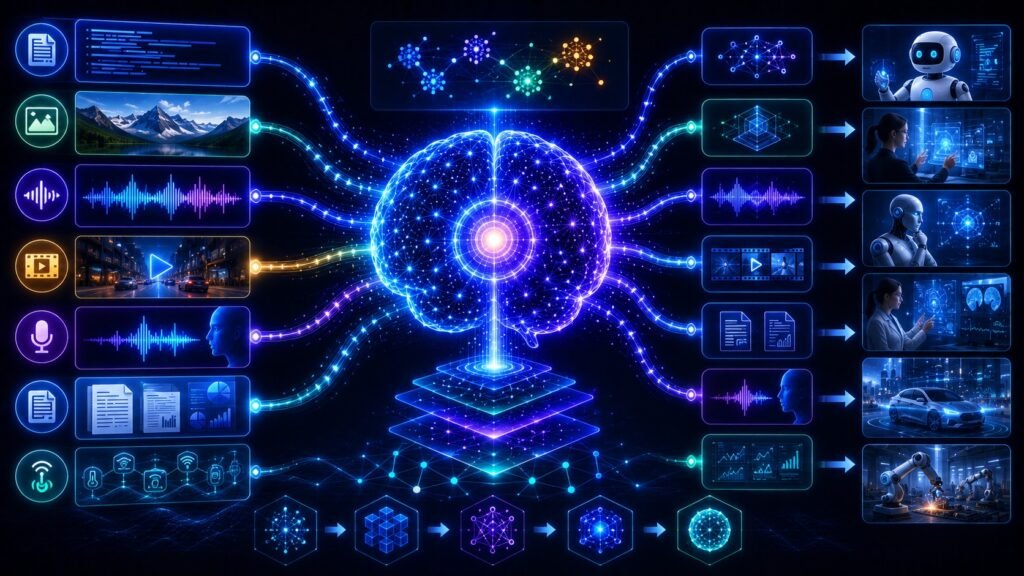
Multimodal AI is artificial intelligence that can understand more than one type of information, such as text, images, audio, video, documents, charts, and sensor data. For beginners, the simplest way to think about it is this: multimodal AI helps machines understand the world through more than words.
In Simple Terms
Multimodal AI means AI that can process multiple “modes” of data together. A mode, or modality, is simply a type of information. Text is one modality. Images are another. Audio, video, documents, charts, and sensor signals are also modalities.
A normal chatbot mainly understands typed text. A multimodal AI system can read your question, inspect an image, listen to audio, understand a video, or analyze a document inside the same workflow. That is why multimodal AI feels more natural. Humans do not understand the world through text alone. We combine sight, sound, language, memory, and context. Multimodal artificial intelligence tries to bring that richer understanding into AI systems.
What Does Multimodal Mean in AI?
In AI, “multimodal” means the system can work across different data types instead of being limited to one. A speech recognition model may only handle audio. A computer vision model may only analyze images. A text model may only process written language. Multimodal AI connects these abilities.
For example, imagine uploading a screenshot of a sales dashboard and asking, “What changed this month?” The AI must read your question, inspect the chart, understand the visual trend, and explain the result in plain language. That requires cross-modal reasoning, where the system connects meaning across text and visuals.
| Modality | Example | What AI Can Do |
| Text | Prompts, emails, articles | Answer, summarize, explain |
| Image | Photos, diagrams, screenshots | Identify, inspect, describe |
| Audio | Voice notes, calls, podcasts | Transcribe, summarize, detect tone |
| Video | Tutorials, demos, footage | Analyze scenes and actions |
| Documents | PDFs, slides, reports | Extract and explain information |
| Charts | Graphs, dashboards | Interpret trends and patterns |
How Multimodal AI Works
Multimodal AI usually works through four main stages: input processing, encoding, fusion, and reasoning. First, the system receives one or more inputs, such as a text prompt, image, audio clip, video, or document. Each input type is handled by a suitable processor. Images may go through a vision encoder, speech may go through an audio model, and text may go through a language model.
Next, the system converts these inputs into embeddings, which are numerical representations of meaning. Then it aligns or combines those representations so the model can understand how the inputs relate to each other. Finally, the model reasons over the combined context and generates an answer, summary, recommendation, image, voice response, or action. Google Cloud describes multimodal models as machine learning models that process different modalities such as images, videos, and text.
A Simple Example of Multimodal AI
Imagine you upload a photo of a broken appliance and ask, “What might be wrong here?” A text-only AI system cannot inspect the photo. A multimodal AI system can analyze the image, recognize visible damage, understand your question, and provide possible explanations.
Another example is education. A student can upload a science diagram and ask, “Explain this simply.” The AI can inspect the diagram, read visible labels, connect them with the student’s question, and explain the concept in beginner-friendly language. This is why multimodal AI is useful: it lets people ask questions in natural ways, using text, images, files, and voice instead of forcing everything into typed descriptions.
Multimodal AI vs Traditional AI
Traditional AI systems often specialize in one data type. A natural language processing system works with text. A computer vision system recognizes objects in images. A speech model turns audio into text. These tools are useful, but they can feel limited when real tasks involve mixed information.
Multimodal AI brings those capabilities together. It can understand a product photo and a customer complaint together, or analyze a video while using its transcript. This makes it more useful for customer support, healthcare workflows, document intelligence, robotics, education, and enterprise search. The main difference is not only that multimodal AI accepts more inputs. The bigger difference is that it can reason across those inputs.
Multimodal AI vs Generative AI
Multimodal AI and generative AI are related, but they are not the same. Multimodal AI describes the ability to process multiple types of information. Generative AI describes the ability to create new content, such as text, images, audio, video, code, or designs.
Some AI systems are both multimodal and generative. For example, a system may accept an image and a written prompt, then generate a detailed explanation. Another system may accept text and generate an image or video. The simple distinction is this: multimodal is about understanding different input types; generative is about producing new outputs.
What Are Multimodal Large Language Models?
Multimodal large language models, often called multimodal LLMs or MLLMs, are language models that can process more than text. They may work with images, audio, video, screenshots, charts, or documents alongside written prompts. NVIDIA describes multimodal large language models as systems that can understand and generate content across text, images, video, audio, and more.
For beginners, this matters because AI assistants are becoming more visual, voice-enabled, and file-aware. Instead of only answering typed questions, multimodal LLMs can help interpret screenshots, summarize uploaded files, analyze images, understand charts, and support richer workflows. These models are becoming important for enterprise copilots, document AI, multimodal search, accessibility tools, robotics, and AI agents.
Real-World Examples of Multimodal AI
Multimodal AI is already useful in many practical workflows. In customer support, AI can review a screenshot, read the user’s complaint, and suggest likely troubleshooting steps. In healthcare, AI may combine medical images, patient notes, lab results, and clinical records to support professionals, although high-risk medical decisions still require expert review.
In business, multimodal AI can help teams analyze dashboards, charts, meeting recordings, product images, PDFs, and spreadsheets. In robotics, systems combine camera input, sensor readings, language instructions, and spatial awareness. In education, AI tutors can explain diagrams, answer spoken questions, and adapt explanations to the learner’s level.
Why Multimodal AI Matters for Business
Businesses rarely store information in one neat format. Important knowledge may live in documents, spreadsheets, call recordings, emails, dashboards, scanned forms, product photos, and support tickets. Multimodal AI helps connect these formats so teams can ask better questions and get more complete answers.
A retail team may combine product images, customer reviews, inventory data, and support messages. A finance team may analyze reports, charts, and tables together. A legal team may review contracts that include text, tables, signatures, and scanned pages. This is why multimodal AI is becoming important for enterprise AI assistants, document understanding, customer support automation, visual search, analytics, and compliance workflows.
Benefits of Multimodal AI
The biggest benefit of multimodal AI is richer context. Users do not always know how to describe everything in words. An image, screenshot, voice note, chart, or file can provide missing information. When AI can use these inputs together, the answer is often more relevant and useful.
Multimodal AI also improves usability. People can interact through voice, images, files, or videos instead of typing long explanations. It can improve accessibility by converting visual information into text, summarizing audio, or helping users understand documents. For organizations, it can reduce manual work across workflows that involve screenshots, forms, reports, product images, recordings, and dashboards.
Limitations and Risks of Multimodal AI
Multimodal AI is powerful, but it is not perfect. These systems can misread images, misunderstand audio, miss small visual details, or hallucinate unsupported explanations. A model might describe something in an image that is not actually there. It may also struggle with blurry images, noisy recordings, dense PDFs, unusual charts, or ambiguous scenes.
Privacy and security also matter. Multimodal systems may process sensitive images, voices, medical records, customer data, business documents, or faces. Microsoft has noted that audio and video modalities introduce safety challenges because people may react differently to spoken, visual, or video-based AI outputs. For sensitive workflows, businesses need access controls, data governance, evaluation, and human review.
Common Beginner Mistakes
One common mistake is thinking multimodal AI only means text-to-image generation. That is too narrow. Multimodal AI includes image understanding, speech processing, video analysis, document intelligence, multimodal search, visual question answering, robotics, and accessibility.
Another mistake is assuming multimodal AI is always accurate because it can “see” or “hear.” It still depends on model quality, input quality, training data, and evaluation. A blurry screenshot, noisy audio clip, or complex chart can still lead to mistakes. The safest way to use multimodal AI is as an assistant that improves understanding, not as an unquestioned authority.
Future of Multimodal AI
The future of AI is increasingly multimodal. AI assistants are becoming more visual, voice-enabled, and document-aware. Enterprise copilots are starting to work across dashboards, screenshots, documents, calls, charts, and business systems. Robotics and autonomous systems also depend heavily on multimodal perception because they must understand real environments.
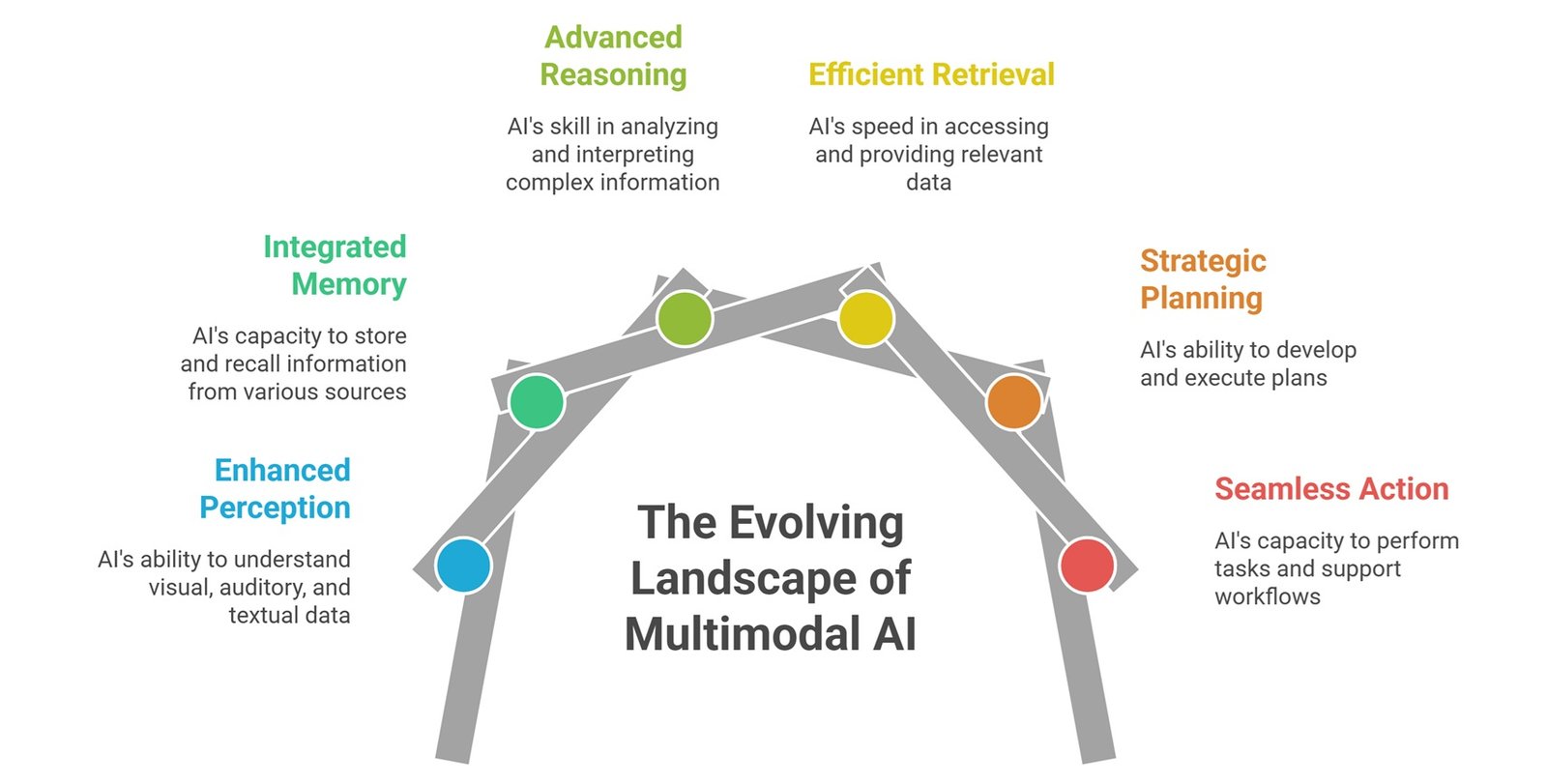
Future multimodal systems will likely combine perception, memory, reasoning, retrieval, planning, and action. That means AI will not only answer written prompts. It will interpret mixed inputs, retrieve relevant context, explain what it sees, respond through voice, and support workflows across business, healthcare, education, design, engineering, and automation.
Suggested Read:
- What Is Multimodal AI? Simple Explanation With Examples
- Multimodal AI Explained Simply
- How Multimodal AI Works
- Multimodal AI vs Generative AI
- What Is a Large Language Model? Explained Simply
- What Is RAG in AI? A Beginner-Friendly Guide
FAQ: Multimodal AI for Beginners
What is multimodal AI for beginners?
Multimodal AI is AI that can understand more than one type of information, such as text, images, audio, video, documents, and charts.
How does multimodal AI work?
It processes different data types, converts them into embeddings, combines them into a shared representation, and reasons across them to generate useful outputs.
What are examples of multimodal AI?
Examples include AI assistants that analyze screenshots, healthcare AI that combines scans and notes, robots that use vision and speech, and tools that summarize videos or documents.
Can AI understand images and text together?
Yes. Multimodal AI systems can connect visual information with written questions, captions, instructions, or documents to produce more context-aware responses.
What are multimodal large language models?
Multimodal LLMs are language models that can process other data types, such as images, audio, documents, video, or screenshots, alongside text.
Why is multimodal AI important?
It helps AI understand real-world information more naturally because many tasks involve text, visuals, speech, files, and context together.
Final Takeaway
Multimodal AI for beginners means understanding AI that goes beyond text. It can connect language, images, audio, video, documents, charts, and sensor data to create richer context and more useful responses.
As AI assistants become more visual, voice-enabled, and document-aware, multimodal AI will become a core foundation for practical AI systems. To continue learning, explore What Is Multimodal AI, How Multimodal AI Works, and Multimodal AI Use Cases next.