
How RAG Systems Work in Practice
RAG systems work by combining retrieval and generation in one workflow. Instead of asking a language model to answer from training memory alone, a RAG system first retrieves relevant information from documents or knowledge sources, then passes that information into the model as context for the final answer. In practice, this makes AI systems more useful for document-heavy, changing, or company-specific tasks.
In simple terms
A real RAG system acts like an AI assistant with access to a searchable knowledge base. When a user asks a question, the system looks for the most relevant pieces of information, selects the best matches, and then asks the model to answer using that retrieved context.
That is the practical difference between a plain chatbot and a RAG workflow. One mostly answers from memory. The other answers with retrieved evidence.
Why RAG matters in real workflows
RAG matters because many useful AI applications depend on information that is not reliably stored inside the model. A support assistant may need current help-center articles. An internal company assistant may need HR policies or product docs. A research tool may need uploaded PDFs or notes.
Without retrieval, the model has to rely on general patterns from training. With retrieval, it can work from the actual material that matters for the task. That is why RAG is widely used for enterprise search, document Q&A, internal knowledge tools, and support assistants.
What a practical RAG system includes
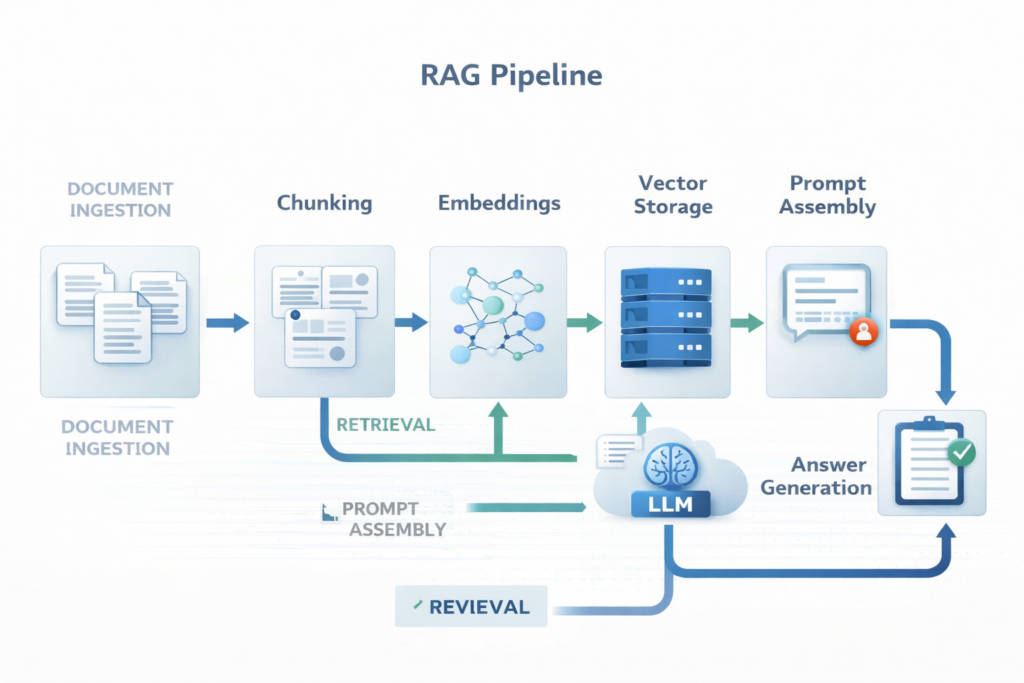
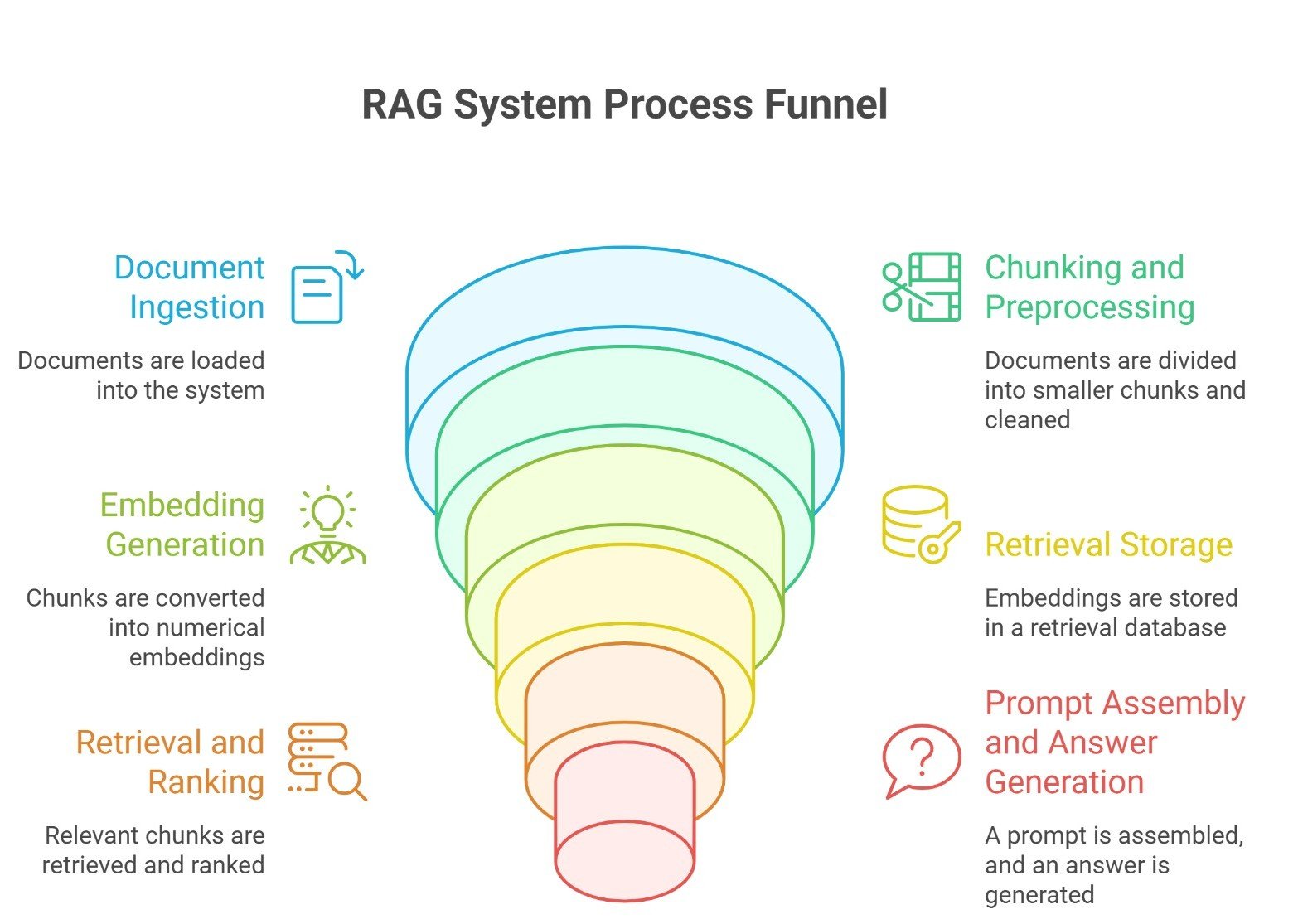
A real RAG system usually has six main layers:
- document ingestion
- chunking and preprocessing
- embedding generation
- retrieval storage
- retrieval and ranking
- prompt assembly and answer generation
Many production systems also include evaluation, logging, and source visibility.
Step 1: Document ingestion
A practical RAG system starts by collecting the source material.
This can include:
- PDFs
- product manuals
- help-center articles
- policy documents
- research papers
- internal notes
- websites or databases
At this stage, the goal is simple: bring the knowledge into a form the system can process.
In practice, ingestion also means cleaning the content. Headers, duplicated text, navigation elements, or broken formatting can hurt retrieval quality later if they are not handled early.
Step 2: Chunking the documents
Once the documents are collected, the system usually splits them into smaller pieces called chunks.
This step matters because retrieval rarely works well at the full-document level. If the system stores an entire 40-page document as one unit, it becomes much harder to retrieve the exact section needed for a user question.
A good chunk should be:
- small enough to retrieve precisely
- large enough to preserve meaning
- structured enough to stand on its own
In practice, teams often use fixed-size chunks with overlap, section-based chunking, or semantic chunking depending on the document type.
Step 3: Turning chunks into embeddings
After chunking, the system converts each chunk into an embedding.
An embedding is a numerical representation of meaning. It allows the system to compare user queries and document chunks based on semantic similarity, not just keyword matching.
This is one of the most important reasons RAG works well. A user may ask a question in different words than the original document uses, but embeddings help the system find related meaning anyway.
For example, a document may say “refund processing timeline,” while the user asks, “How long does it take to get my money back?” Embedding-based retrieval can still connect those ideas.
Step 4: Storing chunks in a retrieval layer
Once embeddings are created, the chunks and their metadata are stored in a retrieval system.
This is often a vector database, but it can also include hybrid retrieval systems that combine vector search with keyword search.
The retrieval layer usually stores:
- the chunk text
- the embedding
- metadata such as title, section, source, or date
This metadata becomes useful later because it helps with filtering, ranking, and source display.
In practice, retrieval quality often improves when the system knows more than just raw chunk similarity. A policy document from last week may be more relevant than an older one, even if both look similar semantically.
Step 5: Retrieving the best chunks
When a user asks a question, the system converts that query into a retrievable form and searches for the most relevant chunks.
This is the heart of the RAG pipeline.
A practical retrieval step often includes:
- vector similarity search
- metadata filtering
- reranking
- top-k chunk selection
The goal is not to retrieve the most text. It is to retrieve the most useful context.
That distinction matters. Too little context can make the answer weak. Too much context can make the prompt noisy and confuse the model.
Step 6: Building the final prompt
After retrieval, the system assembles a prompt for the language model.
This prompt usually includes:
- the user question
- system instructions
- the retrieved chunks
- formatting rules or answer constraints
For example, the system may tell the model:
- answer only from the provided context
- cite sources if possible
- say when the answer is not supported by the retrieved material
This is a practical step that many beginners overlook. RAG does not end at retrieval. The way the retrieved material is presented to the model affects the final answer just as much.
Step 7: Generating the answer
Now the language model generates the answer using the user query and the retrieved context.
At this point, the model is not just responding from general training. It is responding with the retrieved evidence inside the prompt.
That is what makes RAG valuable in practice. It gives the model a stronger chance to produce:
- more grounded answers
- more relevant answers
- more current answers
- more domain-specific answers
In many production systems, the final response also shows source references or linked passages so the user can verify what the answer was based on.
A simple real-world example
Imagine an employee asks:
“What is our current reimbursement policy for remote work equipment?”
A practical RAG workflow might look like this:
- The system receives the question
- It searches the company policy documents
- It retrieves the remote work reimbursement section
- It adds that section to the model prompt
- The model generates a concise answer using the policy text
- The interface shows the answer along with the source section
This is much more useful than asking a general chatbot that has never seen the company’s internal policy.
Where RAG systems often fail
RAG is powerful, but practical systems fail when one or more layers are weak.
Common failure points include:
Poor chunking: If important information is split badly, retrieval quality drops.
Weak retrieval: If the system retrieves irrelevant or incomplete chunks, the answer becomes less reliable.
Noisy prompts: If too much low-value context is passed into the model, generation quality can suffer.
Missing evaluation: If the team never tests real user questions, it becomes hard to spot retrieval gaps or hallucination issues.
Weak source material: A RAG system cannot be better than the documents it relies on. Outdated or messy sources create weak answers.
Why evaluation matters: A practical RAG system should not be judged only by whether the final answer sounds good.
It should also be judged by:
- retrieval relevance
- answer faithfulness
- source usefulness
- coverage of the user question
- consistency across repeated queries
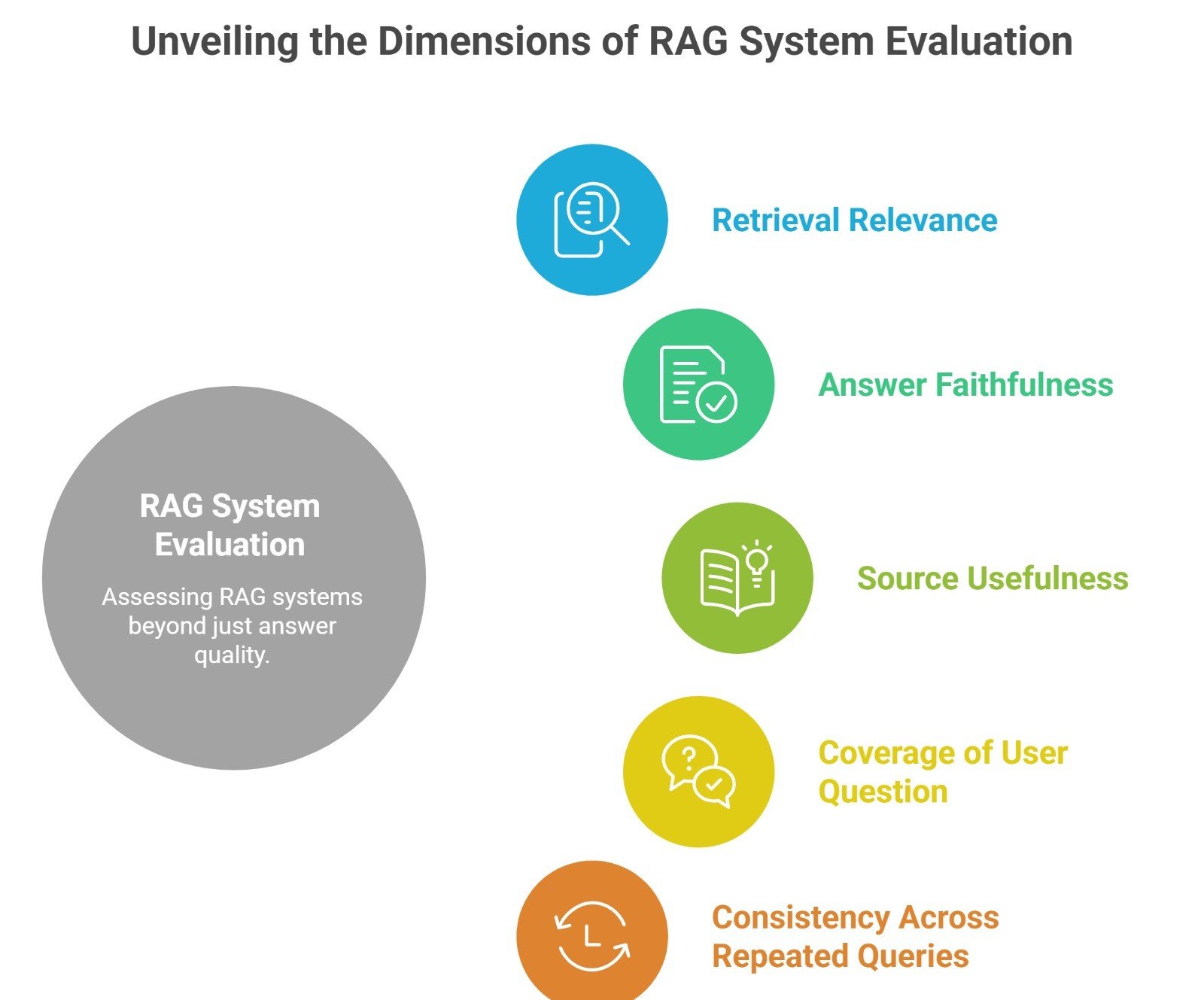
This is why evaluation is a real part of RAG in practice. Strong teams do not only ask whether the answer is fluent. They ask whether the system retrieved the right evidence and used it correctly.
RAG in practice vs RAG in theory
In theory, RAG sounds simple: retrieve, then generate.
In practice, it is a system design problem.
You have to decide:
- how to chunk
- what embedding model to use
- how to store and filter chunks
- how many results to retrieve
- how to format the prompt
- how to evaluate answer quality
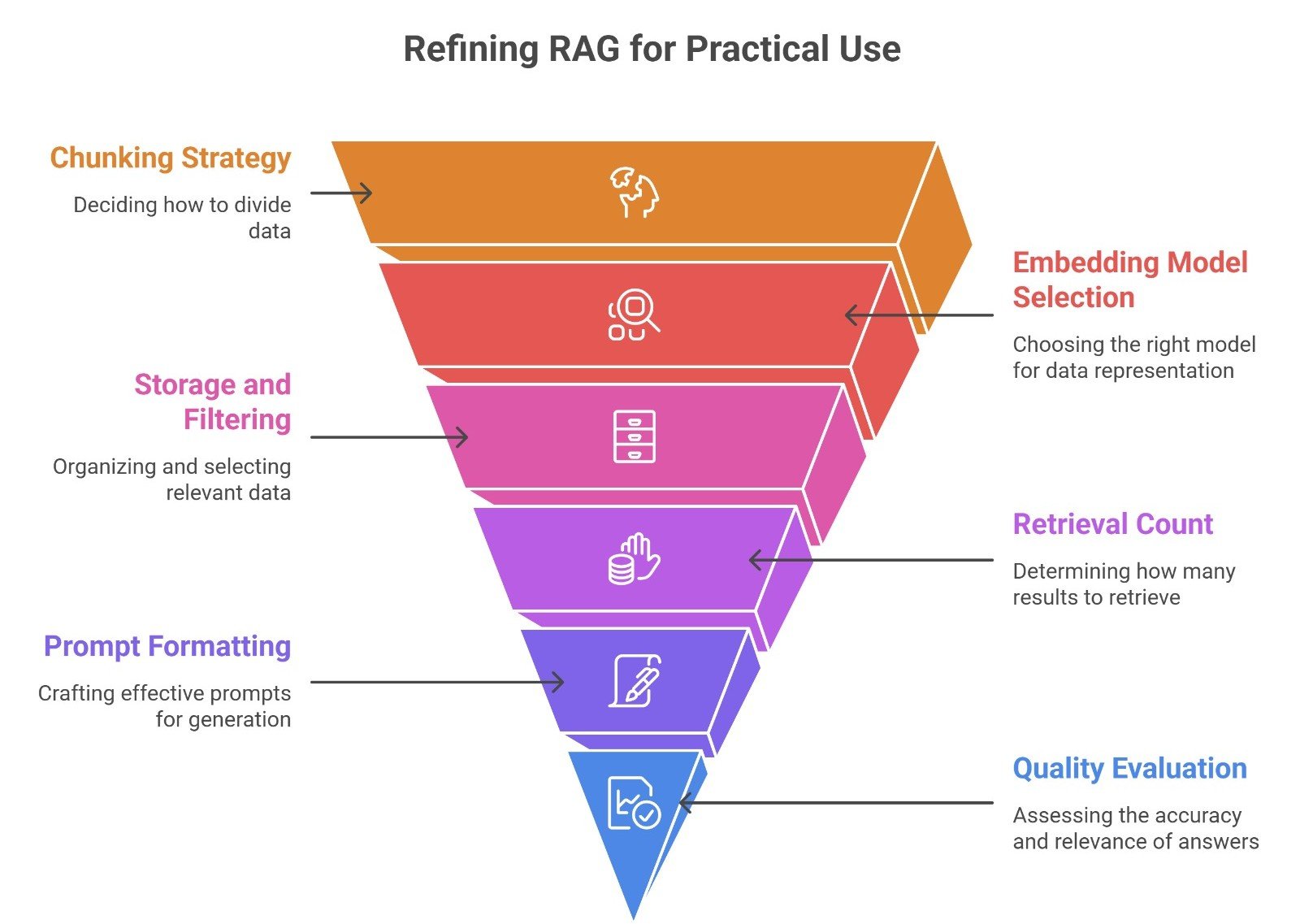
That is why building a strong RAG system is less about one magic model and more about making the whole pipeline work together.
Suggested Read:
- What Is RAG in AI? A Beginner-Friendly Guide
- RAG vs Fine-Tuning: Which One Should You Use?
- Best Chunking Strategies for RAG
- What Vector Databases Do in a RAG Pipeline
- How to Evaluate a RAG System What Is a Large Language Model? Explained Simply
- What Is an AI Agent? A Simple Explanation With Examples
FAQ: How RAG Systems Work in Practice
What is a RAG system in practice?
It is an AI system that retrieves relevant information from external sources before generating an answer.
What are the main steps in a RAG pipeline?
The main steps are ingestion, chunking, embeddings, storage, retrieval, prompt assembly, and generation.
Why do RAG systems use vector databases?
Vector databases help store and search embeddings so the system can retrieve semantically relevant chunks.
Can RAG reduce hallucinations?
Yes, often, because it grounds answers in retrieved material. But weak retrieval or weak prompting can still cause bad answers.
Is RAG only for enterprise use?
No. It is common in enterprise workflows, but it is also useful for research tools, note assistants, and personal document systems.
Final takeaway
RAG systems work in practice by connecting a language model to a retrieval workflow. The model does not answer alone. It answers with retrieved evidence. That makes RAG one of the most practical ways to build AI systems for real documents, real knowledge bases, and real workflows where freshness and grounding matter.