
What Is RAG in AI? A Beginner- Friendly Guide
Large language models like ChatGPT and Claude are incredibly powerful, but they suffer from a major limitation: their knowledge is frozen in time based on when they were trained. If you are exploring how developers solve this issue, you might be asking: what does rag stand for ai architectures?
RAG stands for Retrieval-Augmented Generation. It is an advanced artificial intelligence technique that connects an LLM to an external, private data source—like a business database or a collection of local documents—to pull accurate, real-time facts before generating a response.
RAG in AI stands for Retrieval-Augmented Generation. For those looking for a clear RAG AI ML full name definition, it is a framework that combines the power of large language models with external data retrieval. Essentially, the meaning of RAG in AI is the process of giving an AI model access to a specific “knowledge base” to provide more accurate and up-to-date answers. In simple terms, RAG gives a language model access to the right context before it answers, which can make responses more useful, current, and grounded.
In simple terms
Think of RAG as an open-book version of AI.
A normal language model answers based mostly on patterns it learned during training. A RAG system adds another step: it looks up relevant information from documents, databases, or internal knowledge before generating the answer. That extra retrieval step helps the model respond with information that is closer to the user’s actual question.
What Does RAG Stand For in AI? (The Core Meaning Explained
To truly understand what does rag stand for ai system frameworks, it helps to break down the acronym into its three fundamental components:
-
Retrieval: When you ask the AI a question, the system acts like a hyper-fast digital research assistant. It instantly searches through your uploaded documents or database to locate the exact information required.
-
Augmented: The system takes the retrieved factual snippets and securely attaches them directly to your original question, augmenting (or enhancing) your prompt with pristine context.
-
Generation: Finally, the large language model reads both your question and the verified background context to generate a flawlessly accurate, humanlike answer.
The Open-Book Exam Analogy
To understand this workflow in simple terms, compare a standard LLM to a student taking a closed-book history exam. The student must rely solely on what they memorized months ago, which often leads to guessing or making up facts (known as hallucinations).
Running a model with a Retrieval-Augmented Generation framework transforms that setup into an open-book exam. The AI doesn’t have to guess or improvise; it simply looks up the answer in the provided textbook and synthesizes the exact truth.
Why RAG matters?
Large language models are powerful, but they have limits. They may not know recent information, they may not have access to company-specific documents, and they can sometimes produce confident but incorrect answers.
RAG matters because it helps solve those problems without retraining the whole model.
Instead of asking the model to rely only on its internal training, a RAG system can pull from updated manuals, policies, PDFs, product docs, support articles, research notes, or internal files. This makes RAG especially useful for enterprise search, document Q&A, support assistants, internal knowledge tools, and research workflows.
The main benefit is practical: teams can update the knowledge source without rebuilding the model itself.
What does RAG stand for in AI and Machine Learning?
Retrieval-Augmented Generation (RAG) stands for retrieval-augmented generation.
The phrase has two important parts:
- Retrieval means the system searches for useful information from an external source.
- Generation means the language model uses that retrieved information to produce an answer.
This is what makes RAG different from a basic chatbot experience. It is not only generating text. It is generating text after looking up relevant evidence.
Why is RAG in AIML so popular?
In the world of Artificial Intelligence and Machine Learning (AIML), RAG has become a standard because it bridges the gap between static models and real-time data. Implementing RAG in AIML workflows allows developers to build smarter chatbots that don’t just “guess,” but actually look up facts before responding.
How RAG works?
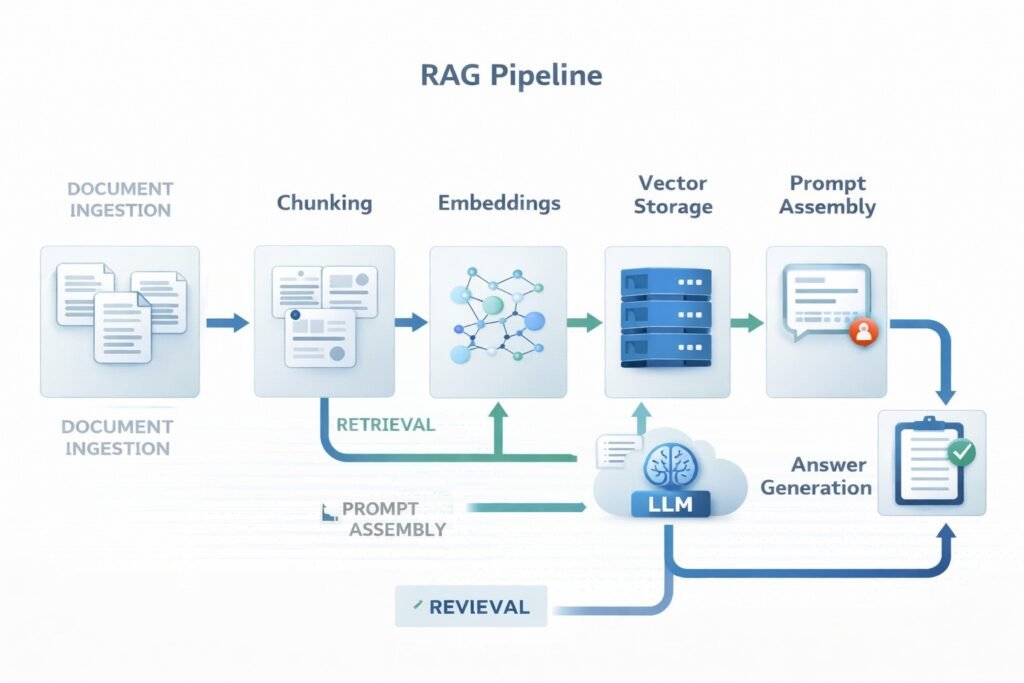
A RAG system usually works in a sequence of steps.
- Documents are collected : The system starts with a knowledge source. This may include PDFs, web pages, help-center articles, policy files, manuals, product docs, research papers, or internal notes.
- Documents are chunked: Large documents are usually split into smaller sections called chunks. This matters because searching smaller sections is easier than searching an entire long file as one block.
- Chunks are converted into embeddings : Each chunk is turned into a numerical representation called an embedding. Embeddings help the system compare meanings and find related content even when the wording is not identical.
- Chunks are stored for retrieval : The embeddings and related metadata are stored in a retrieval layer, often a vector database or hybrid search system.
- The user asks a question : When a user enters a query, that query is also turned into an embedding or passed through a retrieval system.
- Relevant chunks are retrieved: The system searches for the most relevant chunks and returns them as supporting context.
- The model generates an answer: The retrieved context is added to the prompt, and the language model writes an answer using both the query and the retrieved material.
This is the core RAG pipeline: retrieve first, then generate.
What is RAG in the Context of AI and Machine Learning?
To understand what RAG is for AI models structurally, it helps to contrast it with normal web searches or pure machine learning generation.
In standard artificial intelligence, RAG bridges the gap between raw compute power and real-world information retrieval. Instead of fine-tuning or retraining a massive rag machine learning architecture every time a data point changes, a RAG AI system keeps the model frozen and updates the database instead. This process turns standard web searching into a deep cognitive search, making RAG artificial intelligence incredibly cost-effective for enterprise scales.
Understanding the RAG Retrieval Definition and Process
A common question is: what is the RAG retrieval definition? In the context of RAG in AIML, retrieval is the step where the system searches a vector database to find the most relevant “chunks” of information related to a user’s query.
Modern RAG retrieval techniques include:
-
Semantic Search: Finding meaning rather than just keyword matches.
-
Hybrid Search: Combining keyword search with vector embeddings.
-
Re-ranking: Sorting the retrieved data to ensure the most helpful info is sent to the AI model first.
Core Components of a RAG Pipeline
A beginner-friendly way to understand RAG is to break it into its main parts.
| Component | What it does | Simple example |
| Knowledge source | Stores the original information | PDFs, docs, FAQs, policies |
| Chunking | Splits content into smaller parts | Breaking a manual into sections |
| Embeddings | Turns text into searchable vectors | Representing meaning numerically |
| Retrieval layer | Finds relevant chunks | Vector search or hybrid retrieval |
| Prompt assembly | Adds retrieved context to the query | Passing top results into the model |
| LLM | Generates the final answer | Writing a grounded response |
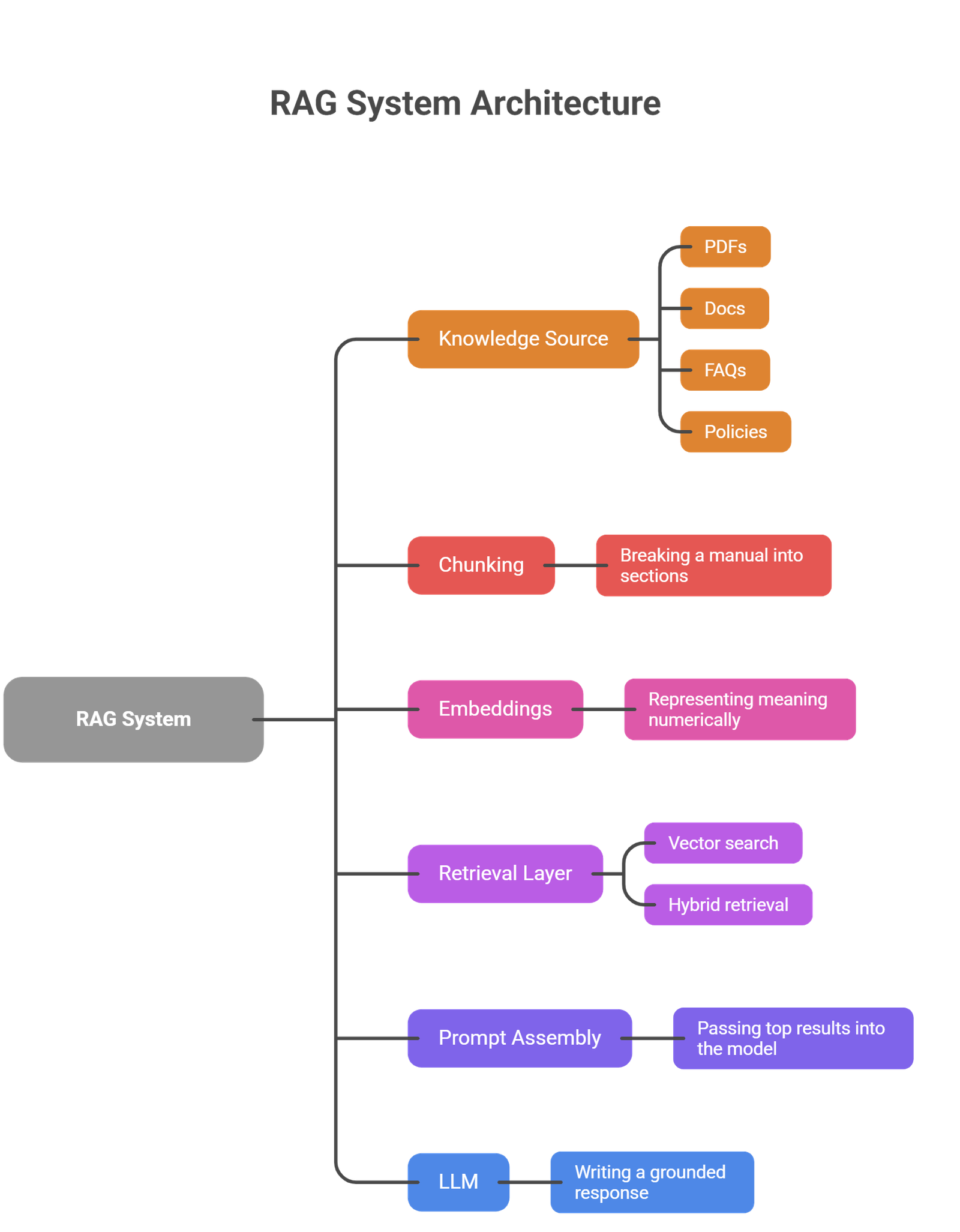
Not every RAG system looks exactly the same, but most production systems use these building blocks in some form.
RAG vs fine-tuning
This is one of the most common beginner questions.
- RAG and fine-tuning solve different problems.
- RAG improves the model by giving it better context at inference time. The model itself does not change. The system simply retrieves useful information before answering.
- Fine-tuning changes the model’s behavior by training it on additional examples. This can help with style, task patterns, tone, or domain adaptation.
| RAG | Fine-tuning |
| Adds external context | Changes model behavior |
| Good for changing knowledge | Good for repeated task adaptation |
| Easier to update with new docs | Requires training workflow |
| Useful for grounded answers | Useful for style or specialized behavior |
If the problem is “the model needs access to my documents,” RAG is often the better fit.
If the problem is “the model needs to behave differently every time,” fine-tuning may be more relevant.
Real-world use cases of RAG
RAG becomes easy to understand when you look at practical use cases.
- Internal company knowledge assistants: A company can build a RAG assistant that answers employee questions using HR policies, onboarding documents, and internal process guides.
- Customer support systems: A support assistant can retrieve help-center content, refund rules, troubleshooting guides, or product documentation before replying.
- Research and document analysis: A RAG workflow can search across uploaded reports, whitepapers, or academic papers and generate summaries grounded in the source material.
- Legal or policy search : Teams can use RAG to search contracts, compliance docs, or policy manuals without manually opening every file.
- Product and sales enablement: A sales assistant can retrieve up-to-date product sheets, pricing notes, feature docs, and battle cards before generating a response.
These examples show why RAG is so widely discussed. Many real business problems involve answering questions from changing document sets.
Why RAG is useful?
RAG is useful because it gives AI systems a way to work with information outside the model’s original training.
That brings several benefits:
- better grounding in real documents
- easier updates when information changes
- support for private or company-specific knowledge
- less dependence on retraining
- stronger alignment with source-backed workflows
For many teams, that makes RAG one of the most practical ways to use LLMs in production.
Common limitations and risks
RAG is useful, but it is not magic.
- One common problem is poor retrieval. If the wrong chunks are retrieved, the answer may still be weak even if the model is strong.
- Another issue is bad chunking. If documents are split in the wrong way, important context may get lost.
- There is also the risk of hallucination. Even with retrieved context, the model can still misinterpret or overstate what the source says.
- A further challenge is evaluation. A RAG system must be judged on both retrieval quality and answer quality. It is not enough for the final response to sound fluent. The retrieved evidence also has to be relevant.
Finally, RAG systems can become more complex than simple chat interfaces. They require decisions about chunk size, metadata, retrieval methods, ranking, latency, and source freshness.
RAG does not replace verification
A common beginner mistake is assuming that retrieved context automatically guarantees truth. It does not.
- RAG improves the chances of a grounded answer, but the output still depends on document quality, retrieval quality, and model behavior. If the source is outdated, incomplete, or poorly retrieved, the answer may still be misleading.
That is why strong RAG systems often include source visibility, testing, and evaluation.
Suggested Read:
- RAG vs Fine-Tuning: Which One Should You Use?
- How RAG Systems Work in Practice?
- What Vector Databases Do in a RAG Pipeline
- How to Evaluate a RAG System
- What Is a Large Language Model? Explained Simply
- What Is an AI Agent? A Simple Explanation With Examples
FAQ: What Is RAG in AI?
What does RAG mean in AI, and what is its full name?
The RAG AI full name is Retrieval-Augmented Generation. In simple terms, it means your AI is “open-book”—it retrieves relevant facts from a database to generate a grounded response.
What is RAG (Retrieval-Augmented Generation) in simple words?
If you’re wondering what is RAG or what does RAG mean in AI, it is a way to make AI smarter by letting it access external documents. Instead of relying only on its training, the model “retrieves” facts from your files to “generate” a better answer.
Why is RAG better than a normal chatbot for some tasks?
Because it can use external documents and updated knowledge instead of relying only on what the model learned during training.
Does RAG train the model again?
No. RAG usually does not retrain the model. It adds useful context at query time.
Is RAG only for enterprise use?
No. It is common in enterprise AI, but it is also useful for research tools, personal document assistants, and knowledge-based applications.
What is the difference between RAG and fine-tuning?
RAG adds retrieved context from external sources. Fine-tuning changes the model itself through additional training.
Final takeaway
RAG in AI is a practical way to make language models more grounded, useful, and connected to real information. Instead of asking the model to answer from memory alone, RAG gives it a chance to retrieve the right context first. For beginners, that is the simplest way to understand it: RAG helps AI answer with better evidence.
The best next step after learning the basics is to explore how RAG systems work in practice, how chunking affects retrieval quality, what vector databases do, and how to evaluate whether a RAG pipeline is actually performing well.